Doorbell and music
A button at the front door rings a bell, and the chat tells everybody in the base who is waiting outside. Then the same door gets a melody, played note by note from two arrays.
Functions: BEEP, SOUND, SAY, and SLEEP of c0de/time
What you need
- for the doorbell: a trigger block with a button on it, next to your front door
- for the melody: a second trigger block with a button on it, next to the first one
- an empty sheet for each program
- nothing else: these functions need no rights, they work for every owner on every server
The idea
A program can't only compute; it can make itself heard. BEEP plays a short bell sound, SOUND plays a note like a note block, and both sound at the trigger block. So the trigger block has to stand where the sound should be: at the door.
SAY reaches farther: it writes into the chat of all players near the trigger block (within 64 blocks by default), or of one player you name. Each message starts with the name of the program and its PID, so you can see which program is talking.
The doorbell
PROGRAM doorbell
NOOP
INCLUDE c0de/minecraft
NOOP
FUNCTION ring
BEGIN
    VARIABLE visitor STRING "Someone"
    IF PID.activator ≠ "" ;
    BEGIN
        ASSIGN visitor PID.activator ;
    END IF
    CALL c0de/minecraft/BEEP
    CALL c0de/minecraft/SAY
        PARAMETER message visitor ⊕ " is at the front door." ;
END FUNCTION
Building and running it
- Place a trigger block outside next to the front door, and put a button on it.
- Open its dialog, set it to the program
doorbelland the functionring, and set Run to Players, so your visitors may press it. - Press the button.
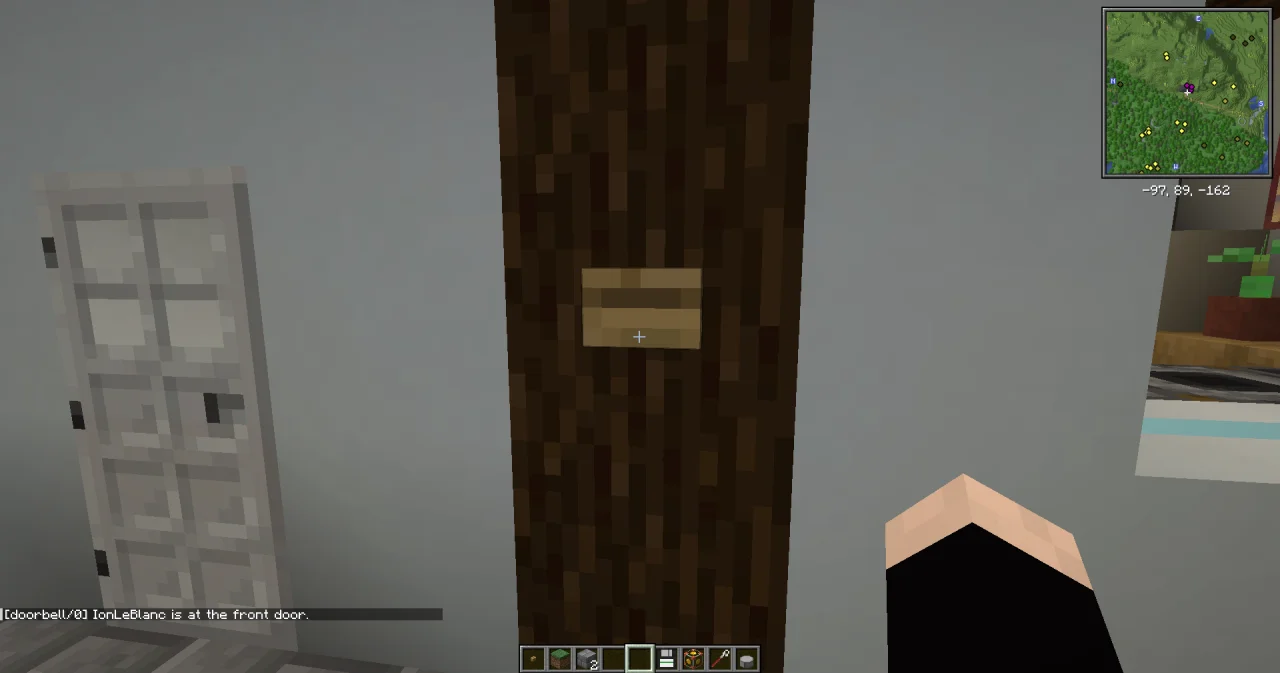
You hear the bell at the door, and the chat shows Steve is at the front door. after the name of the program and its PID.
How it works
- Who rang?
PID.activatoris the name of the player who started the process. A trigger block started by plain redstone, such as a pressure plate or a daylight sensor, may have no player to name; thenvisitorkeeps its start value"Someone". - BEEP has no parameters: one bell sound at the trigger block, nothing else.
- SAY without
playergoes to everybody near the trigger block. Inside a big base, that's everybody who could open the door.
The melody
A tune is a list of notes. Two arrays of the same length describe it: notes holds the pitch of each note, instruments the instrument that plays it.
PROGRAM melody
NOOP
INCLUDE c0de/minecraft
INCLUDE c0de/time
NOOP
VARIABLE notes ARRAY INTEGER
BEGIN
    1 1 8 8 10 10 8
END VARIABLE
VARIABLE instruments ARRAY STRING
BEGIN
    "harp" "harp" "harp" "harp" "bell" "bell" "flute"
END VARIABLE
NOOP
FUNCTION play
BEGIN
    VARIABLE count INTEGER
    CALL LEN
        PARAMETER value notes ;
        RESULT result count
    FOR i INTEGER 0 ; count - 1 ;
    BEGIN
        CALL c0de/minecraft/SOUND
            PARAMETER note notes[i] ;
            PARAMETER instrument instruments[i] ;
        CALL c0de/time/SLEEP
            PARAMETER ticks 6 ;
    END FOR
END FUNCTION
Place the second trigger block next to the first one, set it to melody and play, and press its button: the beginning of "Twinkle, Twinkle, Little Star".
- The notes.
notegoes from 0 to 24, like the clicks on a note block: 0 is F♯, 1 is G, 6 is C, 8 is D, 10 is E, and 12 is F♯ again, one octave higher. A note outside 0 to 24 raises INVALID_ARGUMENT. - The instruments are those of the note block, such as
harp(the default),bass,bellandflute. A name that isn't one raises INVALID_ARGUMENT. - The loop goes through both arrays with the same index
i. LEN gives the number of notes, so the loop still fits when you add notes. - The rhythm. SLEEP waits 6 ticks after each note. Without it, the cursor would play one note per tick, and the tune would be over in a blink.
Try it yourself
- Let the doorbell ring "ding-dong" with two bell notes instead of BEEP.
Solution
Two SOUND calls with a pause between them: first the higher note 19, then 15.
PROGRAM dingdong
NOOP
INCLUDE c0de/minecraft
INCLUDE c0de/time
NOOP
FUNCTION ring
BEGIN
    VARIABLE visitor STRING "Someone"
    IF PID.activator ≠ "" ;
    BEGIN
        ASSIGN visitor PID.activator ;
    END IF
    CALL c0de/minecraft/SOUND
        PARAMETER note 19 ;
        PARAMETER instrument "bell" ;
    CALL c0de/time/SLEEP
        PARAMETER ticks 8 ;
    CALL c0de/minecraft/SOUND
        PARAMETER note 15 ;
        PARAMETER instrument "bell" ;
    CALL c0de/minecraft/SAY
        PARAMETER message visitor ⊕ " is at the front door." ;
END FUNCTION- Send the message only to the owner of the trigger block, and tell the visitor when the owner isn't online.
Solution
PARAMETER player PID.owner ; sends it to the owner only. If they aren't online, SAY raises INVALID_ARGUMENT, so the CALL catches the error in problem, and a second SAY tells everybody near the door.
PROGRAM ownerbell
NOOP
INCLUDE c0de/minecraft
NOOP
FUNCTION ring
BEGIN
    VARIABLE visitor STRING "Someone"
    VARIABLE problem ERROR
    IF PID.activator ≠ "" ;
    BEGIN
        ASSIGN visitor PID.activator ;
    END IF
    CALL c0de/minecraft/BEEP
    CALL c0de/minecraft/SAY problem
        PARAMETER message visitor ⊕ " is at the front door." ;
        PARAMETER player PID.owner ;
    IF problem.code ≠ 0 ;
    BEGIN
        CALL c0de/minecraft/SAY
            PARAMETER message "Nobody is at home." ;
    END IF
END FUNCTION- Play the whole first line of the song, with a rest in the middle. Use the note -1 for a rest.
Solution
The second half is C C B B A A G: 6 6 5 5 3 3 1. The loop only plays notes from 0 up; for -1 it just waits. A rest needs an entry in instruments too, so both arrays keep the same length.
PROGRAM melodyrests
NOOP
INCLUDE c0de/minecraft
INCLUDE c0de/time
NOOP
VARIABLE notes ARRAY INTEGER
BEGIN
    1 1 8 8 10 10 8 -1 6 6 5 5 3 3 1
END VARIABLE
VARIABLE instruments ARRAY STRING
BEGIN
    "harp" "harp" "harp" "harp" "bell" "bell" "flute" "" "harp" "harp" "harp" "harp" "bell" "bell" "flute"
END VARIABLE
NOOP
FUNCTION play
BEGIN
    VARIABLE count INTEGER
    CALL LEN
        PARAMETER value notes ;
        RESULT result count
    FOR i INTEGER 0 ; count - 1 ;
    BEGIN
        IF notes[i] ≥ 0 ;
        BEGIN
            CALL c0de/minecraft/SOUND
                PARAMETER note notes[i] ;
                PARAMETER instrument instruments[i] ;
        END IF
        CALL c0de/time/SLEEP
            PARAMETER ticks 6 ;
    END FOR
END FUNCTION
Read more
- The functions of this recipe: BEEP, SOUND, SAY, SLEEP and LEN
- Making music and c0de/minecraft in the guide
- Structs in the guide: the constant
PIDand its elements - Errors in the guide: catching an error in a CALL