Server commands
Night again, and rain on top of it? On your own world, one button makes it morning: a program runs /time set day and /weather clear, checks that both worked, and wishes everybody a good morning. A second button turns night back on.
Needs an operator – always
COMMAND runs a command like a command block, and command blocks are only for operators. So COMMAND only works if the owner of the trigger block is an operator, and if a player presses the button, that player must be an operator too: if anybody else presses it, the process crashes with PERMISSION_DENIED instead of changing the time. No setting in config/c0de.properties allows it for everybody; there the administrator can only switch COMMAND off for everyone with enableCommand=false. Command blocks must also be enabled on the server: in a single-player world they always are, on a dedicated server it's enable-command-block=true in server.properties (since Minecraft 1.21.11 the game rule "Enable Command Blocks"). In the world of the tutorials, you are an operator and everything is ready.
What you need
- a trigger block with a button on it, and an empty sheet for the program
- for the exercises: a second trigger block with a button
The idea
COMMAND takes a command as text, with or without /, and runs it like a command block at the trigger block. It gives back two results:
result: how often the command succeeded, the number a comparator reads from a command block. 0 means it failed.output: the last message of the command, e.g. "Set the time to 1000" – or why it failed.
A command that fails is not an error of the program: a typo in a command doesn't crash it, the program only sees result 0. So it's up to the program to check every command – that's what this one does.
The program
PROGRAM goodmorning
NOOP
INCLUDE c0de/minecraft
NOOP
VARIABLE commands ARRAY STRING
BEGIN
    "time set day" "weather clear"
END VARIABLE
NOOP
FUNCTION morning
BEGIN
    VARIABLE done INTEGER
    VARIABLE message STRING
    VARIABLE failed INTEGER
    EACH line commands
    BEGIN
        CALL c0de/minecraft/COMMAND
            PARAMETER command line ;
            RESULT result done
            RESULT output message
        IF done = 0 ;
        BEGIN
            CALL c0de/minecraft/SAY
                PARAMETER message "/" ⊕ line ⊕ " failed: " ⊕ message ;
            ASSIGN failed failed + 1 ;
        END IF
    END EACH
    IF failed = 0 ;
    BEGIN
        CALL c0de/minecraft/COMMAND
            PARAMETER command "say Good morning, everybody! The sun is up." ;
    END IF
END FUNCTION
Building and running it
- Place the trigger block and put the button on it.
- Set it to
goodmorningandmorning. - Wait for the night (or make it with
/time set night), and press the button.
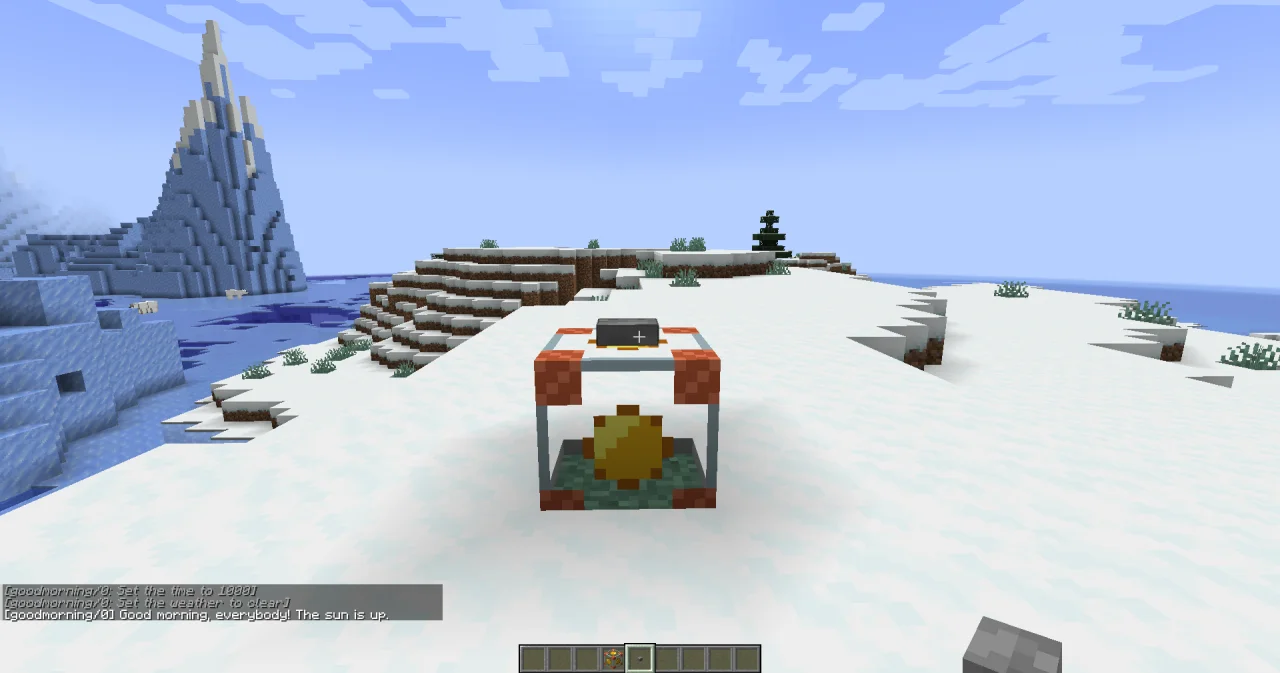
The sun comes up, the rain stops, and the chat shows [goodmorning/3] Good morning, everybody! The sun is up. – the name in brackets is the program and its PID, like the name of a command block. As an operator, you may also see what the commands said, in grey: that's the game rule commandBlockOutput, the same as for command blocks. Every command is also written to the log of the server, with the program and the PID, so the administrator can see who did what.
How it works
- A list of commands. The commands are an ARRAY STRING, and EACH runs them one after the other. A third command is one more text in the list.
resultandoutput. If a command returnsresult0, the program writes the command and itsoutputto the chat with SAY. Try it: change"weather clear"into"weather sunny", and the chat tells you what the game thinks of it.- The greeting.
/sayis a command too: it writes to every player on the server, while SAY only reaches the players within 64 blocks of the trigger block. The program only greets if no command failed. - Where the commands run. COMMAND runs at the center of the trigger block, in its dimension, but without a player:
@sselects nobody, and~ ~ ~is the trigger block./give @p minecraft:breadgives bread to the player nearest to the button.
Try it yourself
- Add a "good night" button: a second entry function
eveningthat runs/time set nightand says good night. Both functions should use the same loop.
Solution
The loop moves into a function runAll with an ARRAY STRING parameter, and each list gets its own variable. The greeting is just the last command of the list; runAll stops at the first command that fails. Set the second trigger block to daynight and evening, the first to daynight and morning.
PROGRAM daynight
NOOP
INCLUDE c0de/minecraft
NOOP
VARIABLE morningCommands ARRAY STRING
BEGIN
    "time set day" "weather clear" "say Good morning, everybody! The sun is up."
END VARIABLE
VARIABLE eveningCommands ARRAY STRING
BEGIN
    "time set night" "say Good night, everybody! Watch out for zombies."
END VARIABLE
NOOP
FUNCTION runAll
    PARAMETER commands ARRAY STRING
BEGIN
    VARIABLE done INTEGER
    VARIABLE message STRING
    EACH line commands
    BEGIN
        CALL c0de/minecraft/COMMAND
            PARAMETER command line ;
            RESULT result done
            RESULT output message
        IF done = 0 ;
        BEGIN
            CALL c0de/minecraft/SAY
                PARAMETER message "/" ⊕ line ⊕ " failed: " ⊕ message ;
            RETURN
        END IF
    END EACH
END FUNCTION
NOOP
FUNCTION morning
BEGIN
    CALL runAll
        PARAMETER commands morningCommands ;
END FUNCTION
NOOP
FUNCTION evening
BEGIN
    CALL runAll
        PARAMETER commands eveningCommands ;
END FUNCTION- Before the program changes the time, it should ask the game what time it was, and put the answer into the greeting.
Solution
/time query daytime changes nothing; its output is the answer, e.g. "The time is 13000". The program keeps it in before and uses it in the greeting. Here, result is not needed, so the CALL only takes output.
PROGRAM goodmorning
NOOP
INCLUDE c0de/minecraft
NOOP
VARIABLE commands ARRAY STRING
BEGIN
    "time set day" "weather clear"
END VARIABLE
NOOP
FUNCTION morning
BEGIN
    VARIABLE done INTEGER
    VARIABLE message STRING
    VARIABLE before STRING
    VARIABLE failed INTEGER
    CALL c0de/minecraft/COMMAND
        PARAMETER command "time query daytime" ;
        RESULT output before
    EACH line commands
    BEGIN
        CALL c0de/minecraft/COMMAND
            PARAMETER command line ;
            RESULT result done
            RESULT output message
        IF done = 0 ;
        BEGIN
            CALL c0de/minecraft/SAY
                PARAMETER message "/" ⊕ line ⊕ " failed: " ⊕ message ;
            ASSIGN failed failed + 1 ;
        END IF
    END EACH
    IF failed = 0 ;
    BEGIN
        CALL c0de/minecraft/COMMAND
            PARAMETER command "say Good morning, everybody! " ⊕ before ⊕ " – now it's day." ;
    END IF
END FUNCTION
Read more
- The functions of this recipe: COMMAND and SAY
- Owner and permissions in the guide: why only operators may run commands
- EACH loops in the guide
- Programs in the world: who owns a trigger block, and who started a process