Watching the surroundings
Two programs that only look: a farm monitor that shows on a display wall how much of the wheat is ripe and calls you when the whole field is, and a counter that tells how many sheep, cows, pigs and chickens are in your pen.
Functions: GET_BLOCK, FIND_ENTITIES, and SAY
What you need
- an empty sheet for each program
- for the farm monitor: a timer block, a display wall and a wheat field of 4 × 4 plants
- for the animal counter: a second timer block, a second display wall and a fenced pen with some animals
- no rights: reading the world is allowed for every owner
The idea
GET_BLOCK reads one block: its ID, like minecraft:wheat, its block states, its redstone power and whether it has an inventory. Block states are what F3 shows on the right when you look at a block: a wheat plant has the state age, from 0 (just planted) to 7 (ripe). GET_BLOCK gives them as a HASH STRING, so states["age"] is the text "7" for a ripe plant.
FIND_ENTITIES looks the other way round: not at one place, but for everything that moves around a position – animals, monsters, players and items lying on the ground. Each one comes as an ENTITY struct with its uuid, type, name and position.
The farm monitor
PROGRAM farmwatch
NOOP
INCLUDE c0de/minecraft
NOOP
FUNCTION check
BEGIN
    VARIABLE spot STRUCT c0de/minecraft/POSITION
    VARIABLE id STRING
    VARIABLE states HASH STRING
    VARIABLE ripe INTEGER
    VARIABLE plants INTEGER
    ASSIGN spot.y PID.y ;
    FOR dx INTEGER 2 ; 5 ;
    BEGIN
        FOR dz INTEGER 0 ; 3 ;
        BEGIN
            ASSIGN spot.x PID.x + dx ;
            ASSIGN spot.z PID.z + dz ;
            CALL c0de/minecraft/GET_BLOCK
                PARAMETER position spot ;
                RESULT id id
                RESULT properties states
            IF id = "minecraft:wheat" ;
            BEGIN
                ASSIGN plants plants + 1 ;
                IF states["age"] = "7" ;
                BEGIN
                    ASSIGN ripe ripe + 1 ;
                END IF
            END IF
        END FOR
    END FOR
    CALL CLS
    CALL PRINT
        PARAMETER value "Wheat: " ⊕ plants ⊕ " plants" ;
    CALL PRINT
        PARAMETER value "Ripe: " ⊕ ripe ;
    IF ripe > 0 AND ripe = plants ;
    BEGIN
        CALL c0de/minecraft/SAY
            PARAMETER message "The wheat is ripe!" ;
    END IF
END FUNCTION
Building and running it
- Place the timer block on the ground next to the field, at the height of the plants. The field begins 2 blocks east of it: its plants are 2 to 5 blocks east and 0 to 3 blocks south of the timer block. Give the farmland water within four blocks, as usual.
- Set the timer block to
farmwatchandcheck, with an interval of 1200 ticks: once a minute is often enough for wheat. - Bind the display wall to
farmwatchandcheck.
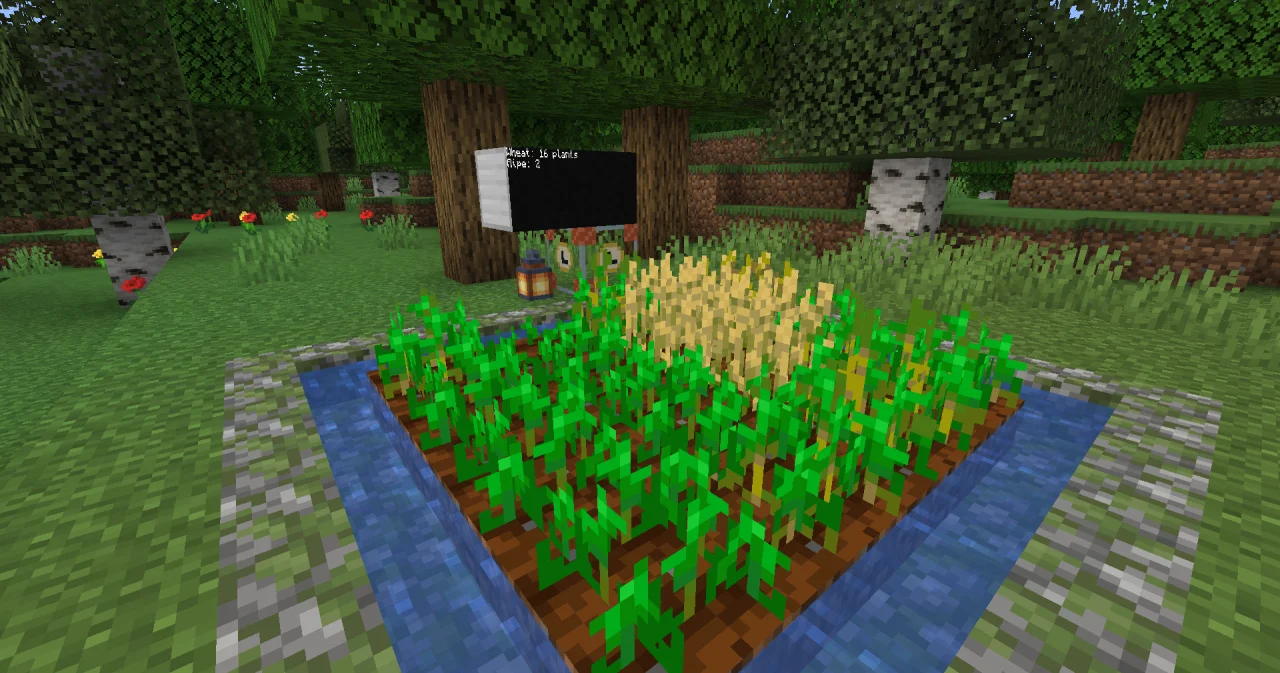
The wall shows Wheat: 16 plants and Ripe: 5, and the next minute a little more. When all plants are ripe, the chat says The wheat is ripe! – once a minute, until you harvest.
How it works
- Two FOR loops walk over the field:
dxfrom 2 to 5,dzfrom 0 to 3.spot.ystays at the height of the timer block. - Only wheat counts. A harvested or trampled spot holds air. So the program counts
plantsonly forminecraft:wheat, andripeonly for those with age 7. - The results you need. GET_BLOCK has four results; the CALL takes only
idandproperties. The others are thrown away. - SAY only when all plants are ripe, and only if there are any:
ripe > 0 AND ripe = plants. An empty field isn't ripe.
The animal counter
PROGRAM pencount
NOOP
INCLUDE c0de/minecraft
NOOP
VARIABLE animals ARRAY STRING
BEGIN
    "sheep" "cow" "pig" "chicken"
END VARIABLE
NOOP
FUNCTION count
BEGIN
    VARIABLE pen STRUCT c0de/minecraft/POSITION
    VARIABLE found ARRAY STRUCT c0de/minecraft/ENTITY
    VARIABLE number INTEGER
    VARIABLE total INTEGER
    ASSIGN pen.x PID.x ;
    ASSIGN pen.y PID.y ;
    ASSIGN pen.z PID.z + 5 ;
    CALL CLS
    EACH animal animals
    BEGIN
        CALL c0de/minecraft/FIND_ENTITIES
            PARAMETER position pen ;
            PARAMETER radius 4 ;
            PARAMETER type "minecraft:" ⊕ animal ;
            RESULT result found
        CALL LEN
            PARAMETER value found ;
            RESULT result number
        ASSIGN total total + number ;
        CALL PRINT
            PARAMETER value animal ⊕ ": " ⊕ number ;
    END EACH
    CALL PRINT
        PARAMETER value "Animals: " ⊕ total ;
END FUNCTION
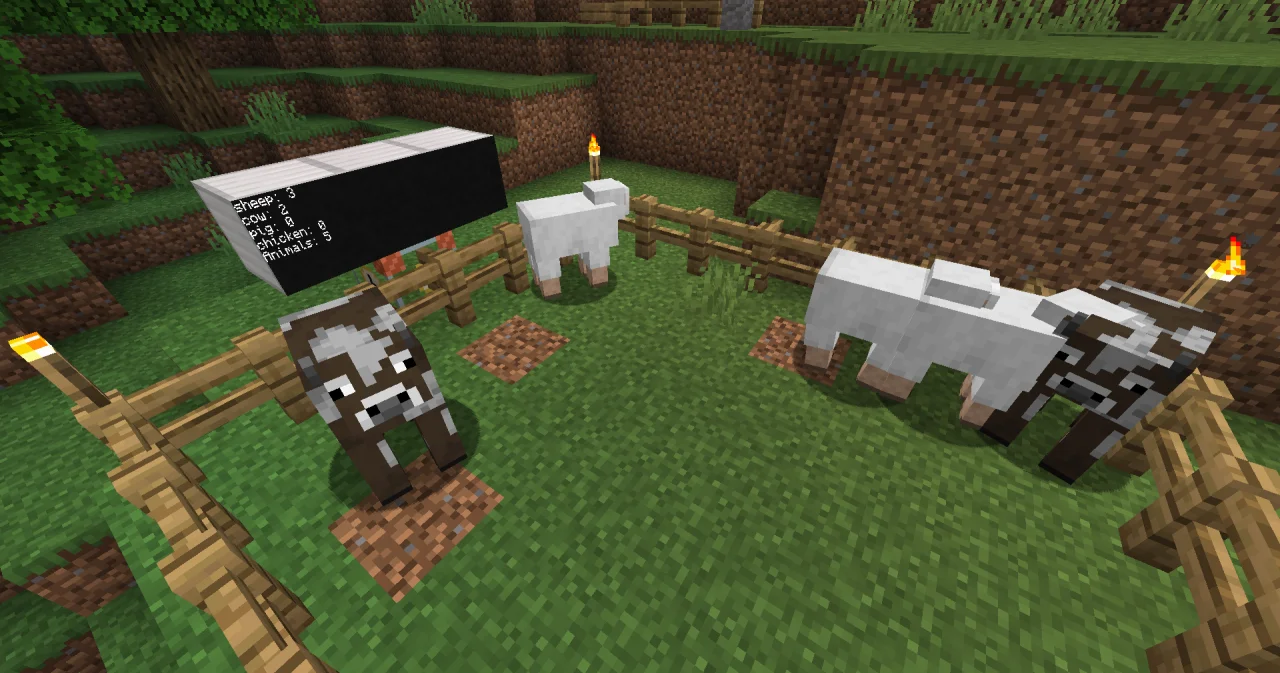
The pen's center is 5 blocks south of the timer block. A pen of 7 × 7 blocks fits into the search radius of 4. Set a second timer block to pencount and count, with an interval of 200 ticks, and bind its display wall to the same program and function. The wall shows sheep: 3, cow: 2 and so on, and the total.
- One search per type.
typenarrows the search to one entity type. The program joins"minecraft:"and the name from the array, so it can print the short name. - Without
type, FIND_ENTITIES finds everything: also you, and the wheat seeds lying around. That's why a counter of animals should always name the type. - The radius goes from 1 to 64 blocks. Keep it as small as the pen, or the animals of your neighbor count too.
Try it yourself
- Turn the counter into a guard: you have 12 animals. If fewer are in the pen, the chat should say how many have escaped.
Solution
PROGRAM penguard
NOOP
INCLUDE c0de/minecraft
NOOP
VARIABLE animals ARRAY STRING
BEGIN
    "sheep" "cow" "pig" "chicken"
END VARIABLE
NOOP
FUNCTION guard
    PARAMETER expected INTEGER 12
BEGIN
    VARIABLE pen STRUCT c0de/minecraft/POSITION
    VARIABLE found ARRAY STRUCT c0de/minecraft/ENTITY
    VARIABLE number INTEGER
    VARIABLE total INTEGER
    ASSIGN pen.x PID.x ;
    ASSIGN pen.y PID.y ;
    ASSIGN pen.z PID.z + 5 ;
    EACH animal animals
    BEGIN
        CALL c0de/minecraft/FIND_ENTITIES
            PARAMETER position pen ;
            PARAMETER radius 4 ;
            PARAMETER type "minecraft:" ⊕ animal ;
            RESULT result found
        CALL LEN
            PARAMETER value found ;
            RESULT result number
        ASSIGN total total + number ;
    END EACH
    IF total < expected ;
    BEGIN
        CALL c0de/minecraft/SAY
            PARAMETER message ( expected - total ) ⊕ " animals have escaped from the pen!" ;
    END IF
END FUNCTION
The parameter expected has a default value, so the timer block needs no item for it. When your herd grows, change the default value in the PARAMETER line.
- How do you count the items lying on the ground in the pen, for example feathers and wool?
Solution
Items are entities too, of the type minecraft:item. Call FIND_ENTITIES with PARAMETER type "minecraft:item" ; and count the result with LEN.
Read more
- The functions of this recipe: GET_BLOCK, FIND_ENTITIES, SAY and LEN
- c0de/minecraft in the guide
- EACH loops and FOR loops in the guide
- Display block in the handbook Devices: display walls