Statements
This book lists the keyword blocks of c0de. A keyword block starts a line and decides what the line does. Some of them, like PARAMETER or ELSE, only work together with others.
Each page shows what a block does, how to craft it and a short example. The examples use the text notation of the guide: one text line is one line on the sheet, and four spaces mean one block further east.
Program structure
These blocks build the frame of a program.
NOOP
NOOP means "no operation": a NOOP line does nothing.
Use NOOP lines to separate parts of your program. A NOOP line may not hold any other block, not even a COMMENT. Line 1 of every program is a NOOP line, and every FUNCTION needs one right above it.
NOOP blocks are also the base of most other recipes.
Recipe
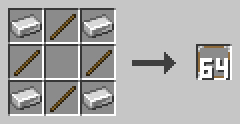
Put iron ingots in the four corners and sticks on the four sides, and leave the middle empty. You get 64 NOOP blocks.
Example
PROGRAM first
NOOP
NOOP
FUNCTION answer
    RESULT result INTEGER
BEGIN
    ASSIGN result 42 ;
END FUNCTION
COMMENT
A COMMENT block holds a note for humans.
Put it at the end of a line. The cursor ignores the COMMENT and every block after it. So a COMMENT in front of blocks switches them off.
A line that starts with a COMMENT is a comment line. It is skipped like a NOOP line. Right-click the block with an empty hand to write its text.
Recipe
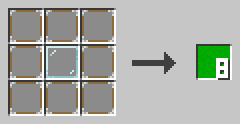
Put a glass block in the middle and eight NOOP blocks around it. You get eight COMMENT blocks.
Example
The text notation writes a COMMENT block as // followed by its text.
// A comment line is skipped completely
VARIABLE time INTEGER 1 // a comment at the end
PROGRAM
The PROGRAM block starts every program.
It sits in line 0 at x=5, followed by a LABEL with the program name. The name must be unique in the whole c0de dimension. Line 1 must be a NOOP line. The program ends at the first empty line.
Recipe
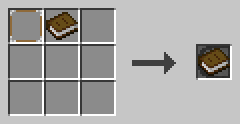
Craft a NOOP block and a book together.
Example
PROGRAM first
NOOP
INCLUDE
An INCLUDE line loads a library.
A LABEL with the library name follows the block, like c0de/math. INCLUDE lines start at x=5, right after the NOOP in line 1. They come before all structs, variables, constants and functions.
Recipe
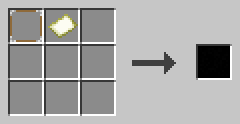
Craft a NOOP block and an empty map together.
Example
PROGRAM math
NOOP
INCLUDE c0de/math
INCLUDE c0de/strings
Now the program can call functions like c0de/math/ROUND.
EXIT
EXIT ends the whole process at once.
It works no matter how deep the cursor is in functions and code blocks. An expression with a number from 0 to 15 follows: the exit code. A comparator next to the trigger block can read it. EXIT only works inside functions.
Exit code 15 means the program crashed. You may use EXIT 15 ; for a fatal problem too.
Recipe
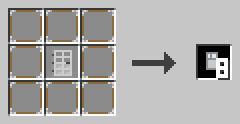
Put an iron door in the middle and eight NOOP blocks around it. You get eight EXIT blocks.
Example
EXIT 3 ;
ASSIGN value 0 ;
The ASSIGN line never runs, because EXIT ends the process first.
Code blocks
A code block is a group of lines between BEGIN and END.
BEGIN
BEGIN starts a code block.
It has the same x as the line that needs the code block. The lines inside are one block further east. Variables made inside a code block only live there. A code block may not be empty: a NOOP line is enough.
Recipe


Put a yellow wool block in the middle and eight NOOP blocks around it for eight BEGIN blocks, or turn one END block into a BEGIN block.
Example
WHILE n > 0 ;
BEGIN
    ASSIGN n n - 1 ;
END WHILE
END
END closes a code block.
It has the same x as its BEGIN. The keyword that opened the block follows it, like END FUNCTION or END WHILE. In an IF with an ELSE, the first END stands alone. After END REPEAT comes the loop condition.
Recipe
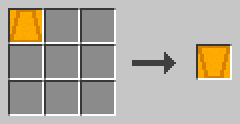
Turn one BEGIN block into an END block.
Example
FUNCTION answer
    RESULT result INTEGER
BEGIN
    ASSIGN result 42 ;
END FUNCTION
Functions
Functions hold the lines that really do something.
FUNCTION
A FUNCTION line starts a function.
It sits at x=5, right below a NOOP line. A LABEL with the function name follows. PARAMETER and RESULT lines may come next, then the code block. It ends with END FUNCTION.
A function can only call functions above it, or itself. Struct and function declarations are not allowed inside a function.
Recipe

Craft a NOOP block and a stone block together.
Example
NOOP
FUNCTION greet
    PARAMETER name STRING "World"
    PARAMETER mark CHAR '!'
    RESULT result STRING
BEGIN
    ASSIGN result "Hello, " ⊕ name ⊕ mark ;
END FUNCTION
PARAMETER
A PARAMETER line is an input of a function.
Below a FUNCTION, it has a name, a type and an optional default value. Below a CALL, it has the name of a parameter and an expression with its value. PARAMETER lines are one block further east than their FUNCTION or CALL.
A caller may leave out parameters with a default value. Parameters are copies: changing them doesn't change the caller's variables.
Recipe


Put a hopper in the middle and eight NOOP blocks around it for eight PARAMETER blocks, or turn one RESULT block into a PARAMETER block.
Example
CALL greet
    PARAMETER name "c0de" ;
    RESULT result greeting
RESULT
A RESULT line is an output of a function.
Below a FUNCTION, it has a name and a type. It starts with the default value of its type. When the function ends, its last value goes back to the caller. Below a CALL, it names a result and the variable that receives it.
RESULT lines come after the PARAMETER lines. Results the caller doesn't list are thrown away.
Recipe

Turn one PARAMETER block into a RESULT block.
Example
CALL c0de/math/ROUND
    PARAMETER value 12.5 ;
    RESULT result rounded
The result result of ROUND goes into the variable rounded.
RETURN
RETURN ends the function right away.
It may name a variable of type ERROR to report a problem to the caller. Without a name, the function returns "no error". The results keep the values they have at that moment.
Recipe
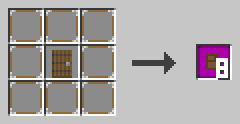
Put a spruce door in the middle and eight NOOP blocks around it. You get eight RETURN blocks.
Example
FUNCTION fail
BEGIN
    VARIABLE e ERROR
    ASSIGN e.code 1000 ;
    RETURN e
END FUNCTION
CALL
A CALL line runs a function.
A LABEL with the function name follows. PARAMETER lines give it values, RESULT lines catch its results. A second LABEL on the CALL line may name an ERROR variable. It catches an error, and your function goes on.
Without that ERROR variable, an error stops your function too and goes on to its caller. You can't call a function inside an expression.
Recipe

Craft a NOOP block and a smooth stone block together.
Example
VARIABLE problem ERROR
CALL c0de/math/DIV problem
    PARAMETER dividend -7 ;
    PARAMETER divisor 2 ;
    RESULT result quotient
Expressions
These blocks calculate values and store them.
ASSIGN
ASSIGN stores the value of an expression in a variable.
A LABEL with the variable follows, then the expression. It ends with ;. The value must fit the type: an INTEGER may go into a FLOAT, and a CHAR into a STRING. Lists and other complex values are copied.
Recipe

Put a cyan wool block in the middle and eight NOOP blocks around it. You get eight ASSIGN blocks.
Example
ASSIGN list[0] 10 ;
ASSIGN list[1] 20 ;
ASSIGN list[2] list[0] + list[1] ;
OPERATOR
An OPERATOR block holds one symbol of an expression.
Right-click it with an empty hand and click a symbol. It can be an operator, (, ) or the ; that ends every expression. A new block shows a question mark.
- math:
+-*/^(power)\(remainder) - compare:
=≠<>≤≥ - logic:
NOTANDORXOR, text:⊕, bits:&|⊻¬←→
Recipe
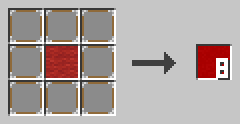
Put a red wool block in the middle and eight NOOP blocks around it. You get eight OPERATOR blocks.
Example
* comes before +, and ( and ) group. = only compares; to store a value, use ASSIGN.
ASSIGN arithmetic 1 + 2 * ( 3 + 3 ) \ 10 * 2 + 10 ;Conditions
An IF runs its code block only when a condition is true.
Structural base
The structural base is the item you craft conditions and loops from.
It is an item, not a block, so you can't place it. IF, ELSE, FOR, EACH, WHILE and REPEAT are all made from it.
Recipe
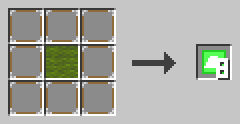
Put a green wool block in the middle and eight NOOP blocks around it. You get eight structural bases.
Example
Combine one structural base with wheat seeds, and you get an IF block. With dirt, you get a FOR block instead.
IF
IF runs its code block only when its expression is true.
The expression must give a BOOLEAN and ends with ;. A code block follows. The last END of the condition is followed by an IF block.
There is no ELSE IF. Put another IF inside the ELSE code block instead.
Recipe


Craft a structural base and wheat seeds, or turn an ELSE block into an IF block.
Example
IF candidate \ divisor = 0 ;
BEGIN
    ASSIGN prime FALSE ;
END IF
ELSE
ELSE runs its code block when the IF condition was false.
The ELSE line holds only the ELSE block, at the same x as its IF. It comes right after the first END, which then stands alone. The second code block ends with END IF.
Recipe


Craft a structural base and wheat, or turn an IF block into an ELSE block.
Example
IF prime ;
BEGIN
    ASSIGN primes primes ⊕ candidate ⊕ " " ;
END
ELSE
BEGIN
    NOOP
END IF
Loops
Loops run their code block again and again.
FOR
FOR counts with a loop variable.
A name, a type (INTEGER or FLOAT), a start value and an end value follow. An optional third value is the step. Without it, the step is 1. The step may not be 0, and a negative step counts down.
The end value is included. The values are computed once, before the loop starts. You can't change the loop variable yourself.
Recipe


Craft a structural base and a dirt block, or turn an EACH block into a FOR block.
Example
FOR i INTEGER 1 ; 10 ; 2 ;
BEGIN
    ASSIGN sum sum + i ;
END FOR
The loop runs with i = 1, 3, 5, 7 and 9.
EACH
EACH goes through an array or a hash.
A name for the loop variable and a LABEL with the array or hash follow. For an array, the loop variable gets each element in order. For a hash, it gets each key in alphabetical order.
The loop works on a copy, so changing the list inside the loop doesn't change the loop. You can't change the loop variable yourself.
Recipe


Craft a structural base and a cobblestone block, or turn a FOR block into an EACH block.
Example
EACH key h
BEGIN
    ASSIGN keys keys ⊕ key ⊕ "=" ⊕ h[key] ⊕ " " ;
END EACH
WHILE
WHILE runs its code block as long as its condition is true.
It checks the condition before each round. If it is false right away, the code block never runs. The condition must give a BOOLEAN and ends with ;.
Recipe


Craft a structural base and a diorite block, or turn a REPEAT block into a WHILE block.
Example
VARIABLE n INTEGER 3
WHILE n > 0 ;
BEGIN
    ASSIGN countdown countdown ⊕ n ⊕ " " ;
    ASSIGN n n - 1 ;
END WHILE
Now countdown is "3 2 1 ".
REPEAT
REPEAT runs its code block, then checks its condition.
The REPEAT line holds only the REPEAT block. The condition comes after END REPEAT. The code block runs again as long as the condition is true, and it always runs at least once.
Recipe
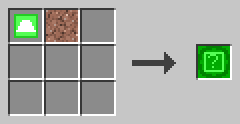

Craft a structural base and a granite block, or turn a WHILE block into a REPEAT block.
Example
REPEAT
BEGIN
    ASSIGN repeats repeats + 1 ;
END REPEAT n > 0 ;
BREAK
BREAK leaves the innermost loop at once.
It works in FOR, EACH, WHILE and REPEAT loops. It may have a condition: then it only leaves the loop if the condition is true. A BREAK outside of a loop is a mistake.
Recipe
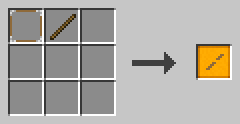
Craft a NOOP block and a stick together.
Example
FOR divisor INTEGER 2 ; candidate - 1 ;
BEGIN
    BREAK candidate \ divisor = 0 ;
END FOR
The loop stops as soon as a divisor is found.