Getting started
Programs that use the library include it with INCLUDE c0de_net/http. Its type and functions start with the library name, like c0de_net/http/HTTP_GET.
How requests are sent
The Minecraft server does not send the requests. The game client of the player who runs the process sends them, from that player's computer.
If a player started the process, with a button, a lever or a pressure plate at the trigger block, it is that player. If nobody did, like a timer block or a redstone clock, it is the owner of the trigger block.
That player must be online and have c0de net installed. So a program reaches what that player's computer can reach, including their home network. Other players who press the button send the request from their own computer, never from the owner's.
A request takes time. The CALL line waits until the answer arrives, an error occurs or the timeout has passed. Other processes and the server go on meanwhile.
If the process ends while a request is running, the request is cancelled. After a server restart, a restored process sends its request again. Keep this in mind for requests that change data, like POST and DELETE.
On a single-player world, the server and the client run on the same computer, and requests work the same way.
The handbook
This book is crafted with Patchouli on Minecraft 1.21.1.
Recipe
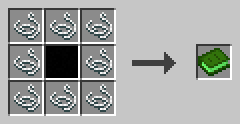
Surround an INCLUDE block with eight strings. After all, it's about the World Wide Web.
Settings
The server has the file config/c0de_net.properties. maxResponseSize limits the size of an answer in bytes (1 KiB to 16 MiB, default 1 MiB). maxRequestsPerPlayer limits how many requests run at the same time on the client of one player (1 to 64, default 8); more requests wait.
Every player has the file config/c0de_net-client.properties. With allowRequests=false, their client sends no requests, and the requests of their processes raise REQUESTS_DISABLED.
Both files are created with the default values. Invalid entries are reported in the log and replaced by the defaults.