Numbers as text
A stock list on a laptop: one row per item with its count, the number of stacks with one decimal, and the count in hexadecimal and octal, all in neat columns. Above it the date and time, below it the total with a thousands separator.
Functions: FORMAT, HEX, OCT, STR, and NOW of c0de/time
What you need
A trigger block with a button and a laptop (48 columns). The program has no parameters and no results.
The idea
⊕ and STR turn a number into a text, but always the same way: 1234 / 64 becomes 19.28125, and 7 is one character wide while 1234 is four. A table needs more: every number in a column must have the same width, and a decimal number needs a fixed number of places.
FORMAT does that with a format string, as printf does in other languages. A conversion starts with %: %7d writes a whole number right-aligned in 7 columns, %8.1f a decimal number with one place in 8 columns, %-12s any value left-aligned in 12 columns. The same function formats dates: %tF is the date, %tR the time in hours and minutes, %tA the weekday.
HEX and OCT write a number in base 16 and base 8, the way programmers write colors and bit patterns.
The program
PROGRAM itemtable
NOOP
INCLUDE c0de/strings
INCLUDE c0de/time
NOOP
FUNCTION show
BEGIN
    VARIABLE stock HASH INTEGER
    BEGIN
        cobblestone 1234
        diamond 7
        oak_log 96
        torch 320
    END VARIABLE
    VARIABLE today TIME
    VARIABLE total INTEGER
    VARIABLE line STRING
    VARIABLE part STRING
    CALL c0de/time/NOW
        RESULT result today
    CALL c0de/strings/FORMAT
        PARAMETER value today ;
        PARAMETER format "Stock on %tA, %tF at %tR" ;
        RESULT result line
    CALL CLS
    CALL PRINT
        PARAMETER value line ;
    CALL PRINT
        PARAMETER value "Item          Count  Stacks   Hex    Oct" ;
    EACH item stock
    BEGIN
        CALL c0de/strings/FORMAT
            PARAMETER value item ;
            PARAMETER format "%-12s" ;
            RESULT result line
        CALL c0de/strings/FORMAT
            PARAMETER value stock[item] ;
            PARAMETER format "%7d" ;
            RESULT result part
        ASSIGN line line ⊕ part ;
        CALL c0de/strings/FORMAT
            PARAMETER value stock[item] / 64 ;
            PARAMETER format "%8.1f" ;
            RESULT result part
        ASSIGN line line ⊕ part ;
        CALL c0de/strings/HEX
            PARAMETER value stock[item] ;
            RESULT result part
        CALL c0de/strings/FORMAT
            PARAMETER value part ;
            PARAMETER format "%6s" ;
            RESULT result part
        ASSIGN line line ⊕ part ;
        CALL c0de/strings/OCT
            PARAMETER value stock[item] ;
            RESULT result part
        CALL c0de/strings/FORMAT
            PARAMETER value part ;
            PARAMETER format "%7s" ;
            RESULT result part
        CALL PRINT
            PARAMETER value line ⊕ part ;
        ASSIGN total total + stock[item] ;
    END EACH
    CALL c0de/strings/FORMAT
        PARAMETER value total ;
        PARAMETER format "Total %,13d" ;
        RESULT result line
    CALL PRINT
        PARAMETER value line ;
END FUNCTION
Building and running it
- Place the laptop, right-click it, click the buttons until they show
itemtableandshow, and click ✔. - Set the trigger block to the same program and function and press the button.
On 12 November 2026 at 18:30 (in the time zone of the server), the laptop shows:
Stock on Thursday, 2026-11-12 at 18:30
Item          Count  Stacks   Hex    Oct
cobblestone    1234    19.3   4D2   2322
diamond           7     0.1     7      7
oak_log          96     1.5    60    140
torch           320     5.0   140    500
Total         1,657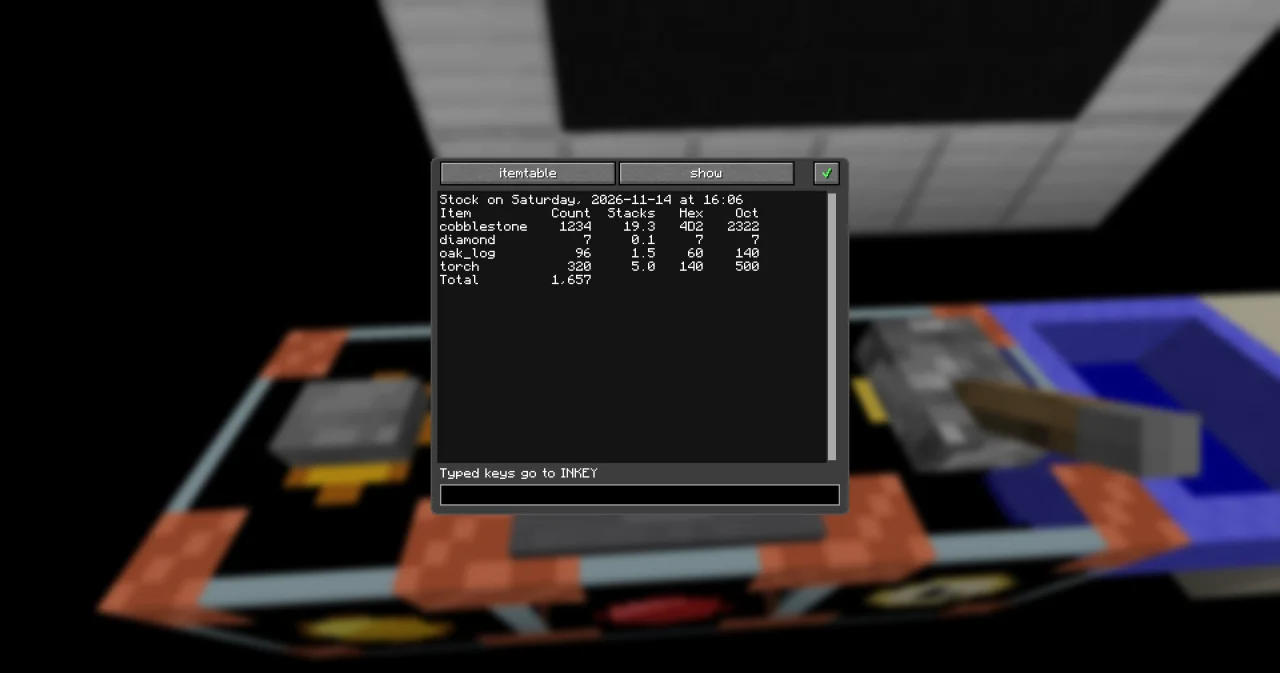
How it works
- NOW of c0de/time gives the current TIME. FORMAT takes one value, but its format string may use it several times:
%tA,%tFand%tRall read the same time. - The header is a plain text, written to fit the widths of the columns: 12 for the name, 7 for the count, 8 for the stacks, 6 and 7 for hex and octal.
- EACH goes through the keys of the hash in alphabetical order. Each column is formatted on its own and added to
linewith⊕. %-12spads the name with spaces on the right; the minus means "left-aligned".%7dpads the count on the left.stock[item] / 64is a FLOAT, because/always gives one, and%8.1frounds it to one decimal: 19.28125 becomes19.3.- HEX gives the text
4D2for 1234 (4 × 256 + 13 × 16 + 2), with capital letters; OCT gives2322. Both are texts, so%6sand%7salign them like any other text. A full stack, 64, is40in hex and100in octal. %,13dwrites the total with a comma between thousands. Text in the format string around the conversion, likeTotal, is copied as it is.- A conversion that doesn't fit the value, like
%dfor a STRING, raises TYPE_MISMATCH; a broken format string raises INVALID_ARGUMENT.
Try it yourself
- Write the count column without FORMAT, as in old BASIC: with STR and RIGHT.
Solution
PROGRAM itemtablestr
NOOP
INCLUDE c0de/strings
INCLUDE c0de/time
NOOP
FUNCTION show
BEGIN
    VARIABLE stock HASH INTEGER
    BEGIN
        cobblestone 1234
        diamond 7
        oak_log 96
        torch 320
    END VARIABLE
    VARIABLE today TIME
    VARIABLE total INTEGER
    VARIABLE line STRING
    VARIABLE part STRING
    CALL c0de/time/NOW
        RESULT result today
    CALL c0de/strings/FORMAT
        PARAMETER value today ;
        PARAMETER format "Stock on %tA, %tF at %tR" ;
        RESULT result line
    CALL CLS
    CALL PRINT
        PARAMETER value line ;
    CALL PRINT
        PARAMETER value "Item          Count  Stacks   Hex    Oct" ;
    EACH item stock
    BEGIN
        CALL c0de/strings/FORMAT
            PARAMETER value item ;
            PARAMETER format "%-12s" ;
            RESULT result line
        CALL c0de/strings/STR
            PARAMETER value stock[item] ;
            RESULT result part
        CALL c0de/strings/RIGHT
            PARAMETER text "       " ⊕ part ;
            PARAMETER length 7 ;
            RESULT result part
        ASSIGN line line ⊕ part ;
        CALL c0de/strings/FORMAT
            PARAMETER value stock[item] / 64 ;
            PARAMETER format "%8.1f" ;
            RESULT result part
        ASSIGN line line ⊕ part ;
        CALL c0de/strings/HEX
            PARAMETER value stock[item] ;
            RESULT result part
        CALL c0de/strings/FORMAT
            PARAMETER value part ;
            PARAMETER format "%6s" ;
            RESULT result part
        ASSIGN line line ⊕ part ;
        CALL c0de/strings/OCT
            PARAMETER value stock[item] ;
            RESULT result part
        CALL c0de/strings/FORMAT
            PARAMETER value part ;
            PARAMETER format "%7s" ;
            RESULT result part
        CALL PRINT
            PARAMETER value line ⊕ part ;
        ASSIGN total total + stock[item] ;
    END EACH
    CALL c0de/strings/FORMAT
        PARAMETER value total ;
        PARAMETER format "Total %,13d" ;
        RESULT result line
    CALL PRINT
        PARAMETER value line ;
END FUNCTION
STR turns the count into a text, 7 spaces go in front, and RIGHT keeps the last 7 characters. The table looks exactly the same – FORMAT just saves the two extra calls.
- Write the date the German way:
Stock on 12.11.2026.
Solution
Change the format string to "Stock on %td.%tm.%tY". %td is the day and %tm the month, both with two digits, and %tY the year with four.
Read more
- c0de/strings: FORMAT, HEX, OCT, STR
- FORMAT in the guide: widths, zeros and decimals
- NOW of c0de/time
- EACH loops: the keys of a hash in alphabetical order