Saving data as text
A high-score table for your games: after every game, the player types their name and points on a laptop, and the table shows the best five. The table is kept between runs as a JSON text in a variable item named scores, and each run also gives you the table as YAML, which is easier to read.
Functions: TO_JSON, FROM_JSON, TO_YAML, FROM_YAML
What you need
A trigger block with a button, a laptop, an I/O block and a few uninitialized variable items: one for the trigger block and one for the I/O block for every game. For the second exercise: a variable item list of type STRING.
The idea
A variable lives only while its program runs. What must survive has to leave the process as an item. A text is the most useful form for it: you can read and change it in the dialog of the item, copy it into a book or send it to a web service, and a later version of the program can still read it after its struct got a new element – a key missing in the text simply keeps its default.
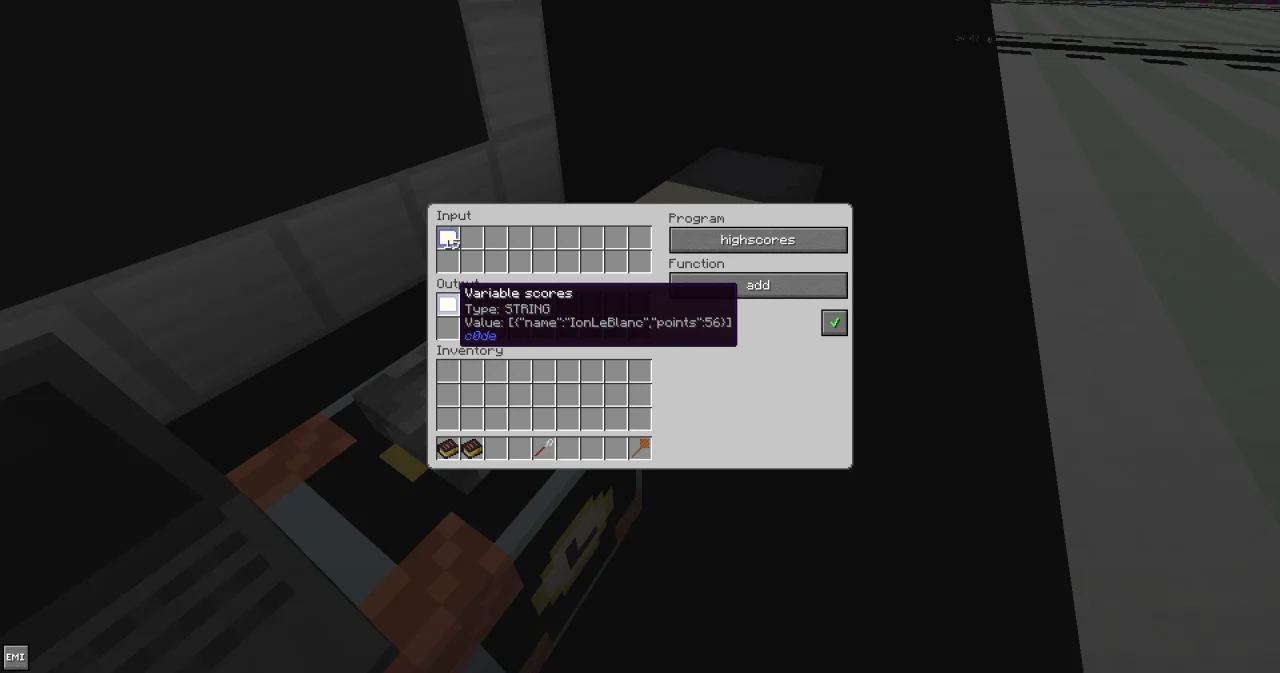
JSON turns any value into a text and back. TO_JSON writes the table as [{"name":"Kai","points":150}], a STRING that fits into a variable item. At the next start, FROM_JSON reads that text back into an array of the same type. YAML does the same in a form that is easier for people to read and write; c0de has both, TO_YAML and FROM_YAML.
One more thing: the item must come out with the name scores, so that it can go straight back into the trigger block. A result can't have the same name as a parameter, but WRITE can give its item any name.
The program
PROGRAM highscores
NOOP
INCLUDE c0de/strings
NOOP
STRUCT entry
BEGIN
    name STRING
    points INTEGER
END STRUCT
NOOP
CONSTANT PLACES INTEGER 5
NOOP
FUNCTION add
    PARAMETER scores STRING "[]"
    RESULT yaml STRING
BEGIN
    VARIABLE table ARRAY STRUCT entry
    VARIABLE player STRING
    VARIABLE points INTEGER
    VARIABLE newcomer STRUCT entry
    VARIABLE place INTEGER
    VARIABLE count INTEGER
    CALL c0de/strings/FROM_JSON
        PARAMETER source scores ;
        PARAMETER destination table ;
    CALL CLS
    CALL PRINT
        PARAMETER value "Name?" ;
    CALL INPUT
        PARAMETER variable player ;
    CALL PRINT
        PARAMETER value "Points?" ;
    CALL INPUT
        PARAMETER variable points ;
    ASSIGN newcomer.name player ;
    ASSIGN newcomer.points points ;
    EACH e table
    BEGIN
        IF e.points ≥ points ;
        BEGIN
            ASSIGN place place + 1 ;
        END IF
    END EACH
    CALL INSERT
        PARAMETER array table ;
        PARAMETER index place ;
        PARAMETER value newcomer ;
        RESULT result table
    CALL LEN
        PARAMETER value table ;
        RESULT result count
    IF count > PLACES ;
    BEGIN
        CALL REMOVE
            PARAMETER container table ;
            PARAMETER index PLACES ;
            RESULT result table
    END IF
    CALL c0de/strings/TO_JSON
        PARAMETER value table ;
        RESULT result scores
    CALL WRITE
        PARAMETER value scores ;
        PARAMETER name "scores" ;
    CALL c0de/strings/TO_YAML
        PARAMETER value table ;
        RESULT result yaml
    EACH e table
    BEGIN
        CALL PRINT
            PARAMETER value e.name ⊕ " " ⊕ e.points ;
    END EACH
END FUNCTION
Building and running it
- Place the laptop and the I/O block. Bind both to the program
highscoresand the functionadd: right-click, click the buttons until they show the program and the function, and click ✔. - Set the trigger block to the same program and function. Put an uninitialized variable item into the trigger block (for the result
yaml) and one into the I/O block (forscores). - Press the button. The laptop asks
Name?: typeKaiand press Enter, then150forPoints?. The screen showsKai 150. - The output of the I/O block now holds the item
scoreswith the text[{"name":"Kai","points":150}], and the output of the trigger block the itemyaml:
- name: Kai
points: 150- For the next game, put the
scoresitem into the input of the trigger block, an uninitialized item each into the trigger block and the I/O block, and press the button again.
With five entries in the table – Alex 300, Steve 200, Kai 150, Zoe 90, Sam 40 – and a new score of Mia with 200, the laptop shows:
Name?
Mia
Points?
200
Alex 300
Steve 200
Mia 200
Kai 150
Zoe 90
Sam has dropped out.
How it works
- The parameter
scoreshas the default"[]", an empty JSON array. In the first game there is no item yet, and the table starts empty. - FROM_JSON reads the text into
table. The type of the variable decides how the document is read: anARRAY STRUCT entryreads an array of objects with the keysnameandpoints.destinationis the variable itself, passed by reference, so FROM_JSON has no result. - The two INPUTs fill
playerandpoints, and the structnewcomergets both. - The table is sorted from the best score down. EACH counts the entries with at least as many points as the newcomer; that is the place where INSERT puts the new entry. A tie goes behind the older entry, so Mia comes after Steve.
- With more than
PLACESentries, REMOVE drops the last one, at index 5. - TO_JSON writes the table into one line of JSON, in the order of the struct elements. WRITE puts it into the I/O block as a variable item named
scores. Without an uninitialized item in a bound I/O block, the process waits on the WRITE line. - TO_YAML writes the same table in block style, one key per line, for the result
yaml.
Try it yourself
- Someone has edited the
scoresitem and broken it:[{"name":"Alex","points":"lots"}]. Instead of crashing, the program should say so and start a new table.
Solution
PROGRAM highscoressafe
NOOP
INCLUDE c0de/strings
NOOP
STRUCT entry
BEGIN
    name STRING
    points INTEGER
END STRUCT
NOOP
CONSTANT PLACES INTEGER 5
NOOP
FUNCTION add
    PARAMETER scores STRING "[]"
    RESULT yaml STRING
BEGIN
    VARIABLE table ARRAY STRUCT entry
    VARIABLE player STRING
    VARIABLE points INTEGER
    VARIABLE newcomer STRUCT entry
    VARIABLE place INTEGER
    VARIABLE count INTEGER
    VARIABLE problem ERROR
    CALL CLS
    CALL c0de/strings/FROM_JSON problem
        PARAMETER source scores ;
        PARAMETER destination table ;
    IF problem.code ≠ 0 ;
    BEGIN
        CALL PRINT
            PARAMETER value "? Unreadable scores, new table" ;
    END IF
    CALL PRINT
        PARAMETER value "Name?" ;
    CALL INPUT
        PARAMETER variable player ;
    CALL PRINT
        PARAMETER value "Points?" ;
    CALL INPUT
        PARAMETER variable points ;
    ASSIGN newcomer.name player ;
    ASSIGN newcomer.points points ;
    EACH e table
    BEGIN
        IF e.points ≥ points ;
        BEGIN
            ASSIGN place place + 1 ;
        END IF
    END EACH
    CALL INSERT
        PARAMETER array table ;
        PARAMETER index place ;
        PARAMETER value newcomer ;
        RESULT result table
    CALL LEN
        PARAMETER value table ;
        RESULT result count
    IF count > PLACES ;
    BEGIN
        CALL REMOVE
            PARAMETER container table ;
            PARAMETER index PLACES ;
            RESULT result table
    END IF
    CALL c0de/strings/TO_JSON
        PARAMETER value table ;
        RESULT result scores
    CALL WRITE
        PARAMETER value scores ;
        PARAMETER name "scores" ;
    CALL c0de/strings/TO_YAML
        PARAMETER value table ;
        RESULT result yaml
    EACH e table
    BEGIN
        CALL PRINT
            PARAMETER value e.name ⊕ " " ⊕ e.points ;
    END EACH
END FUNCTION
The error variable problem on the CALL line catches the error: "lots" is no INTEGER, so FROM_JSON raises TYPE_MISMATCH. On an error, FROM_JSON leaves table unchanged, so it is still the empty array. The laptop shows ? Unreadable scores, new table, and the new scores item holds only the new entry.
- Start a table from a list you type by hand. YAML is easier to type than JSON, because it needs no quotes: write a program that reads a YAML list from a parameter
listand puts it into the I/O block as thescoresitem.
Solution
PROGRAM highscoresyaml
NOOP
INCLUDE c0de/strings
NOOP
STRUCT entry
BEGIN
    name STRING
    points INTEGER
END STRUCT
NOOP
FUNCTION load
    PARAMETER list STRING
BEGIN
    VARIABLE table ARRAY STRUCT entry
    VARIABLE scores STRING
    CALL c0de/strings/FROM_YAML
        PARAMETER source list ;
        PARAMETER destination table ;
    CALL c0de/strings/TO_JSON
        PARAMETER value table ;
        RESULT result scores
    CALL WRITE
        PARAMETER value scores ;
        PARAMETER name "scores" ;
END FUNCTION
Bind an I/O block to highscoresyaml and load, with an uninitialized variable item in it. Give the trigger block a variable item list of type STRING with this text – a YAML list in one line:
[{name: Alex, points: 300}, {name: Steve, points: 200}]FROM_YAML reads it into the same array type as in highscores, and TO_JSON writes it as JSON. The I/O block gets the item scores with [{"name":"Alex","points":300},{"name":"Steve","points":200}], ready for the trigger block of highscores.
Read more
- c0de/strings: TO_JSON, FROM_JSON, TO_YAML, FROM_YAML
- JSON and YAML in the guide, and Data and the network for tags and defaults
- WRITE and the I/O block
- Variable items and Results