A clock on the wall
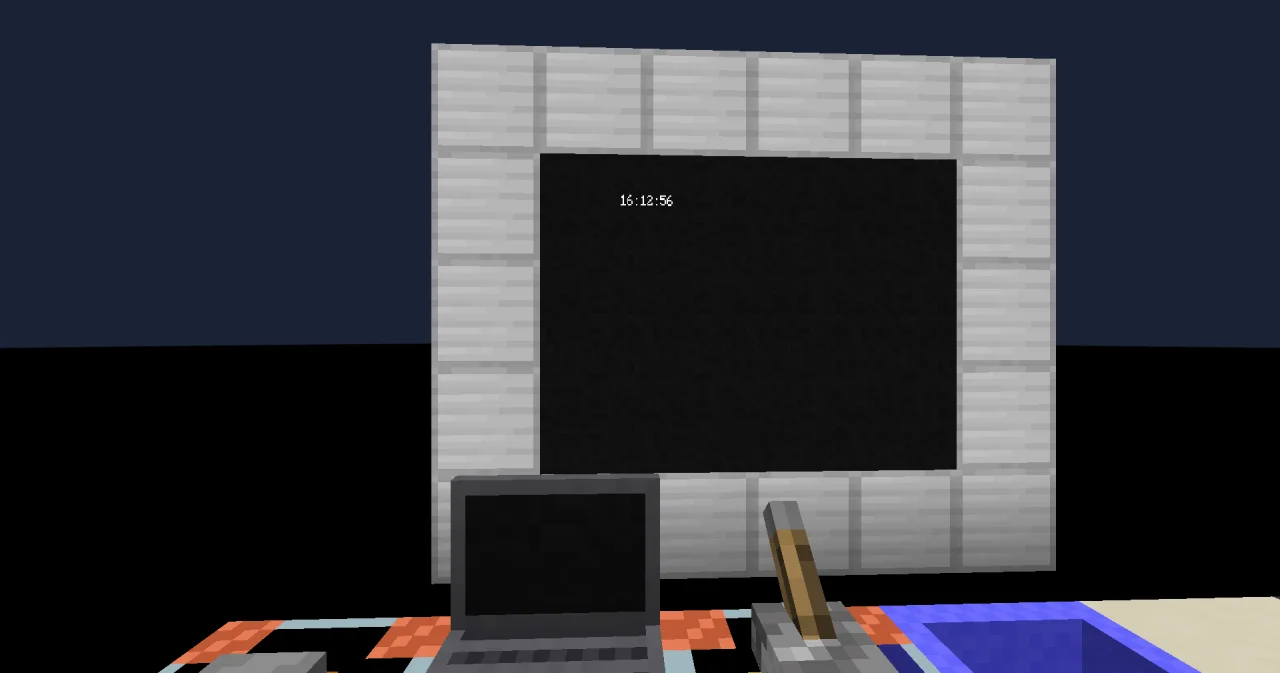
A digital clock on a display wall that shows the real time and moves on every second. A timer block starts the program again and again; each run reads the time once and writes it to the screen.
Functions: NOW, HOUR, MINUTE, SECOND and FORMAT of c0de/strings.
What you need
A timer block, a lever to stop it when you change the program, and a display wall of 2 × 1 display blocks (32 columns, 8 rows). No variable items: the program has no parameters and no results.
The idea
A program can't sit and watch the clock: it runs, does its work and ends. For something that changes all the time, a timer block starts the same function again and again, here every 20 ticks, about once a second. Each run asks NOW for the current time, takes it apart with HOUR, MINUTE and SECOND, and writes 09:05:03 to the screen.
A TIME value is a point in time, counted in milliseconds since the start of 1970. HOUR, MINUTE and SECOND turn it into the numbers you know, in the time zone of the server. FORMAT then pads them with a leading zero, so 9 o'clock reads 09, not 9.
The program
PROGRAM wallclock
NOOP
INCLUDE c0de/time
INCLUDE c0de/strings
NOOP
FUNCTION tick
BEGIN
    VARIABLE now TIME
    VARIABLE part INTEGER
    VARIABLE text STRING
    VARIABLE digits STRING
    CALL c0de/time/NOW
        RESULT result now
    CALL c0de/time/HOUR
        PARAMETER time now ;
        RESULT result part
    CALL c0de/strings/FORMAT
        PARAMETER value part ;
        PARAMETER format "%02d" ;
        RESULT result text
    CALL c0de/time/MINUTE
        PARAMETER time now ;
        RESULT result part
    CALL c0de/strings/FORMAT
        PARAMETER value part ;
        PARAMETER format ":%02d" ;
        RESULT result digits
    ASSIGN text text ⊕ digits ;
    CALL c0de/time/SECOND
        PARAMETER time now ;
        RESULT result part
    CALL c0de/strings/FORMAT
        PARAMETER value part ;
        PARAMETER format ":%02d" ;
        RESULT result digits
    CALL LOCATE
        PARAMETER row 3 ;
        PARAMETER column 12 ;
    CALL PRINT
        PARAMETER value text ⊕ digits ;
END FUNCTION
Building and running it
- Build the display wall: two display blocks side by side, facing the same way.
- Bind it to the program
wallclockand the functiontick(right-click a display block, pick the program and the function, click ✔). - Place a timer block, set it to
wallclock/tickand an interval of 20 ticks. - Place a lever next to the timer block and leave it off. While the lever is on, the timer block pauses.
The clock appears in the middle of the wall and counts the seconds. To change the program, first switch the lever on to stop the timer block: a running process locks the sheet.
How it works
- One NOW, many parts. The program asks for the time once and passes
nowto HOUR, MINUTE and SECOND. Withouttime, each of them would read the clock itself – and at 09:59:59.990, HOUR could still say 9 while MINUTE already says 0, a clock that jumps back to 09:00:00 for a second. - FORMAT pads the numbers.
%02dwrites an integer at least two digits wide and fills it with zeros. The format:%02dadds the colon in the same call. - LOCATE instead of CLS. The new time overwrites the old one at row 3, column 12. Clearing the screen first would make it flicker.
- The cursor takes time too. It moves one line per tick, and
ticktakes about 18 lines. With a timer interval of 20 ticks, a run ends before the next one is due. A timer block starts a new process only when the last one has ended, so a slower program would skip some seconds. - The time zone is the server's. On a server in Berlin, 23:59:59 UTC is shown as
00:59:59.
Try it yourself
- Show the date below the time, like
2026-11-12.
Solution
PROGRAM wallclock
NOOP
INCLUDE c0de/time
INCLUDE c0de/strings
NOOP
FUNCTION tick
BEGIN
    VARIABLE now TIME
    VARIABLE clock STRING
    VARIABLE date STRING
    CALL c0de/time/NOW
        RESULT result now
    CALL c0de/strings/FORMAT
        PARAMETER value now ;
        PARAMETER format "%tT" ;
        RESULT result clock
    CALL c0de/strings/FORMAT
        PARAMETER value now ;
        PARAMETER format "%tF" ;
        RESULT result date
    CALL LOCATE
        PARAMETER row 3 ;
        PARAMETER column 12 ;
    CALL PRINT
        PARAMETER value clock ;
    CALL LOCATE
        PARAMETER row 4 ;
        PARAMETER column 11 ;
    CALL PRINT
        PARAMETER value date ;
END FUNCTION
For TIME values, FORMAT knows its own codes: %tT is the time and %tF the date. One call each replaces HOUR, MINUTE, SECOND and their padding. The parts are worth it when you need the numbers, as in the next exercise.
- Greet the players: "Good morning" before noon, "Good afternoon" before 18:00, "Good evening" after it and "Good night" before 6:00.
Solution
PROGRAM wallclock
NOOP
INCLUDE c0de/time
INCLUDE c0de/strings
INCLUDE c0de/math
VARIABLE greetings ARRAY STRING
BEGIN
    "Good night    " "Good morning  " "Good afternoon" "Good evening  "
END VARIABLE
NOOP
FUNCTION tick
BEGIN
    VARIABLE now TIME
    VARIABLE hour INTEGER
    VARIABLE quarter INTEGER
    VARIABLE clock STRING
    CALL c0de/time/NOW
        RESULT result now
    CALL c0de/strings/FORMAT
        PARAMETER value now ;
        PARAMETER format "%tT" ;
        RESULT result clock
    CALL c0de/time/HOUR
        PARAMETER time now ;
        RESULT result hour
    CALL c0de/math/DIV
        PARAMETER dividend hour ;
        PARAMETER divisor 6 ;
        RESULT result quarter
    CALL LOCATE
        PARAMETER row 3 ;
        PARAMETER column 12 ;
    CALL PRINT
        PARAMETER value clock ;
    CALL LOCATE
        PARAMETER row 5 ;
        PARAMETER column 9 ;
    CALL PRINT
        PARAMETER value greetings[quarter] ;
END FUNCTION
The day has four quarters of six hours, and DIV of c0de/math turns the hour into the number of its quarter, 0 to 3, which picks the greeting from the array. The greetings are padded to the same length, so a long one is overwritten completely by a shorter one.
Read more
- Handbook c0de/time and FORMAT
- Libraries: c0de/time and FORMAT
- TYPE_TIME
- Timer block and Display block
- The cursor