Stopwatch and reaction test
A stopwatch for races in your world: one button starts it, another stops it, and a display wall shows the time to the millisecond. Then a reaction test on a laptop: how fast do you press a key when "GO!" appears?
Functions: TIMER, MILLISECOND and calculations with TIME values, with NOW, SLEEP and FORMAT.
What you need
For the stopwatch: two trigger blocks with a button each, a display wall of 2 × 1 display blocks, a hopper, a chest and a few uninitialized variable items. For the reaction test: a trigger block with a button and a laptop.
The idea
Measuring time means reading the clock twice and subtracting. c0de has two clocks for it:
- NOW returns a TIME, a point in time in milliseconds. Two TIME values subtracted give an INTEGER, the milliseconds between them. A TIME can travel as a variable item, so one process can start the stopwatch and another one stop it.
- TIMER returns the seconds since midnight as a FLOAT, like
32703.25. It is handy inside one process: no TIME values, just a subtraction of two numbers.
The stopwatch
PROGRAM stopwatch
NOOP
INCLUDE c0de/time
INCLUDE c0de/strings
NOOP
FUNCTION stamp
    PARAMETER time TIME
    RESULT text STRING
BEGIN
    VARIABLE millis INTEGER
    VARIABLE digits STRING
    CALL c0de/strings/FORMAT
        PARAMETER value time ;
        PARAMETER format "%tT" ;
        RESULT result text
    CALL c0de/time/MILLISECOND
        PARAMETER time time ;
        RESULT result millis
    CALL c0de/strings/FORMAT
        PARAMETER value millis ;
        PARAMETER format ".%03d" ;
        RESULT result digits
    ASSIGN text text ⊕ digits ;
END FUNCTION
NOOP
FUNCTION start
    RESULT started TIME
BEGIN
    CALL c0de/time/NOW
        RESULT result started
END FUNCTION
NOOP
FUNCTION stop
    PARAMETER started TIME
    RESULT seconds FLOAT
BEGIN
    VARIABLE now TIME
    VARIABLE text STRING
    CALL c0de/time/NOW
        RESULT result now
    ASSIGN seconds (now - started) / 1000 ;
    CALL CLS
    CALL stamp
        PARAMETER time started ;
        RESULT text text
    CALL PRINT
        PARAMETER value "Start " ⊕ text ;
    CALL stamp
        PARAMETER time now ;
        RESULT text text
    CALL PRINT
        PARAMETER value "Stop  " ⊕ text ;
    CALL c0de/strings/FORMAT
        PARAMETER value seconds ;
        PARAMETER format "%.3f" ;
        RESULT result text
    CALL PRINT
        PARAMETER value "Time  " ⊕ text ⊕ " s" ;
END FUNCTION
Building and running it
- Place trigger block A and set it to
stopwatch/start. Put a few uninitialized variable items into its input: each start needs one for its resultstarted. - Place trigger block B right next to A and set it to
stopwatch/stop. B is the only block with an inventory that touches A, so A's output goes into B by itself. - Put a hopper under B that leads into the chest.
- Put a button on each trigger block, and bind the display wall to
stopwatch/stop.
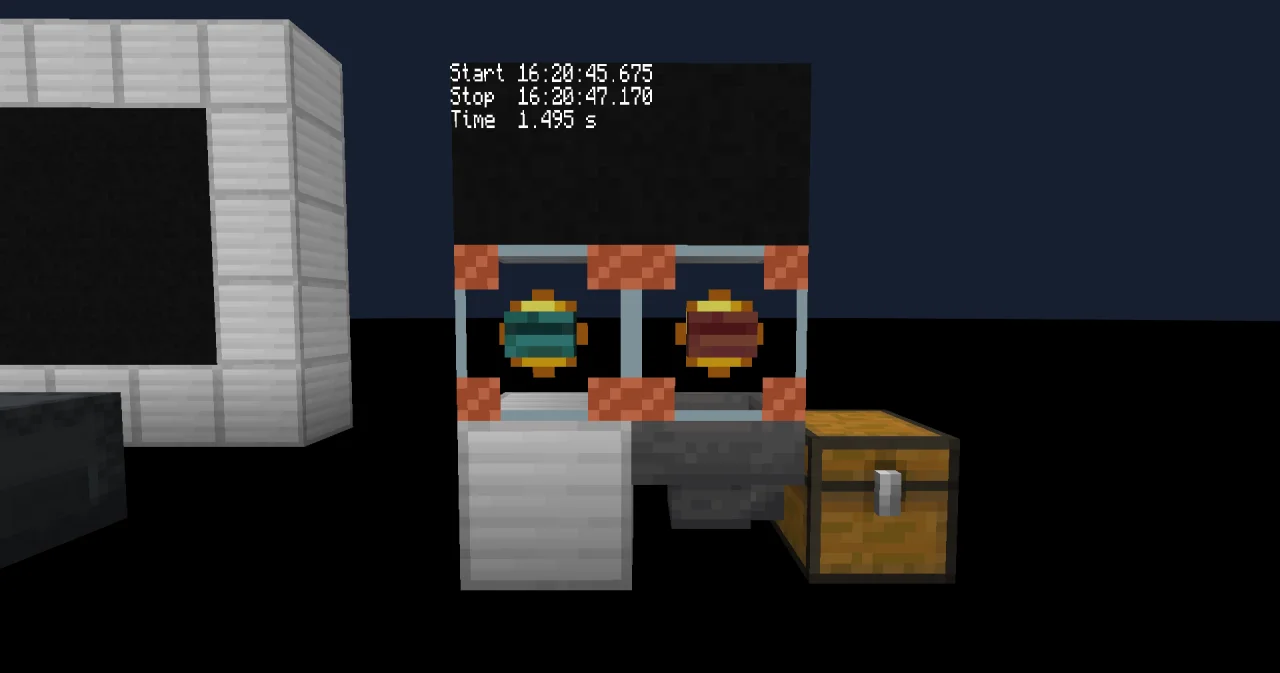
Press the button on A: the item started goes into B. Press the button on B: the wall shows
Start 09:04:50.655
Stop  09:05:03.000
Time  12.345 s
and the item seconds with the value 12.345 falls into the chest – a list of all your times.
How it works
- The time travels as an item.
startonly returns NOW asstarted.stoptakes it as a parameter, so the two processes share nothing but this item. Press A twice, and two items wait in B: the next run takes one for its parameter and passes the other one on into the chest. - Subtracting times.
now - startedis the number of milliseconds. Divided by 1000 with/, it becomes a FLOAT in seconds, and%.3fwrites it with three decimals. - MILLISECOND.
%tTwrites a time to the second.stampadds the milliseconds with MILLISECOND, 0 to 999, padded to three digits by.%03d. - How exact is it? NOW is exact to the millisecond, but a process starts at a tick and the cursor moves one line per tick, so a stopwatch in the game is good to about a twentieth of a second. Both buttons wait the same way, so the error mostly cancels out.
The reaction test
PROGRAM reaction
NOOP
INCLUDE c0de/time
INCLUDE c0de/strings
INCLUDE c0de/math
NOOP
FUNCTION rate
    PARAMETER seconds FLOAT
    RESULT verdict STRING
BEGIN
    ASSIGN verdict "Wake up!" ;
    IF seconds < 0.5 ;
    BEGIN
        ASSIGN verdict "Good" ;
    END IF
    IF seconds < 0.3 ;
    BEGIN
        ASSIGN verdict "Lightning fast!" ;
    END IF
END FUNCTION
NOOP
FUNCTION react
BEGIN
    VARIABLE chance FLOAT
    VARIABLE wait INTEGER
    VARIABLE key STRING
    VARIABLE start FLOAT
    VARIABLE stop FLOAT
    VARIABLE seconds FLOAT
    VARIABLE text STRING
    VARIABLE verdict STRING
    CALL CLS
    CALL PRINT
        PARAMETER value "Press a key to start" ;
    REPEAT
    BEGIN
        CALL INKEY
            RESULT result key
    END REPEAT key = "" ;
    CALL PRINT
        PARAMETER value "Wait for GO!" ;
    CALL c0de/math/RANDOM
        RESULT result chance
    CALL c0de/math/INT
        PARAMETER value 40 + chance * 60 ;
        RESULT result wait
    CALL c0de/time/SLEEP
        PARAMETER ticks wait ;
    CALL PRINT
        PARAMETER value "GO!" ;
    CALL c0de/time/TIMER
        RESULT result start
    REPEAT
    BEGIN
        CALL INKEY
            RESULT result key
    END REPEAT key = "" ;
    CALL c0de/time/TIMER
        RESULT result stop
    IF stop < start ;
    BEGIN
        ASSIGN stop stop + 86400 ;
    END IF
    ASSIGN seconds stop - start ;
    CALL c0de/strings/FORMAT
        PARAMETER value seconds ;
        PARAMETER format "%.3f" ;
        RESULT result text
    CALL rate
        PARAMETER seconds seconds ;
        RESULT verdict verdict
    CALL PRINT
        PARAMETER value "Your time: " ⊕ text ⊕ " s" ;
    CALL PRINT
        PARAMETER value verdict ;
END FUNCTION
Building and running it
Bind the laptop to reaction / react, set the trigger block to the same and press its button. Open the laptop and press a key to start. After two to five seconds, "GO!" appears: press a key as fast as you can. The laptop shows your time and a verdict.
How it works
- A random wait. RANDOM and INT choose between 40 and 99 ticks, and SLEEP waits that long, so you can't guess when "GO!" comes.
- TIMER around the loop. TIMER is read right after "GO!" and right after the key. The loop asks INKEY until a key is there, so the difference is your reaction time – plus a tick or two of the cursor.
- Midnight. TIMER starts again at 0 at midnight. If
stopis smaller thanstart, the test ran over midnight, and a day of 86 400 seconds is added. rateis a function of its own. It takes the seconds as a parameter, so it can be tested with fixed values like 0.25 or 0.8, without waiting for a real reaction.
Try it yourself
- Keys pressed before "GO!" wait for INKEY, so pressing early gives a perfect time. Catch the cheaters: if a key is waiting right after the SLEEP, print "Too early!" and stop.
Solution
PROGRAM reaction
NOOP
INCLUDE c0de/time
INCLUDE c0de/strings
INCLUDE c0de/math
NOOP
FUNCTION rate
    PARAMETER seconds FLOAT
    RESULT verdict STRING
BEGIN
    ASSIGN verdict "Wake up!" ;
    IF seconds < 0.5 ;
    BEGIN
        ASSIGN verdict "Good" ;
    END IF
    IF seconds < 0.3 ;
    BEGIN
        ASSIGN verdict "Lightning fast!" ;
    END IF
END FUNCTION
NOOP
FUNCTION react
BEGIN
    VARIABLE chance FLOAT
    VARIABLE wait INTEGER
    VARIABLE key STRING
    VARIABLE start FLOAT
    VARIABLE stop FLOAT
    VARIABLE seconds FLOAT
    VARIABLE text STRING
    VARIABLE verdict STRING
    CALL CLS
    CALL PRINT
        PARAMETER value "Press a key to start" ;
    REPEAT
    BEGIN
        CALL INKEY
            RESULT result key
    END REPEAT key = "" ;
    CALL PRINT
        PARAMETER value "Wait for GO!" ;
    CALL c0de/math/RANDOM
        RESULT result chance
    CALL c0de/math/INT
        PARAMETER value 40 + chance * 60 ;
        RESULT result wait
    CALL c0de/time/SLEEP
        PARAMETER ticks wait ;
    CALL INKEY
        RESULT result key
    IF key ≠ "" ;
    BEGIN
        CALL PRINT
            PARAMETER value "Too early!" ;
        RETURN
    END IF
    CALL PRINT
        PARAMETER value "GO!" ;
    CALL c0de/time/TIMER
        RESULT result start
    REPEAT
    BEGIN
        CALL INKEY
            RESULT result key
    END REPEAT key = "" ;
    CALL c0de/time/TIMER
        RESULT result stop
    IF stop < start ;
    BEGIN
        ASSIGN stop stop + 86400 ;
    END IF
    ASSIGN seconds stop - start ;
    CALL c0de/strings/FORMAT
        PARAMETER value seconds ;
        PARAMETER format "%.3f" ;
        RESULT result text
    CALL rate
        PARAMETER seconds seconds ;
        RESULT verdict verdict
    CALL PRINT
        PARAMETER value "Your time: " ⊕ text ⊕ " s" ;
    CALL PRINT
        PARAMETER value verdict ;
END FUNCTION
One INKEY after the SLEEP is enough: an early key is still waiting there. RETURN ends react.
- A race through your parkour takes minutes. Show the time as
2:05.300instead of125.300 s.
Solution
PROGRAM stopwatch
NOOP
INCLUDE c0de/time
INCLUDE c0de/strings
INCLUDE c0de/math
NOOP
FUNCTION stamp
    PARAMETER time TIME
    RESULT text STRING
BEGIN
    VARIABLE millis INTEGER
    VARIABLE digits STRING
    CALL c0de/strings/FORMAT
        PARAMETER value time ;
        PARAMETER format "%tT" ;
        RESULT result text
    CALL c0de/time/MILLISECOND
        PARAMETER time time ;
        RESULT result millis
    CALL c0de/strings/FORMAT
        PARAMETER value millis ;
        PARAMETER format ".%03d" ;
        RESULT result digits
    ASSIGN text text ⊕ digits ;
END FUNCTION
NOOP
FUNCTION start
    RESULT started TIME
BEGIN
    CALL c0de/time/NOW
        RESULT result started
END FUNCTION
NOOP
FUNCTION stop
    PARAMETER started TIME
    RESULT seconds FLOAT
BEGIN
    VARIABLE now TIME
    VARIABLE text STRING
    VARIABLE minutes INTEGER
    VARIABLE rest STRING
    CALL c0de/time/NOW
        RESULT result now
    ASSIGN seconds (now - started) / 1000 ;
    CALL CLS
    CALL stamp
        PARAMETER time started ;
        RESULT text text
    CALL PRINT
        PARAMETER value "Start " ⊕ text ;
    CALL stamp
        PARAMETER time now ;
        RESULT text text
    CALL PRINT
        PARAMETER value "Stop  " ⊕ text ;
    CALL c0de/math/DIV
        PARAMETER dividend now - started ;
        PARAMETER divisor 60000 ;
        RESULT result minutes
    CALL c0de/strings/FORMAT
        PARAMETER value ((now - started) \ 60000) / 1000 ;
        PARAMETER format "%06.3f" ;
        RESULT result rest
    CALL PRINT
        PARAMETER value "Time  " ⊕ minutes ⊕ ":" ⊕ rest ;
END FUNCTION
DIV gives the whole minutes of the milliseconds, the remainder \ 60000 the rest of the last minute. %06.3f writes the seconds six characters wide with three decimals and a leading zero, like 05.300.