Home automation
Flip a lever in your base, and the lamp in your real kitchen goes on; flip it back, and it goes off. The program sends the new state of the lamp to your home automation with HTTP_PUT. Its token – the password of the home automation – doesn't stand on the sheet, but comes from a constant item in the trigger block.
Functions: HTTP_PUT, HTTP_CONNECTION, TO_JSON of c0de/strings, SLEEP of c0de/time and GET_LEVER of c0de/minecraft
What you need
The mod c0de net in your game, a home automation with an HTTP API in your home network and a token for it, a trigger block with a lever on top, and a constant item token of type STRING with the token. To try the request first: a second trigger block with a button and a laptop. For the exercises: for each further lamp, another trigger block with a lever and a variable item lamp of type STRING.
The idea
Most home automations – a hub, a bridge, a smart plug – can be switched over HTTP. Each has its own API, but they look alike: an address in your home network, an endpoint for the lamp, the new state as JSON, and a token in the Authorization header. This recipe uses a made-up hub at homehub.local, port 8080, that takes PUT /api/lamps/kitchen with {"on":true}. Look up the address, the endpoint, the data and the kind of token of your own system in its documentation and change the program accordingly.
Two things make this possible, and safe:
- The request comes from your computer. c0de net sends it from the computer of the player who flips the lever, not from the Minecraft server. So it reaches your home network when you play at home – even on a server far away. A friend who flips the lever sends it from their computer, where
homehub.localdoesn't exist. Every player can switch requests off for their own computer. - The token is not on the sheet. Everybody who can see the sheet can read its literals. The token goes into a constant item instead, which can't be changed once it has a value, in a trigger block that only you can change.
The program
PROGRAM homelamp
NOOP
INCLUDE c0de/minecraft
INCLUDE c0de/strings
INCLUDE c0de/time
INCLUDE c0de_net/http
NOOP
FUNCTION send
    PARAMETER token STRING
    PARAMETER on BOOLEAN
BEGIN
    VARIABLE hub STRUCT c0de_net/http/HTTP_CONNECTION
    VARIABLE state BOOLEAN TAG(json: "on")
    VARIABLE data STRING
    ASSIGN hub.server "homehub.local" ;
    ASSIGN hub.port 8080 ;
    ASSIGN hub.base_endpoint "/api" ;
    ASSIGN hub.headers["Authorization"] "Bearer " ⊕ token ;
    ASSIGN hub.headers["Content-Type"] "application/json" ;
    ASSIGN hub.timeout 5 ;
    ASSIGN state on ;
    CALL c0de/strings/TO_JSON
        PARAMETER value state ;
        RESULT result data
    CALL c0de_net/http/HTTP_PUT
        PARAMETER connection hub ;
        PARAMETER endpoint "/lamps/kitchen" ;
        PARAMETER data data ;
END FUNCTION
NOOP
FUNCTION switch
    PARAMETER token STRING
BEGIN
    VARIABLE lever STRUCT c0de/minecraft/POSITION
    VARIABLE on BOOLEAN TRUE
    ASSIGN lever.x PID.x ;
    ASSIGN lever.y PID.y + 1 ;
    ASSIGN lever.z PID.z ;
    CALL send
        PARAMETER token token ;
        PARAMETER on TRUE ;
    WHILE on ;
    BEGIN
        CALL c0de/time/SLEEP
            PARAMETER ticks 10 ;
        CALL c0de/minecraft/GET_LEVER
            PARAMETER position lever ;
            RESULT result on
    END WHILE
    CALL send
        PARAMETER token token ;
        PARAMETER on FALSE ;
END FUNCTION
Try the request first
You can't see what your hub receives, and a mistake in the data just does nothing. So send the same request to the echo of c0de.at first, which answers with the request as it arrived:
PROGRAM lamppreview
NOOP
INCLUDE c0de/strings
INCLUDE c0de_net/http
NOOP
STRUCT received
BEGIN
    method STRING
    path STRING
    headers HASH STRING
    body STRING
END STRUCT
NOOP
FUNCTION preview
    PARAMETER token STRING "test"
    PARAMETER on BOOLEAN TRUE
BEGIN
    VARIABLE hub STRUCT c0de_net/http/HTTP_CONNECTION
    VARIABLE state BOOLEAN TAG(json: "on")
    VARIABLE data STRING
    VARIABLE answer STRING
    VARIABLE echo STRUCT received
    ASSIGN hub.use_ssl TRUE ;
    ASSIGN hub.server "c0de.at" ;
    ASSIGN hub.base_endpoint "/api/tutorial/echo" ;
    ASSIGN hub.headers["Authorization"] "Bearer " ⊕ token ;
    ASSIGN hub.headers["Content-Type"] "application/json" ;
    ASSIGN hub.timeout 5 ;
    ASSIGN state on ;
    CALL c0de/strings/TO_JSON
        PARAMETER value state ;
        RESULT result data
    CALL c0de_net/http/HTTP_PUT
        PARAMETER connection hub ;
        PARAMETER endpoint "/lamps/kitchen" ;
        PARAMETER data data ;
        RESULT result answer
    CALL c0de/strings/FROM_JSON
        PARAMETER source answer ;
        PARAMETER destination echo ;
    CALL CLS
    CALL PRINT
        PARAMETER value echo.method ⊕ " " ⊕ echo.path ;
    CALL PRINT
        PARAMETER value "Authorization: " ⊕ echo.headers["authorization"] ;
    CALL PRINT
        PARAMETER value "Content-Type: " ⊕ echo.headers["content-type"] ;
    CALL PRINT
        PARAMETER value echo.body ;
END FUNCTION
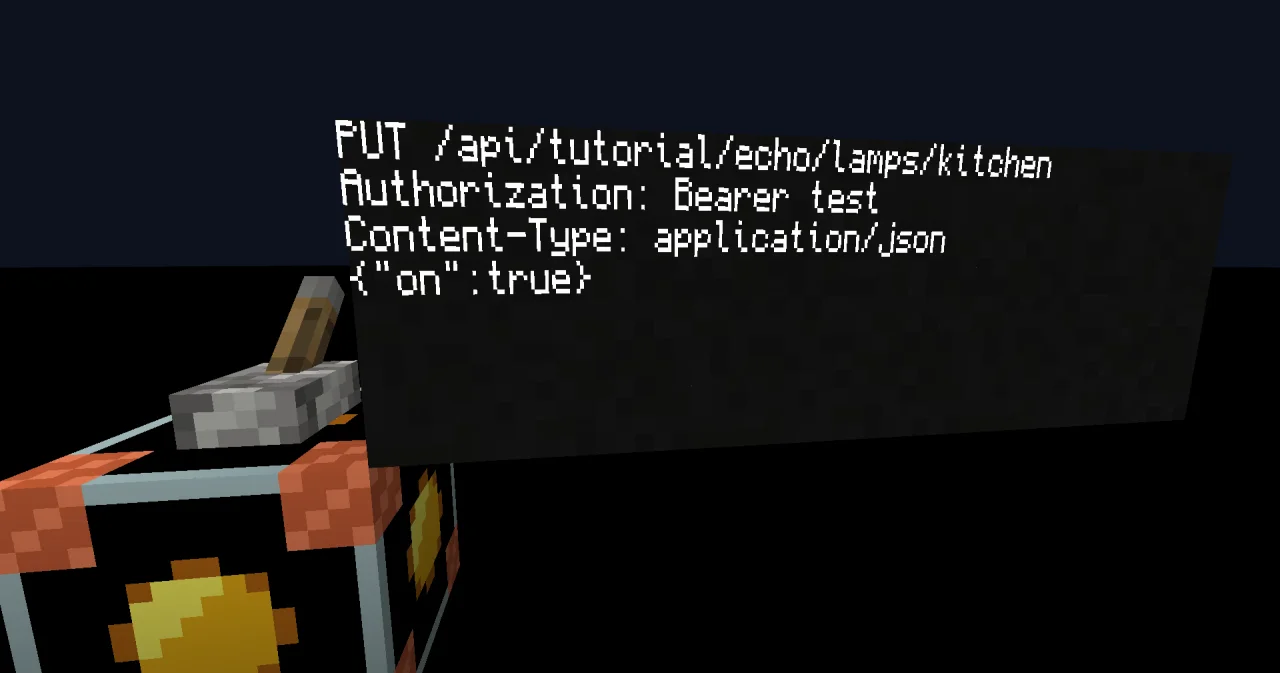
Bind the laptop to lamppreview / preview and start it with a trigger block. It shows:
PUT /api/tutorial/echo/lamps/kitchen
Authorization: Bearer test
Content-Type: application/json
{"on":true}
Use the token test here, not your real one: the echo shows everything it gets. With a variable item on set to FALSE, the last line is {"on":false}.
Building and running it
- Change the address, the port, the endpoint and the data of
sendto those of your home automation. - Set the trigger block to
homelamp/switchand put the lever on top of it. - Make a constant item: name
token, type STRING, your token as value. Put it into the input inventory of the trigger block. Set its Run button to Only me. - Flip the lever on: the lamp at home goes on. Flip it off: after half a second, the lamp goes off.
How it works
- The lever starts it. Switching the lever on gives the trigger block a redstone pulse, and the block knows who flipped it. Switching it off starts nothing, so the process stays alive while the lamp is on: it asks the lever every 10 ticks with GET_LEVER and sends "off" when the lever is off. Meanwhile its sheet is locked.
- Where the lever is.
PID.x,PID.yandPID.zare the position of the trigger block, so the lever on top of it is atPID.y + 1. - The data.
VARIABLE state BOOLEAN TAG(json: "on")puts the value at the keyon, so TO_JSON writes{"on":true}or{"on":false}. - The connection.
use_sslstays FALSE, because most hubs in a home network speak plain http;port8080 andbase_endpoint/apicomplete the address tohttp://homehub.local:8080/api/lamps/kitchen. The token goes into the headerAuthorizationasBearer <token>, which replacesuserandpassword. - The token is a parameter.
switchgets it from the constant item and passes it on tosend. Nothing secret is on the sheet. - When it fails. If the hub isn't reachable, HTTP_PUT raises REQUEST_FAILED, and the process crashes; the trigger block shows the error. The "off" request is sent by the player who switched the lamp on, so they must still be online.
Try it yourself
- Switch several lamps with the same program.
Solution
Give switch and send a parameter lamp STRING with the default "kitchen", and use the endpoint "/lamps/" ⊕ lamp. Each lamp gets its own trigger block with a lever and a variable item lamp, like garden; the constant item token is the same for all.
- A friend flips your lever while you're online. What happens?
Solution
With Only me on the Run button, nothing: the trigger block doesn't start. With Players, the process starts and sends the request from your friend's computer. Unless they are in your home network, homehub.local is unknown there, and the process crashes with REQUEST_FAILED (1003). Your lamp, and your token, stay safe.
Read more
- HTTP_PUT, HTTP_CONNECTION and the example Switching a lamp
- How requests are sent
- Constant items and Trigger block
- GET_LEVER and SLEEP