Colors and the screen
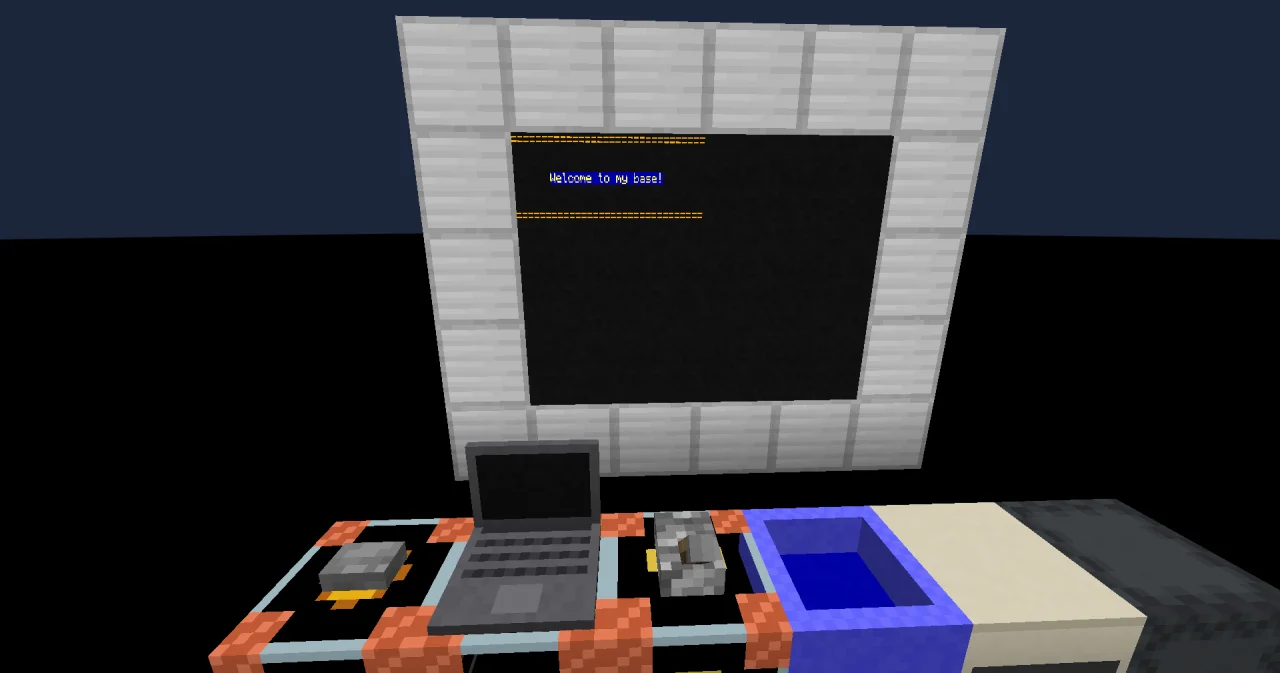
White text on a dark screen works, but a sign at the entrance of your base should catch the eye. Today your sign gets yellow letters on a blue background, framed by two golden lines at the top and the bottom.
New words
- Parameter: a detail of an instruction, like the color for "change the color". An optional parameter may be left out; then it has a value chosen for you.
- Row and column: the screen is a grid of characters. Rows count from the top, columns from the left, both starting at 0.
What you need
The sign of the last lesson. Language blocks: CALL, PARAMETER, LABEL, LITERAL and OPERATOR, and a hammer to insert lines.
The idea
"Paint the wall" isn't enough for a builder. Which wall? In which color? Most instructions need such details. In programming, they are called parameters.
And the order matters, even more than before. Imagine telling a builder: "Lay the blocks. Then use gold blocks." The first row is already finished in whatever blocks the builder had at hand. You have to say "use gold blocks" before "lay the blocks".
It's the same on the screen. You first pick a color, then you write. Everything written afterwards has that color, until you pick another one.
The program
The program stays on the same sheet. It replaces the sign of the last lesson.
PROGRAM sign
NOOP
NOOP
FUNCTION welcome
BEGIN
    CALL CLS
    CALL COLOR
        PARAMETER foreground COLOR_GOLD ;
    CALL PRINT
        PARAMETER value "================================" ;
    CALL LOCATE
        PARAMETER row 3 ;
        PARAMETER column 6 ;
    CALL COLOR
        PARAMETER foreground COLOR_YELLOW ;
        PARAMETER background COLOR_DARK_BLUE ;
    CALL PRINT
        PARAMETER value "Welcome to my base!" ;
    CALL COLOR
        PARAMETER foreground COLOR_GOLD ;
    CALL LOCATE
        PARAMETER row 6 ;
    CALL PRINT
        PARAMETER value "================================" ;
END FUNCTION
Building it
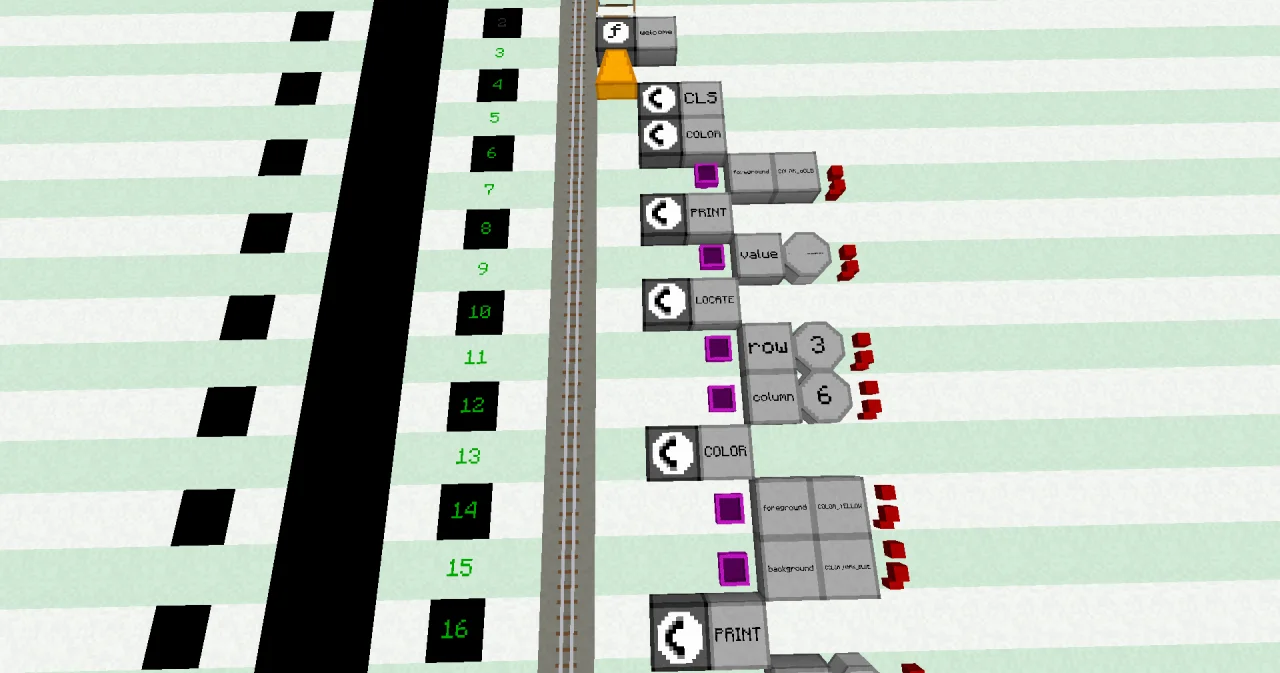
Lines 0 to 5 stay as they are. The old PRINT (lines 6 and 7 of the last lesson) moves down to lines 16 and 17. To make room, right-click line 6 with the hammer ten times: each click inserts an empty line in front of it. Then fill the empty lines, and add the new lines after the old PRINT. While a line is empty, the line numbers after it are dark red, because the first empty line ends the program. They turn green again when the gap is filled.
- Line 6: a CALL block at x=6, then a LABEL named
COLOR. - Line 7: a PARAMETER block at x=7, a LABEL
foreground, a LABELCOLOR_GOLDand an OPERATOR;. - Lines 8 and 9: a CALL
PRINTwith the PARAMETERvalue, like in the last lesson. The LITERAL holds 32 equal signs================================. - Line 10: a CALL block at x=6, then a LABEL named
LOCATE. - Line 11: a PARAMETER at x=7, a LABEL
row, a LITERAL 3 (type INTEGER) and an OPERATOR;. - Line 12: a PARAMETER at x=7, a LABEL
column, a LITERAL 6 and an OPERATOR;. - Lines 13 to 15: a CALL
COLORwith two PARAMETER lines:foregroundisCOLOR_YELLOW,backgroundisCOLOR_DARK_BLUE. - Lines 16 and 17: the old PRINT of "Welcome to my base!".
- Lines 18 and 19: a CALL
COLORwith only theforegroundCOLOR_GOLD. - Lines 20 and 21: a CALL
LOCATEwith only therow6. - Lines 22 and 23: a PRINT of the 32 equal signs, like lines 8 and 9.
- Line 24: the END FUNCTION.
Running it
The display wall and the trigger block stay bound to sign and welcome, as the names didn't change. Press the button. The wall shows:
================================


      Welcome to my base!


================================
The lines are gold, the welcome text is yellow on a dark blue background.
How it works
CALL COLORchanges the colors of everything printed from now on. Its parameterforegroundis the color of the letters.COLOR_GOLDis one of 16 names for the colors of Minecraft text, fromCOLOR_BLACKtoCOLOR_WHITE.- The first PRINT writes 32 equal signs. The wall is 32 columns wide, so the line fills one row exactly.
CALL LOCATEmoves the cursor of the screen, the place where the next text goes. Row 3, column 6 is the fourth row from the top and the seventh column from the left, as both count from 0. The welcome text has 19 characters, so it stands roughly in the middle.- The second COLOR has two parameters: yellow letters on a dark blue background.
- The third COLOR has only
foreground.backgroundis an optional parameter: if you leave it out, it is 0, the color of the screen itself. That's why the bottom line has no blue background. - The second LOCATE has only
row.columnis optional too, and is 0 when you leave it out: the line starts at the left edge. - Why row 6 and not row 7, the last row? PRINT starts a new line after its text. In the last row, the new line pushes the whole screen up by one row, and the top line disappears.
Try it yourself
- Make a flag: three stripes of colored spaces, two rows each. A space shows only its background color.
Solution
Each stripe is a COLOR with the same foreground and background, and two PRINTs of 32 spaces. This is the flag of Austria, red, white and red:
PROGRAM sign
NOOP
NOOP
FUNCTION welcome
BEGIN
    CALL CLS
    CALL COLOR
        PARAMETER foreground COLOR_RED ;
        PARAMETER background COLOR_RED ;
    CALL PRINT
        PARAMETER value "                                " ;
    CALL PRINT
        PARAMETER value "                                " ;
    CALL COLOR
        PARAMETER foreground COLOR_WHITE ;
        PARAMETER background COLOR_WHITE ;
    CALL PRINT
        PARAMETER value "                                " ;
    CALL PRINT
        PARAMETER value "                                " ;
    CALL COLOR
        PARAMETER foreground COLOR_RED ;
        PARAMETER background COLOR_RED ;
    CALL PRINT
        PARAMETER value "                                " ;
    CALL PRINT
        PARAMETER value "                                " ;
END FUNCTION
For other flags, pick other colors. Black doesn't show, as background 0 is the color of the screen.
- In the program, swap lines 13 to 15 (the yellow COLOR) with lines 16 and 17 (the PRINT of the welcome text). What changes on the sign?
Solution
The welcome text is gold on the screen color, not yellow on blue. When it is printed, the last COLOR was the gold of the top line. The yellow comes afterwards and is replaced by the gold of lines 18 and 19 right away, before anything else is printed. Order matters!
Read more
- COLOR: the parameters and the 16 color names
- LOCATE and CLS
- Display block: rows and columns of display walls
- Talking to players
- Hammer: inserting and deleting lines