When things go wrong
Every programmer makes mistakes, every day. What makes a good programmer is knowing how to find them. Today the computer of Oak Hill gets a small program that shares the harvest of the wheat farm between the players of the base. Somebody built it in a hurry: it has three mistakes. You find them one by one, with the tools c0de gives you, and repair the program.
New words
- bug: a mistake in a program. The program doesn't run, or it does something you didn't mean.
- debugging: finding and removing bugs.
- error: a problem that stops a program while it runs, like dividing by zero.
- catching an error: noticing it and reacting to it, instead of letting the program stop.
What you need
- a new, empty sheet in the c0de dimension, and the wrench
- a trigger block with a button, and a debug trigger block
- the debugging tool (it looks like a fly swatter)
- the hammer, to insert lines, and the pliers, to move a line to the right
- three INTEGER variable items named
rows,lengthandplayers - the blocks you know: PROGRAM, NOOP, FUNCTION, PARAMETER, RESULT, BEGIN, END, ASSIGN, IF, LABEL, LITERAL, OPERATOR and the type blocks INTEGER and FLOAT
- for the exercises: your laptop, the blocks VARIABLE, CALL and ELSE and the type block ERROR
The idea
Think of a recipe for a cake. Three things can go wrong with it:
- A word is misspelled. "Add 200 g of flowr." You notice it at once when you read the recipe. In c0de, the line number turns red while you build.
- The recipe is wrong. It says "a spoon of salt" where it should say sugar. You follow it exactly, and the cake tastes horrible. Nothing warns you; you only see it in the result. In c0de, the program runs, but its result is wrong.
- The recipe asks for something impossible. "Share the cake fairly between all guests" – but there are no guests. In c0de, this is an error while the program runs: the program stops, and we say it crashes.
Each kind of bug has its own tool to find it.
The program
This is the program as your hurried friend built it. It takes the size of the wheat field (rows and length) and the number of players, and returns how much wheat there is and how much each player gets. Build it exactly like this, mistakes included.
PROGRAM repair
NOOP
NOOP
FUNCTION share
    PARAMETER rows INTEGER
    PARAMETER length INTEGER
    PARAMETER players INTEGER
    RESULT wheat INTEGER
    RESULT each FLOAT
BEGIN
    ASSIGN wheat rows + length ;
    ASSIGN each wheat / players
END FUNCTION
Building it
The program goes on a new sheet. Build it line by line, like the programs before:
- Lines 0 to 3: PROGRAM
repair, two NOOP lines, FUNCTIONshare. - Lines 4 to 6: three PARAMETER lines at x=6, each with a LABEL and an INTEGER type block.
- Lines 7 and 8: two RESULT lines:
wheatwith INTEGER andeachwith FLOAT, because a share can be a decimal number. - Line 9: BEGIN at x=5.
- Line 10: ASSIGN at x=6, LABEL
wheat, LABELrows, OPERATOR+, LABELlength, OPERATOR;. - Line 11: ASSIGN at x=6, LABEL
each, LABELwheat, OPERATOR/, LABELplayers– and no;at the end. - Line 12: END FUNCTION at x=5.
Running it
Bug 1: the red line
Look at the line numbers at x=2. All of them are dark green or faint – except line 11, which is dark red. A red line number means: this line is wrong, the program can't run like this.
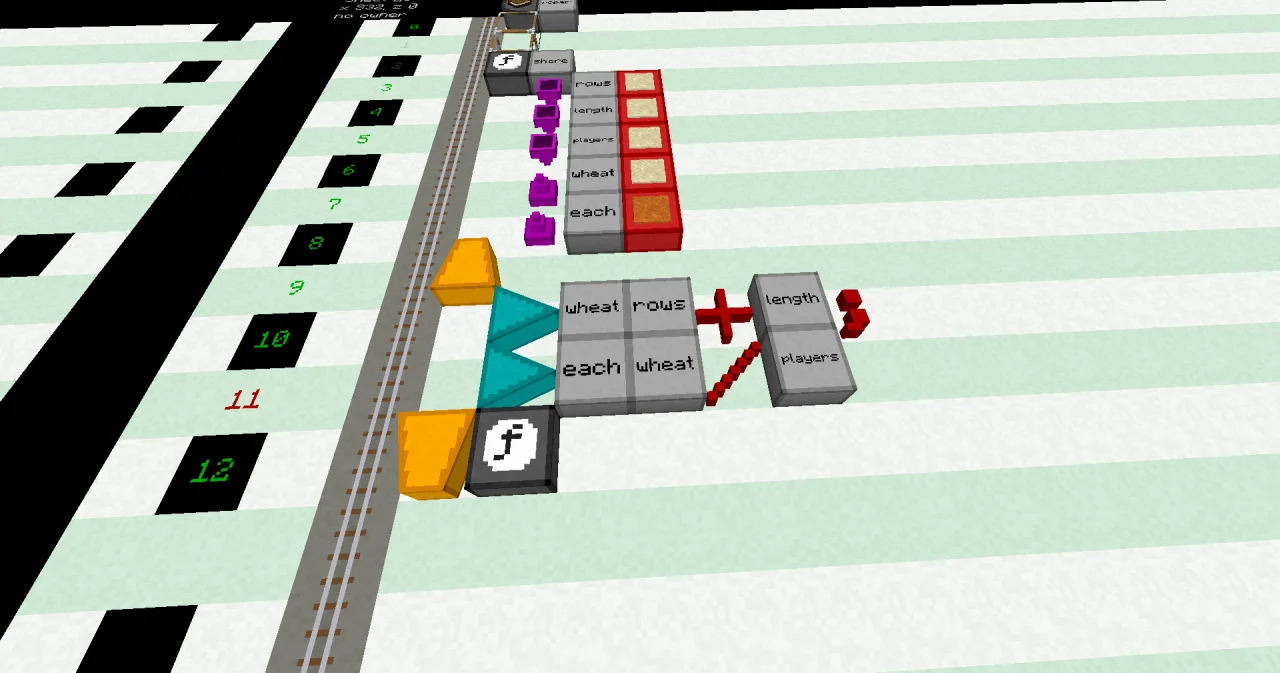
But what is wrong? Right-click a block of line 11 with the debugging tool. Its dialog tells you that the expression doesn't end with ;. Every calculation in c0de ends with the OPERATOR ;, and this one doesn't.
Repair it: place an OPERATOR block with ; at the end of line 11. The line number turns dark green.
Bug 2: the wrong result
Now the program runs. Leave the dimension and set the trigger block to the program repair and the function share. Put in three items: rows with the value 3, length with 10 and players with 2. You don't need an uninitialized item this time: three items go in, so three items come out. Press the button.
The output inventory holds wheat with the value 13 and each with 6.5. But a field of 3 rows of 10 wheat has 30 wheat, not 13! Nothing turned red, nothing crashed. The program did exactly what it says – it just says the wrong thing.
To see where it goes wrong, watch the program work, one line at a time:
- Place the debug trigger block on the black floor next to the sheet. Set it to the same program and function, and put the same three items into it.
- Hit the debug trigger block with the debugging tool. A red cursor appears on the cursor rail of the sheet. It waits.
- Left-click the red cursor with the debugging tool. It moves one line, and your chat shows the line it is in now. Click until it has passed line 10.
- Right-click the cursor. The dialog shows the values on its stack:
rowsis 3,lengthis 10 – andwheatis 13.
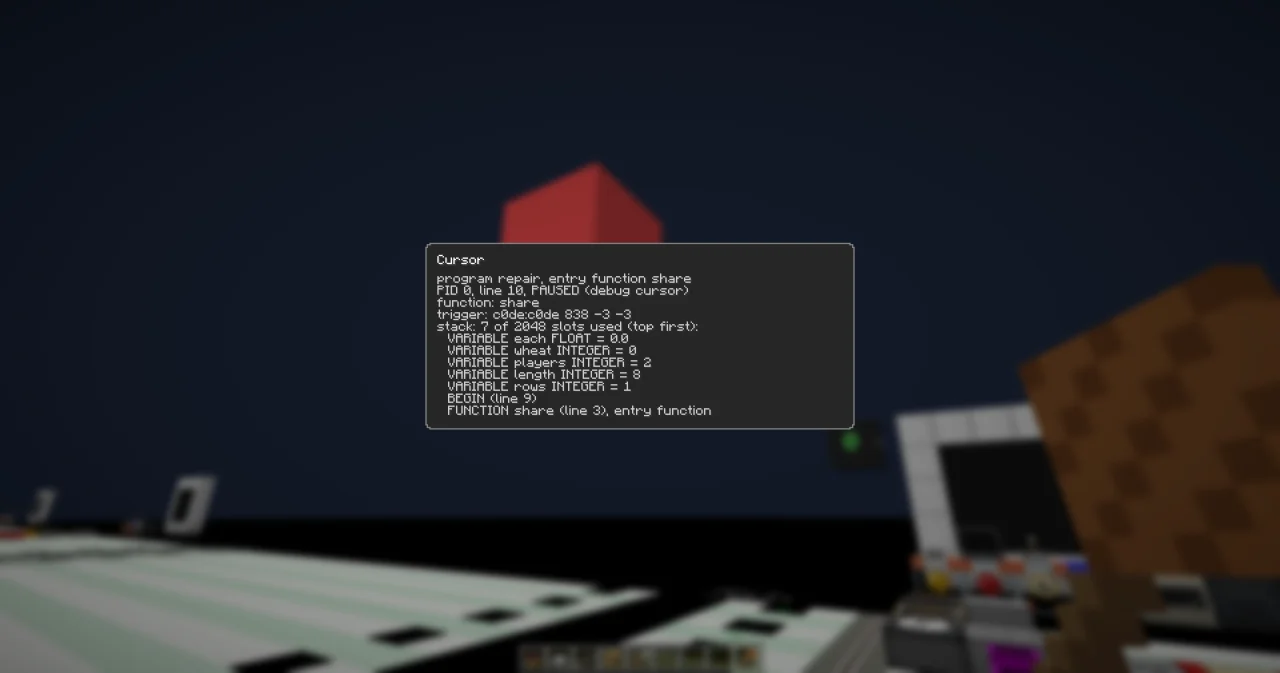
So line 10 is the culprit: rows + length adds the numbers, but the area of a field is rows times length. Repair it: replace the OPERATOR + in line 10 with *. Run it again: now wheat is 30 and each is 15.0.
Bug 3: the crash
Your friends are away. Set the item players to 0 and press the button again. The trigger block plays a low note: the program crashed. Open its dialog. It shows the error:
- the code 303, DIVISION_BY_ZERO, with the message "Division by 0",
- the function
shareand the line 11, where it happened.
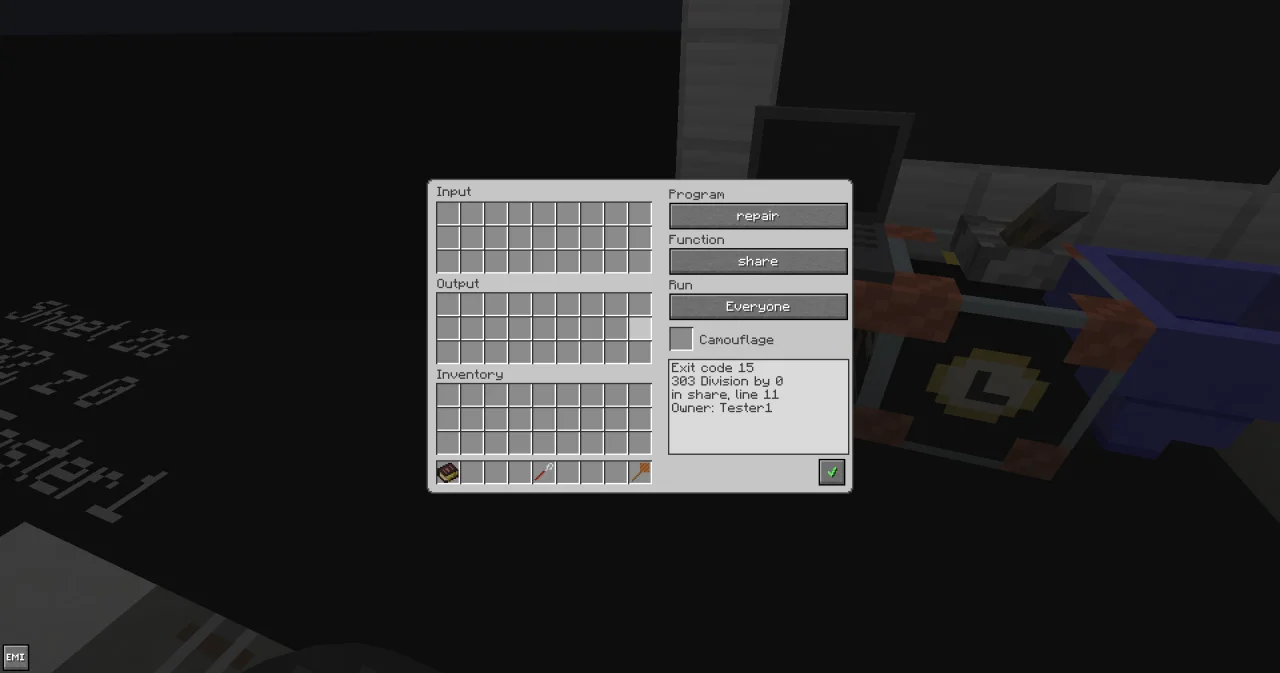
Nobody can share 30 wheat among 0 players – not even a computer. A crashed program gives no results. Your three items come back unchanged in the output inventory, so you can try again.
Repair it: only divide if there is somebody to share with. This is the repaired program:
PROGRAM repair
NOOP
NOOP
FUNCTION share
    PARAMETER rows INTEGER
    PARAMETER length INTEGER
    PARAMETER players INTEGER
    RESULT wheat INTEGER
    RESULT each FLOAT
BEGIN
    ASSIGN wheat rows * length ;
    IF players > 0 ;
    BEGIN
        ASSIGN each wheat / players ;
    END IF
END FUNCTION
Line 11 is now an IF that asks players > 0 ;. The division moves one block further east into its own code block, in line 13. To make room, right-click line 11 twice with the hammer, then line 14 once: each right-click inserts an empty line in front of the clicked line. Right-click the division, now in line 13, with the pliers: its blocks move one block to the right. Then place the blocks of the IF, BEGIN and END IF lines in the empty lines. With 0 players, wheat is 30 and each stays 0.0.
How it works
- The line colors check every line while you build: dark green is right, dark yellow is unfinished, dark red is wrong. A program with a red line can't run. The debugging tool tells you what is wrong.
- A wrong result is a bug that only you can find, because only you know what the program should do. Calculate one example by hand, and compare it with the result. The debug trigger block lets you stop after every line and look at the values.
- An error stops the function where it happens. If nothing catches it, the whole program crashes: the trigger block plays a low note, keeps the error in its dialog, and gives back the items unchanged. The dialog tells you what happened, in which function and in which line.
- Avoiding the error is often the simplest repair: an IF checks that the values make sense before you use them.
Bugs aren't a disaster. Read the message, find the line, change one thing, try again.
Try it yourself
- An IF can avoid an error, but you can also catch it. Take the IF out of
shareagain, so the division can fail. Then write a second functionharvestwith the same three parameters. It callsshareand prints the result on your laptop – or "Nobody to share with!" ifsharefailed.
Solution
To catch an error, give the CALL line a variable of the type ERROR after the function name: CALL share problem. If share fails, the program doesn't crash. The error goes into problem instead, and harvest goes on. problem.code is 0 if everything went well.
PROGRAM repair
NOOP
NOOP
FUNCTION share
    PARAMETER rows INTEGER
    PARAMETER length INTEGER
    PARAMETER players INTEGER
    RESULT wheat INTEGER
    RESULT each FLOAT
BEGIN
    ASSIGN wheat rows * length ;
    ASSIGN each wheat / players ;
END FUNCTION
NOOP
FUNCTION harvest
    PARAMETER rows INTEGER
    PARAMETER length INTEGER
    PARAMETER players INTEGER
BEGIN
    VARIABLE problem ERROR
    VARIABLE wheat INTEGER
    VARIABLE each FLOAT
    CALL share problem
        PARAMETER rows rows ;
        PARAMETER length length ;
        PARAMETER players players ;
        RESULT wheat wheat
        RESULT each each
    CALL CLS
    CALL PRINT
        PARAMETER value "Harvest: " ⊕ wheat ⊕ " wheat" ;
    IF problem.code = 0 ;
    BEGIN
        CALL PRINT
            PARAMETER value "Each player gets " ⊕ each ;
    END
    ELSE
    BEGIN
        CALL PRINT
            PARAMETER value "Nobody to share with!" ;
    END IF
END FUNCTION
Bind your laptop to repair and harvest, and set the trigger block to harvest. With 2 players, the laptop shows "Harvest: 30 wheat" and "Each player gets 15.0". With 0 players, it shows "Harvest: 30 wheat" and "Nobody to share with!". The wheat is still counted, because line 10 ran before the division failed.
- Your program can also report a problem itself. Change
shareso that it raises its own error with the code 1001 and the message "Nobody to share with" ifplayersis less than 1. What does the trigger block show for 0 players?
Solution
The built-in function RAISE raises an error of your own. Its code must be 1000 or higher; smaller codes belong to the errors of c0de.
PROGRAM repair
NOOP
NOOP
FUNCTION share
    PARAMETER rows INTEGER
    PARAMETER length INTEGER
    PARAMETER players INTEGER
    RESULT wheat INTEGER
    RESULT each FLOAT
BEGIN
    ASSIGN wheat rows * length ;
    IF players < 1 ;
    BEGIN
        CALL RAISE
            PARAMETER code 1001 ;
            PARAMETER message "Nobody to share with" ;
    END IF
    ASSIGN each wheat / players ;
END FUNCTION
With 0 players, the program crashes, and the dialog of the trigger block shows the code 1001, the message "Nobody to share with", the function share and the line 13. Your own message tells the player much better what went wrong than "Division by 0". Called from harvest of exercise 1, the error would be caught like any other.
Read more
- Line numbers in the guide
- Debugging tool in the guide, and Debug trigger block in the handbook Triggers
- Errors and Your own errors in the guide
- Crashes in the guide, and the example A crash on purpose
- RAISE in the handbook Functions, and TYPE_ERROR in the handbook Data