Tables and your own types
Oak Hill opens a shop. Visitors type the name of an item on the laptop, and the shop tells them the price. A list from the last lesson doesn't help here: you'd have to remember that the saddle is number 2. Today you meet a table that finds a value by its name. And the offer of the day gets a type of your own that keeps the item, its price and its stock together.
New words
- table (in c0de: HASH): values stored under names, like the prices in a price list.
- key: the name under which a value is stored in a table, like "bread".
- struct (in c0de: STRUCT): your own type that groups values that belong together, each with its own name.
What you need
- the laptop of your base, with a trigger block and a button next to it
- a new, empty sheet in the c0de dimension
- from the creative inventory: the blocks you know and the new HASH and STRUCT type blocks
The idea
Look at the price list on the wall of a market stall:
| Item | Price |
|---|---|
| bread | 2 |
| torch | 1 |
| saddle | 12 |
| diamond | 50 |
Nobody reads it from the top to find the saddle. You look for the name, and next to it is the price. A table in a program works like that: every value has a name, its key. You ask for the key "saddle" and get 12. In c0de, such a table is called a HASH.
The stall also has a sign for the offer of the day: "golden apple, 20 emeralds, only 3 left". Three values that belong together. You could keep them in three variables, but they are really one thing: an offer. A struct is a type you make yourself for such a thing. You give it a name, offer, and say what every offer has: an item, a price and a stock.
The program
The program shop goes on a new sheet.
PROGRAM shop
NOOP
STRUCT offer
BEGIN
    item STRING
    price INTEGER
    stock INTEGER
END STRUCT
NOOP
FUNCTION prices
BEGIN
    VARIABLE price HASH INTEGER
    BEGIN
        bread 2
        torch 1
        saddle 12
        diamond 50
    END VARIABLE
    VARIABLE today STRUCT offer
    BEGIN
        item "golden apple"
        price 20
        stock 3
    END VARIABLE
    VARIABLE wanted STRING
    CALL CLS
    CALL PRINT
        PARAMETER value "Offer: " ⊕ today.item ⊕ " for " ⊕ today.price ⊕ " emeralds" ;
    CALL PRINT
        PARAMETER value "Only " ⊕ today.stock ⊕ " left!" ;
    CALL PRINT
        PARAMETER value "What do you want to buy?" ;
    CALL INPUT
        PARAMETER variable wanted ;
    CALL PRINT
        PARAMETER value wanted ⊕ " costs " ⊕ price[wanted] ⊕ " emeralds." ;
END FUNCTION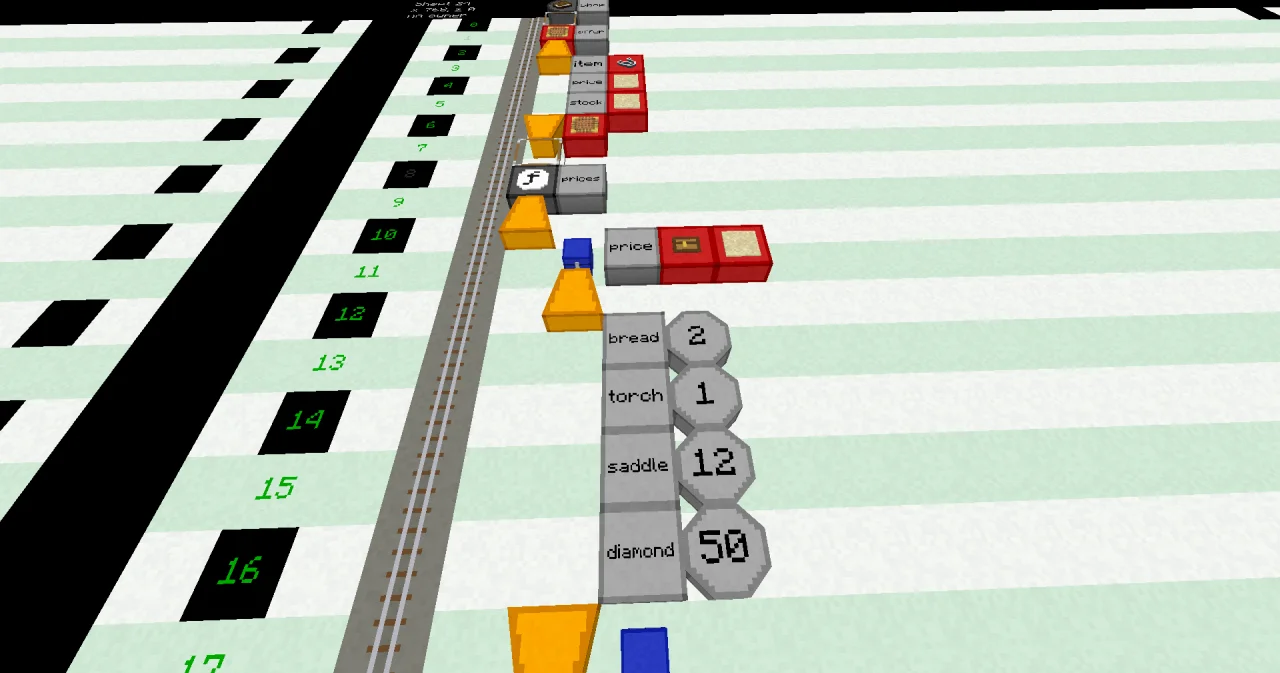
Building it
The new parts:
- Lines 2 to 7: the struct type. A STRUCT block at x=5 and a LABEL
offer, then BEGIN at x=5, three element lines at x=6 (a LABELitemand a STRING type block, a LABELpriceand an INTEGER type block, a LABELstockand an INTEGER type block), and an END block at x=5 followed by a STRUCT block. - Line 8: a NOOP line, because the FUNCTION follows.
- Line 11: a VARIABLE block at x=6, a LABEL
price, a HASH type block and an INTEGER type block: a table of whole numbers. - Lines 12 to 17: the start values of the table: BEGIN at x=6, four lines at x=7, each with a LABEL for the key and a LITERAL for the value (
breadand 2,torchand 1 …), and an END block at x=6 followed by a VARIABLE block. - Line 18: a VARIABLE block at x=6, a LABEL
today, a STRUCT block and a LABELoffer. - Lines 19 to 23: the start values of the offer, built like the table: a LABEL with the name of the element and a LITERAL with its value.
- Line 27: in the PARAMETER line, the LABELs
today.itemandtoday.price. In the LABEL dialog,todayis the name and.itemthe index. - Line 35: the LABEL
price[wanted], with the namepriceand the index[wanted].
Keys and element names are LABEL blocks, so they follow the rules for names: letters, digits and the underscore, no spaces.
Running it
Bind the laptop to the program shop and the function prices, and set the trigger block to the same. Press the button and open the laptop:
Offer: golden apple for 20 emeralds
Only 3 left!
What do you want to buy?
Type saddle and press Enter. The laptop answers "saddle costs 12 emeralds." and the program ends. Press the button again for the next customer.
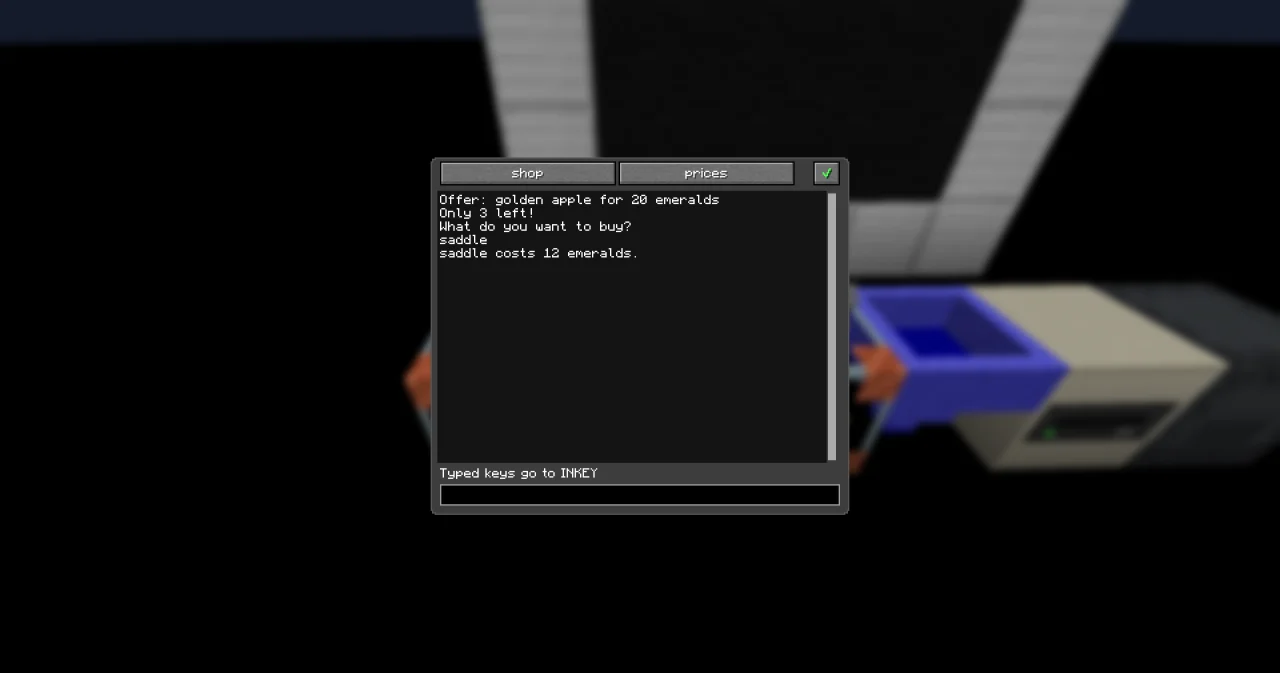
Now try cake. The program crashes: the trigger block plays a low note, and its dialog shows the error UNKNOWN_KEY. The table has no key "cake". Exercise 2 fixes that.
How it works
The struct:
STRUCT offerdeclares a new type calledoffer. It stands at x=5, outside of every function, so the whole program can use it. Like a function, it must be above the lines that use it.VARIABLE today STRUCT offermakes a variable of that type. It has three elements, and the code block below gives each of them a start value.today.itemreads one element: the dot says "the elementitemoftoday".today.priceis 20,today.stockis 3.
The table:
VARIABLE price HASH INTEGERmakes a table whose values are INTEGERs. The keys are always texts.price[wanted]looks up the value under the key inwanted. If you typed saddle, that'sprice["saddle"], and the answer is 12.- A key that isn't in the table is an error: UNKNOWN_KEY. The program crashes in line 34, the CALL PRINT that needs
price[wanted]. ASSIGN price["cake"] 5 ;would add a new key to the table, or change the price if the key exists already. A table grows by itself, like a list.
A table and a list look alike, but you find their values differently: a list by position (0, 1, 2 …), a table by name. EACH works with tables too: it goes through the keys in alphabetical order.
Try it yourself
- Add a discount to the offer: a new element
discountwith the value 5. Show the price minus the discount, and how much the customer saves.
Solution
The struct gets a fourth element, and the offer a fourth start value. The price is calculated in the PARAMETER line: - comes before ⊕.
PROGRAM shop
NOOP
STRUCT offer
BEGIN
    item STRING
    price INTEGER
    stock INTEGER
    discount INTEGER
END STRUCT
NOOP
FUNCTION prices
BEGIN
    VARIABLE price HASH INTEGER
    BEGIN
        bread 2
        torch 1
        saddle 12
        diamond 50
    END VARIABLE
    VARIABLE today STRUCT offer
    BEGIN
        item "golden apple"
        price 20
        stock 3
        discount 5
    END VARIABLE
    VARIABLE wanted STRING
    CALL CLS
    CALL PRINT
        PARAMETER value "Offer: " ⊕ today.item ⊕ " for " ⊕ today.price - today.discount ⊕ " emeralds" ;
    CALL PRINT
        PARAMETER value "You save " ⊕ today.discount ⊕ "! Only " ⊕ today.stock ⊕ " left!" ;
    CALL PRINT
        PARAMETER value "What do you want to buy?" ;
    CALL INPUT
        PARAMETER variable wanted ;
    CALL PRINT
        PARAMETER value wanted ⊕ " costs " ⊕ price[wanted] ⊕ " emeralds." ;
END FUNCTION
The laptop shows "Offer: golden apple for 15 emeralds" and "You save 5! Only 3 left!".
- Don't crash on unknown items: answer "Sorry, we don't sell cake." instead.
Solution
The built-in function HAS_KEY asks if a table has a key. Its result is a BOOLEAN, which an IF can use.
PROGRAM shop
NOOP
STRUCT offer
BEGIN
    item STRING
    price INTEGER
    stock INTEGER
END STRUCT
NOOP
FUNCTION prices
BEGIN
    VARIABLE price HASH INTEGER
    BEGIN
        bread 2
        torch 1
        saddle 12
        diamond 50
    END VARIABLE
    VARIABLE today STRUCT offer
    BEGIN
        item "golden apple"
        price 20
        stock 3
    END VARIABLE
    VARIABLE wanted STRING
    VARIABLE known BOOLEAN
    CALL CLS
    CALL PRINT
        PARAMETER value "Offer: " ⊕ today.item ⊕ " for " ⊕ today.price ⊕ " emeralds" ;
    CALL PRINT
        PARAMETER value "Only " ⊕ today.stock ⊕ " left!" ;
    CALL PRINT
        PARAMETER value "What do you want to buy?" ;
    CALL INPUT
        PARAMETER variable wanted ;
    CALL HAS_KEY
        PARAMETER hash price ;
        PARAMETER key wanted ;
        RESULT result known
    IF known ;
    BEGIN
        CALL PRINT
            PARAMETER value wanted ⊕ " costs " ⊕ price[wanted] ⊕ " emeralds." ;
    END
    ELSE
    BEGIN
        CALL PRINT
            PARAMETER value "Sorry, we don't sell " ⊕ wanted ⊕ "." ;
    END IF
END FUNCTION
With cake, the laptop answers "Sorry, we don't sell cake.". With diamond, it answers "diamond costs 50 emeralds.".
Read more
- Types, Variables and constants and Structs in the guide
- TYPE_HASH and TYPE_STRUCT in the handbook Data
- HAS_KEY in the handbook Functions
- Crashes: what the trigger block shows when a program crashes