Using libraries
For game nights in Oak Hill, you need a die. You could carve one out of wood – or let the computer roll it. A computer can't really throw anything, but it can pick a number by chance. You don't have to write that yourself: c0de comes with ready-made functions for it, and for playing sounds and writing to the chat, too.
New words
- library: a collection of ready-made functions that somebody else wrote, so you don't have to.
- INCLUDE: the line that loads a library into your program.
- random number: a number picked by chance, different every time.
What you need
- a new, empty sheet in the c0de dimension, and the wrench
- a trigger block with a button on it, in your base
- the blocks you know (PROGRAM, NOOP, FUNCTION, BEGIN, END, VARIABLE, CALL, PARAMETER, RESULT, LABEL, LITERAL, OPERATOR, the type blocks INTEGER and FLOAT) and the new one: an INCLUDE block (for the exercises also IF and ELSE)
The idea
When you build a house in Minecraft, you don't make your own bricks from clay first, every single time. You take the bricks from a chest where they are ready. Programmers do the same: things that many programs need – calculating, working with text, the clock – are written once and put into a library. Your program only says which library it wants, and then it can call its functions.
c0de has four libraries:
| Library | What its functions do |
|---|---|
c0de/math | calculating, rounding and random numbers |
c0de/strings | working with text |
c0de/time | the clock and the calendar of the real world |
c0de/minecraft | the world around the trigger block: sounds, the chat, levers, doors and more |
A library function has a long name: the library, a slash and the function, like c0de/math/RANDOM. That way, two libraries can have a function with the same name without mixing them up.
The program
The program dice goes on a new sheet.
PROGRAM dice
NOOP
INCLUDE c0de/math
INCLUDE c0de/minecraft
NOOP
FUNCTION roll
BEGIN
    VARIABLE chance FLOAT
    VARIABLE die INTEGER
    CALL c0de/math/RANDOM
        RESULT result chance
    CALL c0de/math/INT
        PARAMETER value chance * 6 + 1 ;
        RESULT result die
    CALL c0de/minecraft/SOUND
        PARAMETER note 12 ;
        PARAMETER instrument "bell" ;
    CALL c0de/minecraft/SAY
        PARAMETER message "You rolled a " ⊕ die ;
END FUNCTION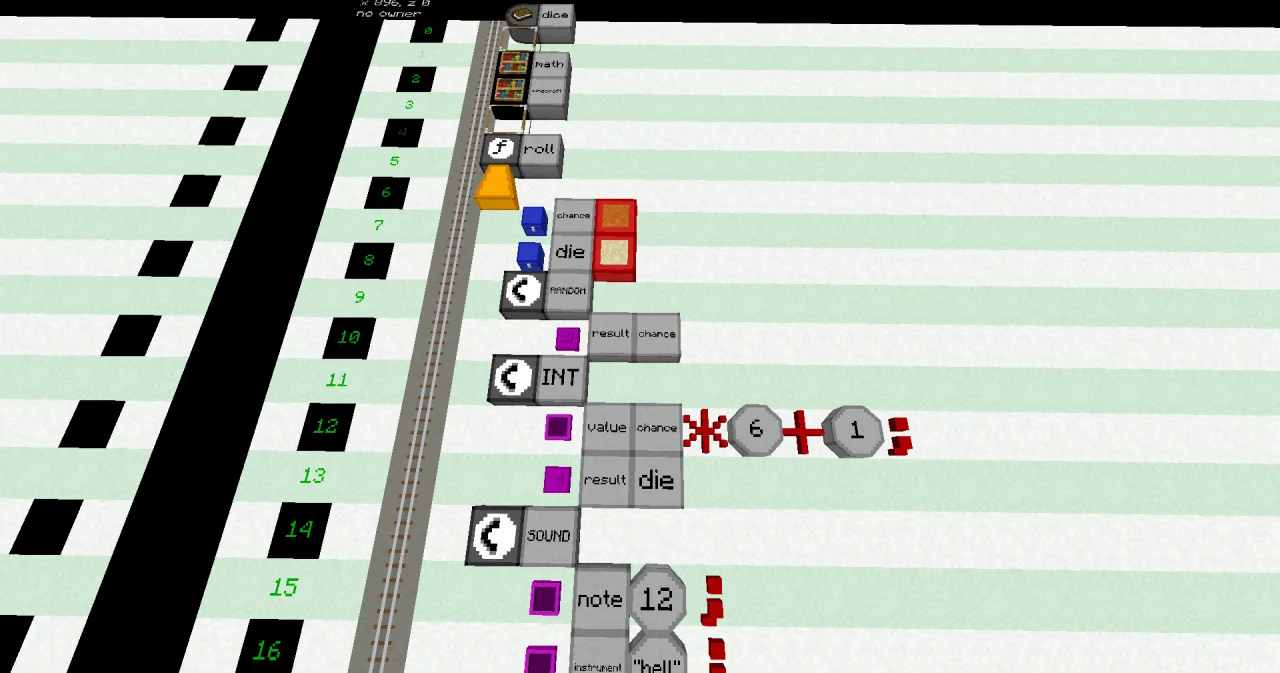
Building it
- Line 0: PROGRAM
dice. - Line 1: NOOP. Every program needs it here.
- Lines 2 and 3: an INCLUDE block at x=5 and a LABEL. Right-click the LABEL with an empty hand: its dialog lists all libraries. Pick
c0de/mathin line 2 andc0de/minecraftin line 3. INCLUDE lines always come right after the NOOP in line 1. - Line 4: NOOP, because a FUNCTION needs a NOOP line right above it.
- Lines 5 to 8: FUNCTION
roll, BEGIN, and two variables:chance(FLOAT) for the random number anddie(INTEGER) for the number of the die. - Lines 9 and 10: a CALL block at x=6 with a LABEL
c0de/math/RANDOM. In the next line, one block further east, a RESULT block, a LABELresultand a LABELchance. - Lines 11 to 13: CALL
c0de/math/INT, with a PARAMETER linevalue chance * 6 + 1 ;and a RESULT lineresult die. - Lines 14 to 16: CALL
c0de/minecraft/SOUNDwith two PARAMETER lines:note 12 ;andinstrument "bell" ;. - Lines 17 and 18: CALL
c0de/minecraft/SAYwith a PARAMETER linemessage "You rolled a " ⊕ die ;. - Line 19: END FUNCTION.
Running it
Leave the dimension. Set the trigger block to the program dice and the function roll. The die needs no variable items: it has no parameters and no results. Press the button.
You hear a bell at the trigger block, and the chat shows something like:
[dice/0] You rolled a 4Press the button again, and again. The numbers change: 2, 6, 1, 4 … Every number from 1 to 6 comes up, and none is more likely than the others.
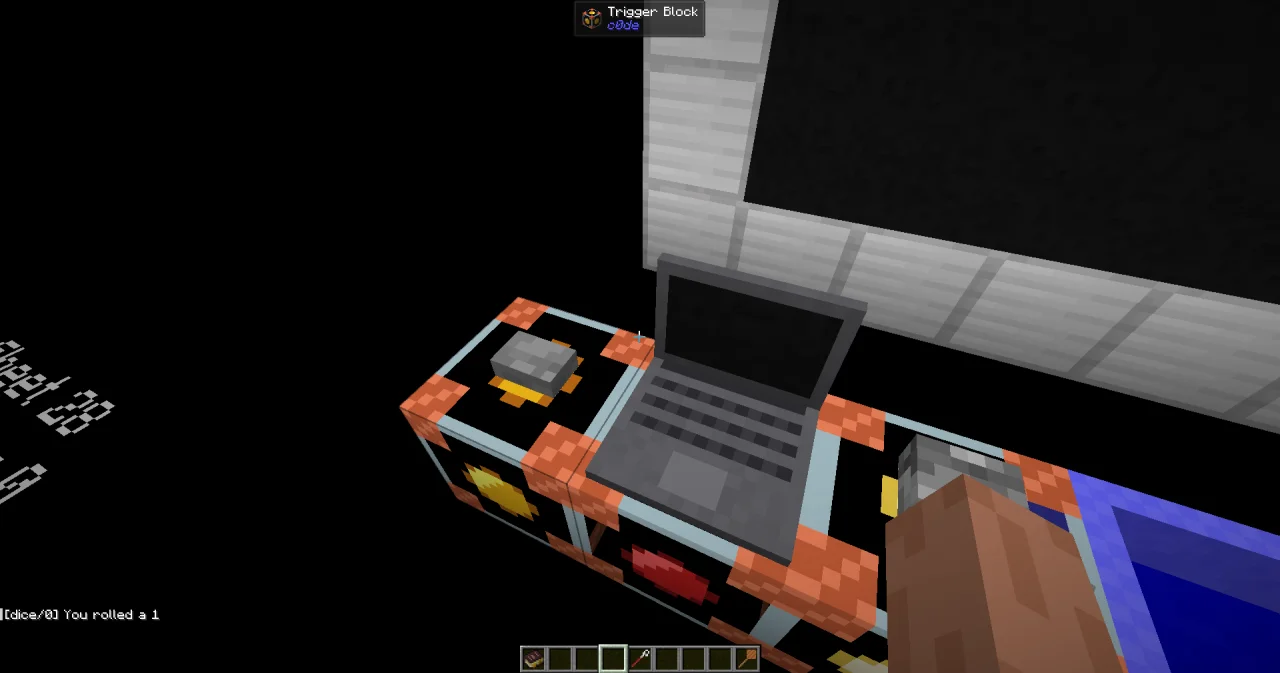
The beginning of the message, [dice/0], is added by SAY: the name of the program and the number of its process. So everybody sees which program is talking. All players within 64 blocks of the trigger block get the message.
How it works
INCLUDE c0de/mathandINCLUDE c0de/minecraftload the two libraries. Without the INCLUDE line, c0de doesn't know the functions, and the CALL line turns red.CALL c0de/math/RANDOMgives back a random decimal number from 0 up to below 1, like 0.0, 0.3527 or 0.9991 – but never 1. A function with one result calls itresult, so the RESULT lineresult chancemeans: put the result into my variablechance.chance * 6 + 1turns it into a number from 1 up to below 7, like 1.0, 3.116 or 6.9946.CALL c0de/math/INTrounds a number down to a whole number: 3.116 becomes 3, and 6.9946 becomes 6. Sodieis always 1, 2, 3, 4, 5 or 6.CALL c0de/minecraft/SOUNDplays a note like a note block:notegoes from 0 to 24, like the clicks on a note block, andinstrumentis the sound, likeharp,bass,bellorflute.CALL c0de/minecraft/SAYwrites itsmessageto the chat.
You call a library function exactly like your own functions: CALL, the name, PARAMETER lines for what goes in, RESULT lines for what comes out. To find out which parameters and results a function has, look it up in the handbook Functions – the links are below.
Try it yourself
- Many games need two dice. Roll two and tell both numbers and their sum, like "You rolled 3 and 5: 8".
Solution
Call RANDOM and INT twice, once for each die. The brackets around first + second make sure the two numbers are added before they are joined to the text.
PROGRAM dice
NOOP
INCLUDE c0de/math
INCLUDE c0de/minecraft
NOOP
FUNCTION roll
BEGIN
    VARIABLE chance FLOAT
    VARIABLE first INTEGER
    VARIABLE second INTEGER
    CALL c0de/math/RANDOM
        RESULT result chance
    CALL c0de/math/INT
        PARAMETER value chance * 6 + 1 ;
        RESULT result first
    CALL c0de/math/RANDOM
        RESULT result chance
    CALL c0de/math/INT
        PARAMETER value chance * 6 + 1 ;
        RESULT result second
    CALL c0de/minecraft/SOUND
        PARAMETER note 12 ;
        PARAMETER instrument "bell" ;
    CALL c0de/minecraft/SAY
        PARAMETER message "You rolled " ⊕ first ⊕ " and " ⊕ second ⊕ ": " ⊕ ( first + second ) ;
END FUNCTION- A six is special. Play a different sound for a six: the flute at note 24.
Solution
An IF decides which SOUND to play. Everything else stays the same.
PROGRAM dice
NOOP
INCLUDE c0de/math
INCLUDE c0de/minecraft
NOOP
FUNCTION roll
BEGIN
    VARIABLE chance FLOAT
    VARIABLE die INTEGER
    CALL c0de/math/RANDOM
        RESULT result chance
    CALL c0de/math/INT
        PARAMETER value chance * 6 + 1 ;
        RESULT result die
    IF die = 6 ;
    BEGIN
        CALL c0de/minecraft/SOUND
            PARAMETER note 24 ;
            PARAMETER instrument "flute" ;
    END
    ELSE
    BEGIN
        CALL c0de/minecraft/SOUND
            PARAMETER note 12 ;
            PARAMETER instrument "bell" ;
    END IF
    CALL c0de/minecraft/SAY
        PARAMETER message "You rolled a " ⊕ die ;
END FUNCTION
Read more
- Libraries in the guide, with Including libraries and Making music
- INCLUDE in the handbook Statements
- The functions of this lesson: RANDOM, INT, SOUND and SAY
- All functions of a library: c0de/math and c0de/minecraft