Lists
Oak Hill needs a notice board: "Feed the cats", "Get more torches", "Plant wheat". You don't know how many notes there will be, so one variable per note won't do. Today you keep all notes in one list. You type them on the laptop, and the display wall at the entrance shows the whole list.
New words
- list (in c0de: ARRAY): many values of the same type under one name, one after the other.
- element: one value in a list.
- index: the number of an element in the list. The first element has the index 0.
What you need
- your display wall of 2 × 1 display blocks, the laptop, and a trigger block with a button
- a new, empty sheet in the c0de dimension
- from the creative inventory: the blocks you know (with REPEAT and BREAK) and the new ARRAY type block and EACH block
The idea
Think of a shopping list on paper. It has one name, "shopping list", but many lines. You can read it from top to bottom, add a line at the end, or cross one out.
A list in a program works the same way. It is one variable that holds many values, the elements, in a fixed order. Each element has a number, its index. Computers start counting at 0, so the first element is number 0, the second number 1, and so on. A list with 3 elements has the indexes 0, 1 and 2.
In c0de, a list is called an ARRAY. It grows by itself when you add elements, and shrinks when you remove them.
The program
The program notes goes on a new sheet. The laptop and the display wall both belong to it.
PROGRAM notes
NOOP
NOOP
FUNCTION board
BEGIN
    VARIABLE notes ARRAY STRING
    BEGIN
        "Feed the cats"
    END VARIABLE
    VARIABLE note STRING
    VARIABLE count INTEGER
    REPEAT
    BEGIN
        CALL CLS
        EACH line notes
        BEGIN
            CALL PRINT
                PARAMETER value line ;
        END EACH
        CALL INPUT
            PARAMETER variable note ;
        BREAK note = "end" ;
        CALL LEN
            PARAMETER value notes ;
            RESULT result count
        CALL INSERT
            PARAMETER array notes ;
            PARAMETER index count ;
            PARAMETER value note ;
            RESULT result notes
    END REPEAT TRUE ;
END FUNCTION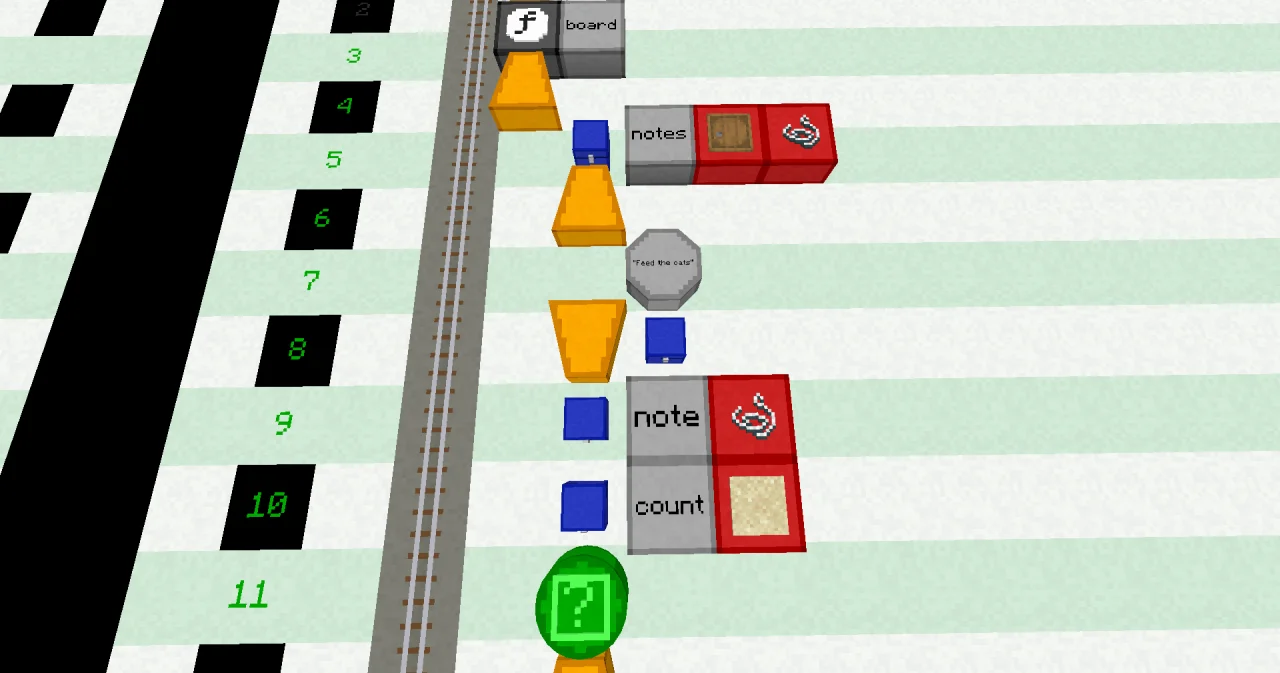
Building it
The new lines:
- Line 5: a VARIABLE block at x=6, a LABEL
notes, an ARRAY type block and a STRING type block: a list of texts. - Lines 6 to 8: the start values of the list: BEGIN at x=6, a LITERAL
"Feed the cats"at x=7, and an END block at x=6 followed by a VARIABLE block. More LITERAL blocks in line 7 would give more start notes. - Line 14: an EACH block at x=7, a LABEL
lineand a LABELnotes. - Lines 15 to 18: BEGIN at x=7, the CALL PRINT of
lineat x=8 and x=9, and an END block at x=7 followed by an EACH block. - Line 21: a BREAK block at x=7, a LABEL
note, an OPERATOR=, a LITERAL"end"and an OPERATOR;. - Lines 25 to 29: a CALL block at x=7 with a LABEL
INSERT, then at x=8 the PARAMETER linesarray(LABELnotes),index(LABELcount) andvalue(LABELnote), each with its;, and the RESULT line with the LABELsresultandnotes. - Line 30: an END block at x=6, a REPEAT block, a LITERAL
TRUEand an OPERATOR;.
Running it
Bind the display wall and the laptop to the program notes and the function board, and set the trigger block to the same. Press the button. The wall shows the first note, "Feed the cats".
Open the laptop. Its input line shows INPUT note (STRING):. Type "Get more torches" and press Enter: the wall now shows two notes. Type "Plant wheat": three.
Feed the cats
Get more torches
Plant wheat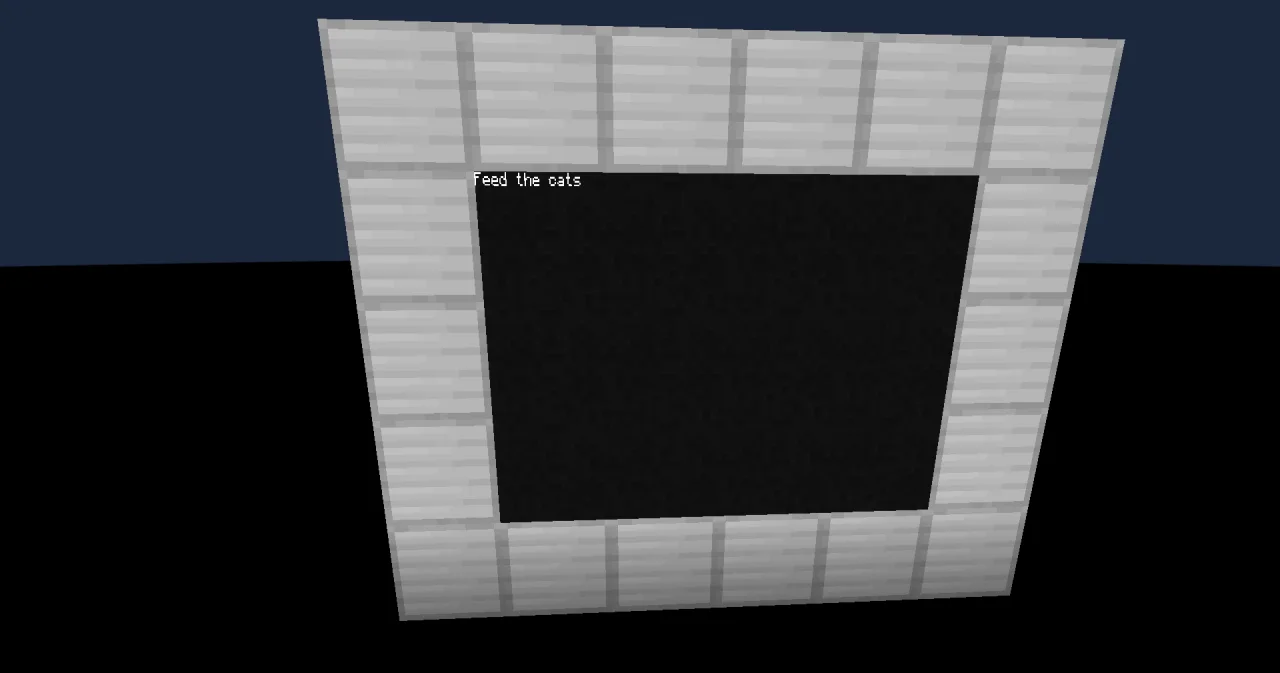
Type "end" to stop the program. The notes stay on the wall, but the list itself is gone: a variable only lives while its program runs. The next start begins with "Feed the cats" again.
The wall has 8 rows. With more than 8 notes, the first ones scroll off the top.
How it works
VARIABLE notes ARRAY STRINGmakes a list of texts. Its start values come in the code block below it: here one note, "Feed the cats", with the index 0.- The REPEAT loop runs forever (
END REPEAT TRUE ;). Its only way out is the BREAK. CALL CLSclears the screens, then the EACH loop prints the list. EACH goes through the list from index 0 to the end. In every round, the loop variablelineholds the next element. You don't need to know how long the list is.CALL INPUTwaits for the next note from the laptop.BREAK note = "end" ;leaves the loop when you type "end".CALL LENcounts the elements of the list. With one note,countis 1.CALL INSERTputsnoteinto the list at the indexcount. With one note, that is index 1, right after the last element: the new note goes to the end. INSERT gives back the longer list as its result, andRESULT result notesstores it innotesagain.
You can also read and change one element with its index: notes[0] is "Feed the cats", and ASSIGN notes[0] "Feed the dog" ; changes it. The index can be a number or a variable, like notes[i], but no calculation: notes[i + 1] doesn't work. Calculate the index into a variable first.
Try it yourself
- Show every note with its number, and let the player delete a note: when they type "delete", the laptop asks for the number of the note.
Solution
A FOR loop from 0 to count - 1 prints each note with its index, i ⊕ ": " ⊕ notes[i]. For "delete", a second INPUT reads the number, and REMOVE takes the element out of the list. The elements after it move up by one.
PROGRAM notes
NOOP
NOOP
FUNCTION board
BEGIN
    VARIABLE notes ARRAY STRING
    BEGIN
        "Feed the cats"
    END VARIABLE
    VARIABLE note STRING
    VARIABLE count INTEGER
    VARIABLE number INTEGER
    REPEAT
    BEGIN
        CALL LEN
            PARAMETER value notes ;
            RESULT result count
        CALL CLS
        FOR i INTEGER 0 ; count - 1 ;
        BEGIN
            CALL PRINT
                PARAMETER value i ⊕ ": " ⊕ notes[i] ;
        END FOR
        CALL INPUT
            PARAMETER variable note ;
        BREAK note = "end" ;
        IF note = "delete" ;
        BEGIN
            CALL INPUT
                PARAMETER variable number ;
            CALL REMOVE
                PARAMETER container notes ;
                PARAMETER index number ;
                RESULT result notes
        END
        ELSE
        BEGIN
            CALL INSERT
                PARAMETER array notes ;
                PARAMETER index count ;
                PARAMETER value note ;
                RESULT result notes
        END IF
    END REPEAT TRUE ;
END FUNCTION
After "Get more torches", "Plant wheat", "delete" and 0, the wall shows "0: Get more torches" and "1: Plant wheat". A number that isn't in the list, like 7, makes the program crash with INDEX_OUT_OF_BOUNDS.
- Show the number of notes above the list.
Solution
Move the CALL LEN to the start of the loop and print "Notes: " ⊕ count before the EACH loop.
PROGRAM notes
NOOP
NOOP
FUNCTION board
BEGIN
    VARIABLE notes ARRAY STRING
    BEGIN
        "Feed the cats"
    END VARIABLE
    VARIABLE note STRING
    VARIABLE count INTEGER
    REPEAT
    BEGIN
        CALL LEN
            PARAMETER value notes ;
            RESULT result count
        CALL CLS
        CALL PRINT
            PARAMETER value "Notes: " ⊕ count ;
        EACH line notes
        BEGIN
            CALL PRINT
                PARAMETER value line ;
        END EACH
        CALL INPUT
            PARAMETER variable note ;
        BREAK note = "end" ;
        CALL INSERT
            PARAMETER array notes ;
            PARAMETER index count ;
            PARAMETER value note ;
            RESULT result notes
    END REPEAT TRUE ;
END FUNCTION
Read more
- Types, Variables and constants and EACH loops in the guide
- TYPE_ARRAY in the handbook Data, EACH in the handbook Statements
- LEN, INSERT and REMOVE in the handbook Functions