Reading data from the web
A weather station for your base: type the name of a city, press the button, and a display wall shows the sky, the temperature and the wind there right now. The data comes from Open-Meteo, a free weather service that needs no account and no key.
Functions: HTTP_CONNECTION, HTTP_GET, and FROM_JSON of c0de/strings
What you need
The mod c0de net in your game, a trigger block with a button, a display wall of 2 × 1 display blocks (32 columns and 8 rows), one uninitialized variable item, and optionally a variable item city of type STRING with the name of a city, for example Berlin. Without it, the program shows Vienna. For the exercises: two uninitialized variable items and a timer block.
The idea
A web API is a web page for programs: instead of HTML, it answers with JSON. Open-Meteo has two of them. The geocoding API turns a name into a place with its coordinates, and the forecast API tells the weather at coordinates. So the program asks twice: first "where is Berlin?", then "what's the weather at 52.52, 13.41?".
c0de_net/http sends the requests. A struct HTTP_CONNECTION says which server to ask and how; HTTP_GET asks for one endpoint, a path with a query, and returns the answer as text. FROM_JSON reads that text into variables of your own types. You only declare the parts of the answer you need; FROM_JSON ignores the rest.
The requests don't come from the Minecraft server, but from the computer of the player who presses the button, which must have c0de net installed. Every player can switch this off for their own computer.
The program
PROGRAM weatherwall
NOOP
INCLUDE c0de/strings
INCLUDE c0de_net/http
NOOP
STRUCT place
BEGIN
name STRING
country STRING
latitude FLOAT
longitude FLOAT
END STRUCT
NOOP
STRUCT search
BEGIN
results ARRAY STRUCT place
END STRUCT
NOOP
STRUCT weather
BEGIN
temperature FLOAT TAG(json: "temperature_2m")
wind FLOAT TAG(json: "wind_speed_10m")
code INTEGER TAG(json: "weather_code")
END STRUCT
NOOP
FUNCTION sky
PARAMETER code INTEGER
RESULT result STRING
BEGIN
ASSIGN result "Clear" ;
IF code ≥ 1 ;
BEGIN
ASSIGN result "Cloudy" ;
END IF
IF code ≥ 45 ;
BEGIN
ASSIGN result "Fog" ;
END IF
IF code ≥ 51 ;
BEGIN
ASSIGN result "Rain" ;
END IF
IF code ≥ 71 ;
BEGIN
ASSIGN result "Snow" ;
END IF
IF code ≥ 80 ;
BEGIN
ASSIGN result "Showers" ;
END IF
IF code ≥ 95 ;
BEGIN
ASSIGN result "Thunderstorm" ;
END IF
END FUNCTION
NOOP
FUNCTION show
PARAMETER city STRING "Vienna"
RESULT found BOOLEAN
BEGIN
VARIABLE api STRUCT c0de_net/http/HTTP_CONNECTION
VARIABLE answer STRING
VARIABLE places STRUCT search
VARIABLE town STRUCT place
VARIABLE now STRUCT weather TAG(json: "current")
VARIABLE count INTEGER
VARIABLE text STRING
ASSIGN api.use_ssl TRUE ;
ASSIGN api.server "geocoding-api.open-meteo.com" ;
ASSIGN api.timeout 10 ;
CALL c0de_net/http/HTTP_GET
PARAMETER connection api ;
PARAMETER endpoint "/v1/search?count=1&name=" ⊕ city ;
RESULT result answer
CALL c0de/strings/FROM_JSON
PARAMETER source answer ;
PARAMETER destination places ;
CALL LEN
PARAMETER value places.results ;
RESULT result count
CALL CLS
IF count = 0 ;
BEGIN
CALL PRINT
PARAMETER value "No city called " ⊕ city ;
RETURN
END IF
ASSIGN found TRUE ;
ASSIGN town places.results[0] ;
ASSIGN api.server "api.open-meteo.com" ;
CALL c0de_net/http/HTTP_GET
PARAMETER connection api ;
PARAMETER endpoint "/v1/forecast?latitude=" ⊕ town.latitude ⊕ "&longitude=" ⊕ town.longitude ⊕ "¤t=temperature_2m,wind_speed_10m,weather_code" ;
RESULT result answer
CALL c0de/strings/FROM_JSON
PARAMETER source answer ;
PARAMETER destination now ;
CALL sky
PARAMETER code now.code ;
RESULT result text
CALL PRINT
PARAMETER value town.name ⊕ ", " ⊕ town.country ;
CALL PRINT
PARAMETER value "" ;
CALL PRINT
PARAMETER value text ;
CALL PRINT
PARAMETER value now.temperature ⊕ " °C" ;
CALL PRINT
PARAMETER value "Wind " ⊕ now.wind ⊕ " km/h" ;
END FUNCTIONBuilding and running it
- Build the display wall from two display blocks side by side. Right-click one of them, click the buttons until they show
weatherwallandshow, and click ✔. - Set the trigger block to the program
weatherwalland the functionshow. Put an uninitialized variable item into its input inventory, and the itemcityif you want another city than Vienna. - Press the button. After a moment, the wall shows:
Vienna, Austria

Cloudy
6.2 °C
Wind 7.7 km/h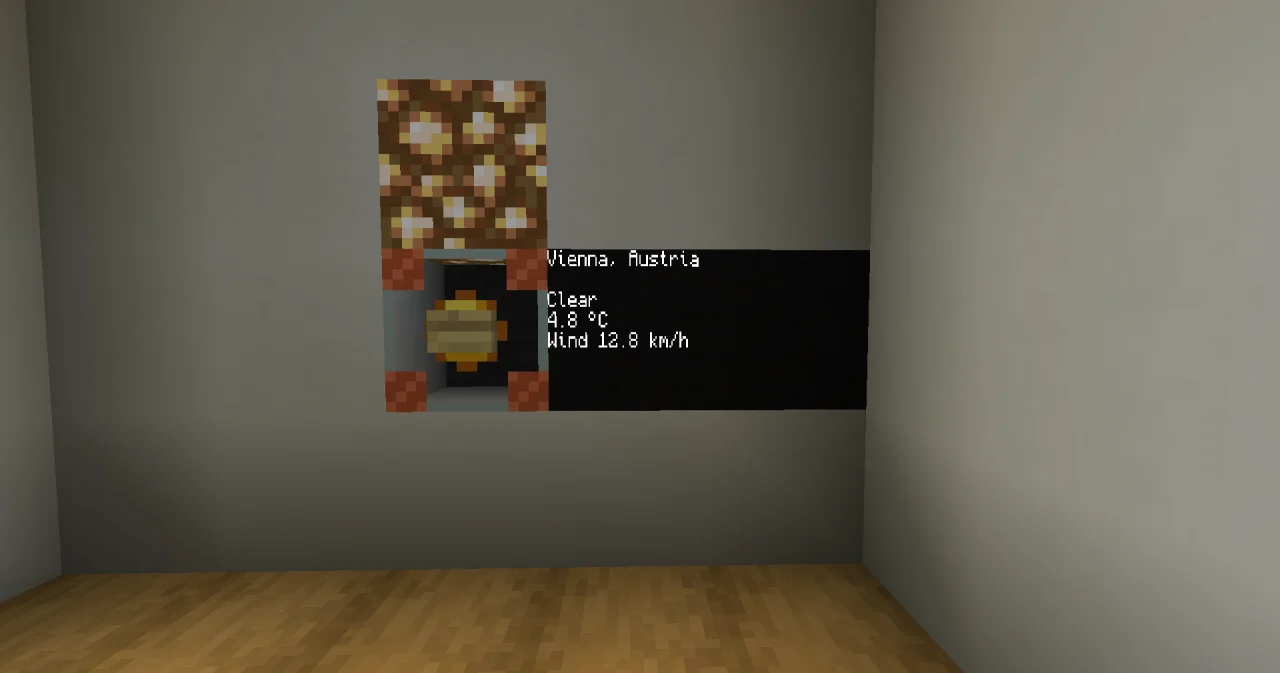
The result item found is TRUE. For a name that Open-Meteo doesn't know, like Xyzzyqx, the wall shows No city called Xyzzyqx, and found is FALSE.
How it works
- One connection, two servers.
apiis set up once:use_sslfor https, atimeoutof 10 seconds instead of 60. For the second request, onlyserverchanges. The endpoint is everything behind the server name, including the query after?. - The geocoding answer looks like
{"results": [{"name": "Vienna", "latitude": 48.20849, "longitude": 16.37208, "country": "Austria", …}]}with many more keys. The structsearchhas the one elementresults, an array ofplace, andplacehas just the four elements the program uses. - No result is not an error. For an unknown city, the answer has no
resultsat all. FROM_JSON then keeps the start value of the element, an empty array, and LEN says 0. (A tag on a VARIABLE line, likeTAG(json: "results"), would raise UNKNOWN_KEY instead.) - Tags rename. The forecast calls its values
temperature_2m,wind_speed_10mandweather_code. The tags in the structweathermap them to shorter names. The tag onVARIABLE now STRUCT weather TAG(json: "current")is a path: FROM_JSON reads only the objectcurrentof the answer. - Numbers into the endpoint.
⊕turns the coordinates into text, so the endpoint becomes/v1/forecast?latitude=48.20849&longitude=16.37208¤t=…. - The weather code is a number of the WMO: 0 is a clear sky, 1 to 3 clouds, 45 fog, 51 to 67 rain, 71 to 77 snow, 80 to 82 showers, 95 and above thunderstorms.
skychecks the limits from low to high, so the last one that fits wins. - Errors. If the player has no c0de net, or Open-Meteo doesn't answer, the CALL raises an error of c0de net and the process crashes; the trigger block shows it. When the network fails shows how to catch them.
Try it yourself
- Show tomorrow's lowest and highest temperature in Vienna. Open-Meteo gives daily values with
daily=temperature_2m_min,temperature_2m_max.
Solution
PROGRAM weathertomorrow
NOOP
INCLUDE c0de/strings
INCLUDE c0de_net/http
NOOP
FUNCTION tomorrow
    RESULT low FLOAT
    RESULT high FLOAT
BEGIN
    VARIABLE api STRUCT c0de_net/http/HTTP_CONNECTION
    VARIABLE answer STRING
    VARIABLE lows ARRAY FLOAT TAG(json: "daily.temperature_2m_min")
    VARIABLE highs ARRAY FLOAT TAG(json: "daily.temperature_2m_max")
    ASSIGN api.use_ssl TRUE ;
    ASSIGN api.server "api.open-meteo.com" ;
    ASSIGN api.timeout 10 ;
    CALL c0de_net/http/HTTP_GET
        PARAMETER connection api ;
        PARAMETER endpoint "/v1/forecast?latitude=48.21&longitude=16.37&daily=temperature_2m_min,temperature_2m_max&forecast_days=2" ;
        RESULT result answer
    CALL c0de/strings/FROM_JSON
        PARAMETER source answer ;
        PARAMETER destination lows ;
    CALL c0de/strings/FROM_JSON
        PARAMETER source answer ;
        PARAMETER destination highs ;
    ASSIGN low lows[1] ;
    ASSIGN high highs[1] ;
    CALL PRINT
        PARAMETER value "Tomorrow: " ⊕ low ⊕ " to " ⊕ high ⊕ " °C" ;
END FUNCTION
forecast_days=2 asks for today and tomorrow, and each daily value comes as an array with one number per day: {"daily": {"temperature_2m_min": [3.1, 4.0], …}}. The tags on the VARIABLE lines are paths into the answer; index 1 is tomorrow. One answer can be read twice, into different variables.
To run it, set the trigger block to weathertomorrow / tomorrow, put in two uninitialized variable items for the results low and high, and press the button. The two items come out with the temperatures. To see the PRINT line Tomorrow: … to … °C as well, bind the display wall to weathertomorrow / tomorrow.
- Keep the wall up to date without pressing the button.
Solution
Use a timer block instead of the trigger block, with the same program and function and an interval of 18000 ticks (15 minutes; Open-Meteo updates its current values every 15 minutes). Nobody starts a timer block's process, so the requests come from the owner of the timer block, who must be online. Asking every second would gain nothing and only load the free service.
- Try the city
New York. What happens, and how do you fix it?
Solution
The process crashes with INVALID_ARGUMENT: Not a valid URL … (Illegal character in query). A URL can't contain spaces. Write the city as New+York; in a query, + stands for a space.
Read more
- c0de_net/http: Getting started, HTTP_CONNECTION, HTTP_GET, Errors
- FROM_JSON and JSON and YAML
- Data and the network: types, tags and FROM_JSON in detail
- Display block and Timer block
- The Open-Meteo documentation lists all values the forecast can give