The order desk
Your neighbours order wheat, carrots and pumpkins by mail. The order desk looks into your mailbox, lists the new orders on the laptop, flags them and puts them into a folder Orders. A second button shows the next open order with its text and marks it as answered when you've packed it.
Functions: IMAP_SERVER, MAILBOX, MAIL, IMAP_SELECT, IMAP_SEARCH, IMAP_FETCH, IMAP_STORE and IMAP_MOVE
What you need
- the mod c0de net in your game
- a mail account whose provider allows IMAP – look up its IMAP server, like
imap.example.com, and its port, usually 993 - your app password as the secret
mailPasswordin your vault, as in Mail from the farm, and the vault open - a folder Orders in your mailbox – make it in your mail program, or with the program of Tidying the mailbox
- two trigger blocks with buttons,
ordersanddeliver, a laptop, and variable itemsserver(STRING) andport(INTEGER)
The idea
IMAP is how mail programs read a mailbox on the server: the messages stay there, in folders like INBOX, and every program sees the same. c0de's struct type IMAP_SERVER holds the connection, like SMTP_SERVER for sending.
Every function of c0de_net/mail opens a connection of its own, does its work and closes it again – nothing stays open between two CALL lines. So how do the functions know which folder you're working in? IMAP_SELECT checks that a folder exists and writes its name into the element folder of your IMAP_SERVER variable. The functions for messages – IMAP_SEARCH, IMAP_FETCH, IMAP_STORE, IMAP_MOVE and IMAP_EXPUNGE – work in that folder. Because IMAP_SELECT changes the variable, you pass the variable itself, not a calculation.
Messages have UIDs, numbers that are unique in their folder. IMAP_SEARCH returns the UIDs of the messages that match criteria, IMAP_FETCH reads the messages of some UIDs. And every message has flags: \Seen once it's read, \Answered, \Flagged for the important ones, \Deleted and \Draft. IMAP_STORE sets and removes them.
The program
PROGRAM orderdesk
NOOP
INCLUDE c0de_net/mail
NOOP
FUNCTION orders
    PARAMETER server STRING "imap.example.com"
    PARAMETER port INTEGER 0
    RESULT count INTEGER
BEGIN
    SECRET mailPassword STRING
    VARIABLE imap STRUCT c0de_net/mail/IMAP_SERVER
    VARIABLE box STRUCT c0de_net/mail/MAILBOX
    VARIABLE uids ARRAY INTEGER
    VARIABLE letters ARRAY STRUCT c0de_net/mail/MAIL
    ASSIGN imap.server server ;
    ASSIGN imap.port port ;
    ASSIGN imap.user "steve@example.com" ;
    ASSIGN imap.password mailPassword ;
    CALL CLS
    CALL c0de_net/mail/IMAP_SELECT
        PARAMETER server imap ;
        RESULT result box
    CALL PRINT
        PARAMETER value box.unseen ⊕ " of " ⊕ box.messages ⊕ " messages unseen" ;
    CALL c0de_net/mail/IMAP_SEARCH
        PARAMETER server imap ;
        PARAMETER criteria "UNSEEN SUBJECT Order:" ;
        RESULT result uids
    CALL c0de_net/mail/IMAP_FETCH
        PARAMETER server imap ;
        PARAMETER uids uids ;
        PARAMETER text FALSE ;
        RESULT result letters
    EACH letter letters
    BEGIN
        CALL PRINT
            PARAMETER value "New: " ⊕ letter.subject ;
    END EACH
    CALL c0de_net/mail/IMAP_STORE
        PARAMETER server imap ;
        PARAMETER uids uids ;
        PARAMETER flags "\\Flagged" ;
    CALL c0de_net/mail/IMAP_MOVE
        PARAMETER server imap ;
        PARAMETER uids uids ;
        PARAMETER folder "Orders" ;
    CALL LEN
        PARAMETER value uids ;
        RESULT result count
END FUNCTION
NOOP
FUNCTION deliver
    PARAMETER server STRING "imap.example.com"
    PARAMETER port INTEGER 0
BEGIN
    SECRET mailPassword STRING
    VARIABLE imap STRUCT c0de_net/mail/IMAP_SERVER
    VARIABLE box STRUCT c0de_net/mail/MAILBOX
    VARIABLE uids ARRAY INTEGER
    VARIABLE letters ARRAY STRUCT c0de_net/mail/MAIL
    VARIABLE count INTEGER
    ASSIGN imap.server server ;
    ASSIGN imap.port port ;
    ASSIGN imap.user "steve@example.com" ;
    ASSIGN imap.password mailPassword ;
    CALL CLS
    CALL c0de_net/mail/IMAP_SELECT
        PARAMETER server imap ;
        PARAMETER folder "Orders" ;
        RESULT result box
    CALL c0de_net/mail/IMAP_SEARCH
        PARAMETER server imap ;
        PARAMETER criteria "FLAGGED UNANSWERED" ;
        RESULT result uids
    CALL LEN
        PARAMETER value uids ;
        RESULT result count
    IF count = 0 ;
    BEGIN
        CALL PRINT
            PARAMETER value "No open orders" ;
        EXIT 0 ;
    END IF
    CALL c0de_net/mail/IMAP_FETCH
        PARAMETER server imap ;
        PARAMETER uids uids[0] ;
        RESULT result letters
    CALL PRINT
        PARAMETER value letters[0].from ;
    CALL PRINT
        PARAMETER value letters[0].subject ;
    CALL PRINT
        PARAMETER value letters[0].text ;
    CALL c0de_net/mail/IMAP_STORE
        PARAMETER server imap ;
        PARAMETER uids uids[0] ;
        PARAMETER flags "\\Answered" ;
    CALL c0de_net/mail/IMAP_STORE
        PARAMETER server imap ;
        PARAMETER uids uids[0] ;
        PARAMETER flags "\\Flagged" ;
        PARAMETER mode "remove" ;
END FUNCTION
Building and running it
- Set the first trigger block to
orderdesk/ordersand the second one toorderdesk/deliver. Put the variable itemsserverandportinto both, and an uninitialized variable item for the resultcountinto the first one. - Bind the laptop to
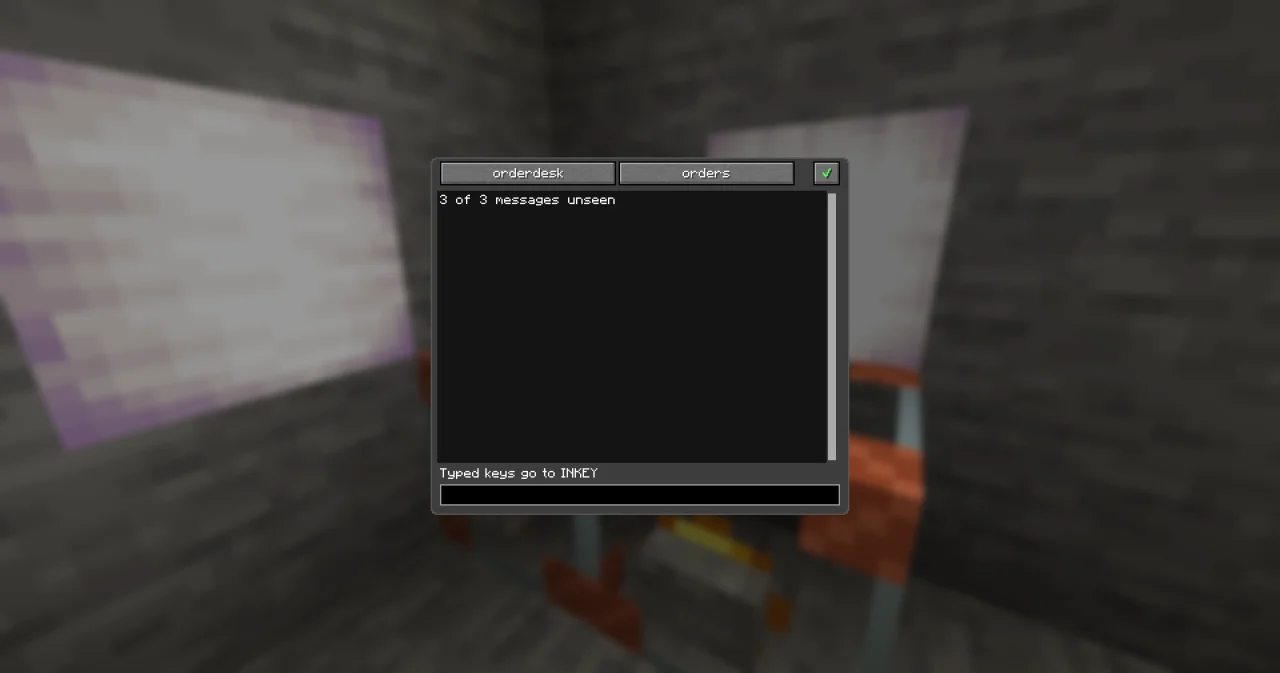
orderdesk/ordersand press the first button. The laptop shows how many messages are unseen, and the new orders:
3 of 6 messages unseen
New: Order: 32 wheat
New: Order: 12 carrots
The result count is 2. In your mail program, the two orders have moved to Orders, with a flag, and they are still unread.
- Bind the laptop to
orderdesk/deliverand press the second button. It shows the oldest flagged order that isn't answered yet, with its text:
Sam <sam@example.com>
Order: 16 eggs
Sixteen eggs for the bakery, by Friday.
Press it again for the next order. When all are done, it says No open orders.
How it works
- IMAP_SELECT without a
folderselects INBOX and returns its MAILBOX:messages,unseen,recent,uid_nextanduid_validity. After the CALL,imap.folderis"INBOX". - The criteria
UNSEEN SUBJECT Order:are words of IMAP, and all of them must match: unread, withOrder:in the subject. Others areSEEN,FLAGGED,UNANSWERED,FROM alex,SINCE 1-Nov-2026and more – the page of IMAP_SEARCH lists them. A text with spaces goes in double quotes: typeSUBJECT "wheat order"in the dialog of the literal, which the text notation writes as"SUBJECT \"wheat order\"". - IMAP_FETCH returns a list of MAIL structs:
uid,from,to,cc,subject,date,text,flagsandsize. WithtextFALSE, it reads everything but the text, which is faster and leaves the message unseen – your mail program still shows it as new. Indeliver, it reads the text, and the message becomes\Seen, as when you open it. - IMAP_STORE adds flags by default. In the dialog of the literal, type
\Flagged; the text notation of the program writes the backslash twice,"\\Flagged".mode "remove"takes a flag away,mode "set"replaces all of them. - IMAP_MOVE puts the messages into another folder of the same mailbox. In INBOX, they are gone; in Orders, they get new UIDs.
deliverselects Orders, searchesFLAGGED UNANSWEREDand takes the first UID,uids[0]– the UIDs come oldest first. After showing the order, it adds\Answeredand removes\Flagged, so the next press shows the next one.
The functions take one UID or a list, so uids[0] and uids both work.
Try it yourself
- The orders should also be shown with their text when they arrive.
Solution
Leave out PARAMETER text FALSE ; in orders, and print letter.text in the EACH loop. Mind that this marks every new order as seen. A laptop has 20 rows, so long texts scroll away – print only the first line: find the first line break, CHR 10, with INSTR of c0de/strings and cut the text there with LEFT.
- Only orders from your neighbours should count, not the ones from strangers.
Solution
Add FROM to the criteria, once for every neighbour you accept, each in its own search: "UNSEEN SUBJECT Order: FROM alex@example.com". IMAP has no "or" in c0de's criteria, so search once per neighbour and move the UIDs of each search.
Read more
- IMAP_SERVER, MAIL and MAILBOX
- IMAP_SEARCH: all criteria
- Reading orders in the handbook
- Tidying the mailbox