Calculating
You have 1000 cobblestone for a wall around Oak Hill. How many stacks is that, and how many single items are left over? Your base computer gets a second display wall, next to the storage room, and a new program: the stack calculator.
New words
- Expression: a calculation, like
items * 64 + 3. The computer works it out to one value. - Operator: a sign for a step of a calculation, like
+or*. - Whole number and decimal number: c0de keeps them apart. INTEGER holds whole numbers like 15, FLOAT holds decimal numbers like 15.625.
What you need
Two more display blocks, another trigger block with a button, and a free sheet. Language blocks: PROGRAM, NOOP, INCLUDE, FUNCTION, BEGIN, END, VARIABLE, ASSIGN, CALL, PARAMETER, RESULT, LABEL, LITERAL, OPERATOR and INTEGER type blocks.
The idea
A stack holds 64 cobblestone. To find out how many stacks 1000 cobblestone are, you divide: 1000 ÷ 64 = 15.625. That's 15 full stacks, and a bit. The bit is the remainder: 15 stacks are 960 items, so 40 are left over.
You can check it: 15 × 64 + 40 = 1000. Here you already use a rule from school: multiply first, then add. Otherwise you would get 15 × 104 = 1560. If you want to add first, you use brackets: (2 + 3) × 4 = 20, but 2 + 3 × 4 = 14.
A computer calculates the same way. A calculation in a program is called an expression, and the signs +, -, *, / are operators.
The program
The stack calculator is a new program on a new sheet.
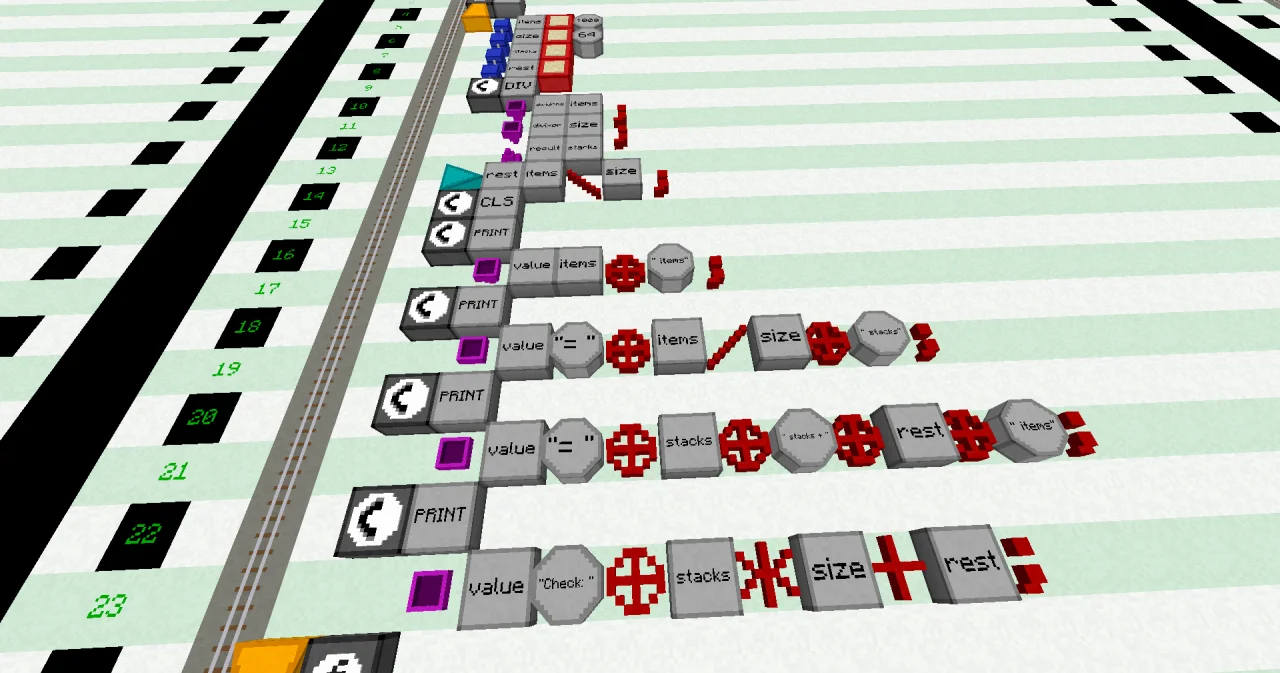
PROGRAM stacks
NOOP
INCLUDE c0de/math
NOOP
FUNCTION calculate
BEGIN
    VARIABLE items INTEGER 1000
    VARIABLE size INTEGER 64
    VARIABLE stacks INTEGER
    VARIABLE rest INTEGER
    CALL c0de/math/DIV
        PARAMETER dividend items ;
        PARAMETER divisor size ;
        RESULT result stacks
    ASSIGN rest items \ size ;
    CALL CLS
    CALL PRINT
        PARAMETER value items ⊕ " items" ;
    CALL PRINT
        PARAMETER value "= " ⊕ items / size ⊕ " stacks" ;
    CALL PRINT
        PARAMETER value "= " ⊕ stacks ⊕ " stacks + " ⊕ rest ⊕ " items" ;
    CALL PRINT
        PARAMETER value "Check: " ⊕ stacks * size + rest ;
END FUNCTION
Building it
Place the new trigger block in your base, next to the storage room, and right-click it with the wrench. As it isn't set up yet, you land in front of the next free sheet.
- Line 0: PROGRAM and a LABEL
stacks. - Line 1: NOOP.
- Line 2: an INCLUDE block at x=5 and a LABEL
c0de/math. It gives the program the math helpers of c0de; you need one of them below. - Line 3: NOOP.
- Line 4: FUNCTION and a LABEL
calculate. - Line 5: BEGIN.
- Lines 6 to 9: four VARIABLE lines at x=6, each with a LABEL and an INTEGER type block:
itemswith a LITERAL 1000,sizewith a LITERAL 64, andstacksandrestwithout a start value. - Line 10: a CALL at x=6 and a LABEL
c0de/math/DIV. - Lines 11 and 12: two PARAMETER lines at x=7:
dividendgets the LABELitems,divisorthe LABELsize, each followed by an OPERATOR;. - Line 13: a RESULT block at x=7, a LABEL
resultand a LABELstacks. - Line 14: an ASSIGN at x=6, a LABEL
rest, a LABELitems, an OPERATOR\, a LABELsizeand an OPERATOR;. - Line 15: a CALL
CLS. - Lines 16 to 23: four CALL
PRINTlines, each with its PARAMETERvalue. The texts are LITERALs of type STRING,⊕,/,*and+are OPERATORs. - Line 24: END FUNCTION.
Running it
Build a display wall of two display blocks next to the storage room. Bind it to the program stacks and the function calculate, and set up the trigger block the same way. Put a button on the trigger block and press it. The wall shows:
1000 items
= 15.625 stacks
= 15 stacks + 40 items
Check: 1000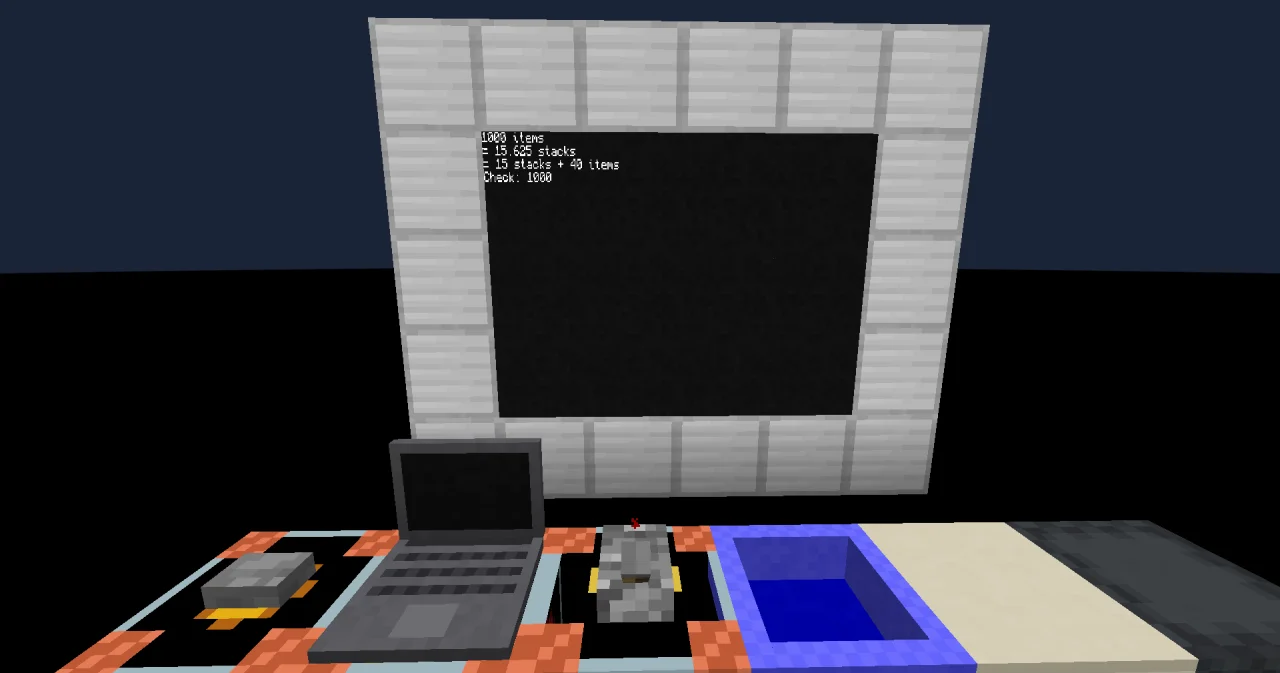
How it works
- Lines 6 to 9 make four boxes for whole numbers (INTEGER): the number of items, the size of a stack, and two boxes for the answers.
items / sizedivides. In c0de,/always gives a decimal number (FLOAT), even when the division works out: 64 / 64 is 1.0, not 1. So line 19 prints 15.625.- A FLOAT doesn't fit into an INTEGER box:
ASSIGN stacks items / size ;would crash the program. For whole stacks, lines 10 to 13 ask a helper:c0de/math/DIVdivides two whole numbers and drops the part after the point. Its PARAMETER lines give it the two numbers, and its RESULT line says where the answer goes: intostacks. You'll learn more about such helpers later in this path. items \ sizeis the remainder of the division: what is left over when you take out as many full stacks as possible. 1000 \ 64 is 40."Check: " ⊕ stacks * size + restfirst calculatesstacks * size(960), then addsrest(1000), and only then joins the number to the text. Like at school,*and/come before+and-;⊕comes last.
The operators of c0de for numbers:
| Operator | Means | Example | Value |
|---|---|---|---|
+ | plus | 15 + 40 | 55 |
- | minus | 1000 - 40 | 960 |
* | times | 15 * 64 | 960 |
/ | divided by (always a FLOAT) | 1000 / 64 | 15.625 |
\ | remainder | 1000 \ 64 | 40 |
^ | to the power of | 2 ^ 10 | 1024 |
( ) | calculate this first | ( 2 + 3 ) * 4 | 20 |
Try it yourself
- Ender pearls stack to 16. How many stacks are 100 ender pearls?
Solution
Change the LITERALs in line 6 to 100 and in line 7 to 16. The wall shows "= 6.25 stacks" and "= 6 stacks + 4 items".
PROGRAM stacks
NOOP
INCLUDE c0de/math
NOOP
FUNCTION calculate
BEGIN
    VARIABLE items INTEGER 100
    VARIABLE size INTEGER 16
    VARIABLE stacks INTEGER
    VARIABLE rest INTEGER
    CALL c0de/math/DIV
        PARAMETER dividend items ;
        PARAMETER divisor size ;
        RESULT result stacks
    ASSIGN rest items \ size ;
    CALL CLS
    CALL PRINT
        PARAMETER value items ⊕ " items" ;
    CALL PRINT
        PARAMETER value "= " ⊕ items / size ⊕ " stacks" ;
    CALL PRINT
        PARAMETER value "= " ⊕ stacks ⊕ " stacks + " ⊕ rest ⊕ " items" ;
    CALL PRINT
        PARAMETER value "Check: " ⊕ stacks * size + rest ;
END FUNCTION- A shulker box has 27 slots. How many cobblestone fit into a shulker box full of stacks? Let the program calculate the number of items.
Solution
Remove the start value of items and add ASSIGN items 27 * size ; after the VARIABLE lines. The wall shows "1728 items". The check is right too: 27 stacks and 0 items. And 1728 / 64 is 27.0, a FLOAT, although the division works out.
PROGRAM stacks
NOOP
INCLUDE c0de/math
NOOP
FUNCTION calculate
BEGIN
    VARIABLE items INTEGER
    VARIABLE size INTEGER 64
    VARIABLE stacks INTEGER
    VARIABLE rest INTEGER
    ASSIGN items 27 * size ;
    CALL c0de/math/DIV
        PARAMETER dividend items ;
        PARAMETER divisor size ;
        RESULT result stacks
    ASSIGN rest items \ size ;
    CALL CLS
    CALL PRINT
        PARAMETER value items ⊕ " items" ;
    CALL PRINT
        PARAMETER value "= " ⊕ items / size ⊕ " stacks" ;
    CALL PRINT
        PARAMETER value "= " ⊕ stacks ⊕ " stacks + " ⊕ rest ⊕ " items" ;
    CALL PRINT
        PARAMETER value "Check: " ⊕ stacks * size + rest ;
END FUNCTION
Read more
- Expressions and Operators in the guide
- Types: INTEGER and FLOAT
- DIV: dividing whole numbers
- OPERATOR in the handbook