Giving and getting values
The stack calculator always counts 1000 cobblestone. To count something else, you had to go into the c0de dimension and change the program. Today the calculator takes the number from a card you put into the trigger block, and hands you the answer as two cards.
New words
- Input: the values that go into a program.
- Output: the values that come out of it.
- Result: a value a function gives back when it ends.
- Variable item: a card that carries a value with a name and a type into or out of a program.
What you need
The stack calculator of the last lesson, and the hammer to delete lines. Language blocks: PARAMETER and RESULT (a PARAMETER block turns into a RESULT block in the crafting grid), LABEL and INTEGER type blocks. From the creative inventory: two variable items.
The idea
Think of a furnace. You put in raw iron and coal: the input. The furnace does its work. Then you take out iron ingots: the output. The furnace works the same way every time, but with different input, you get different output.
Almost every program works like this: input, processing, output.
A function can be built like a furnace. Its parameters are the slots for the input: each one has a name and a type, like "items, a whole number". Its results are the slots for the output. The function doesn't care where the input comes from. It works with whatever value is in the slot.
The program
The program stays on the sheet of the stack calculator and replaces it.
PROGRAM stacks
NOOP
INCLUDE c0de/math
NOOP
FUNCTION calculate
    PARAMETER items INTEGER
    RESULT stacks INTEGER
    RESULT rest INTEGER
BEGIN
    VARIABLE size INTEGER 64
    CALL c0de/math/DIV
        PARAMETER dividend items ;
        PARAMETER divisor size ;
        RESULT result stacks
    ASSIGN rest items \ size ;
END FUNCTION
Building it
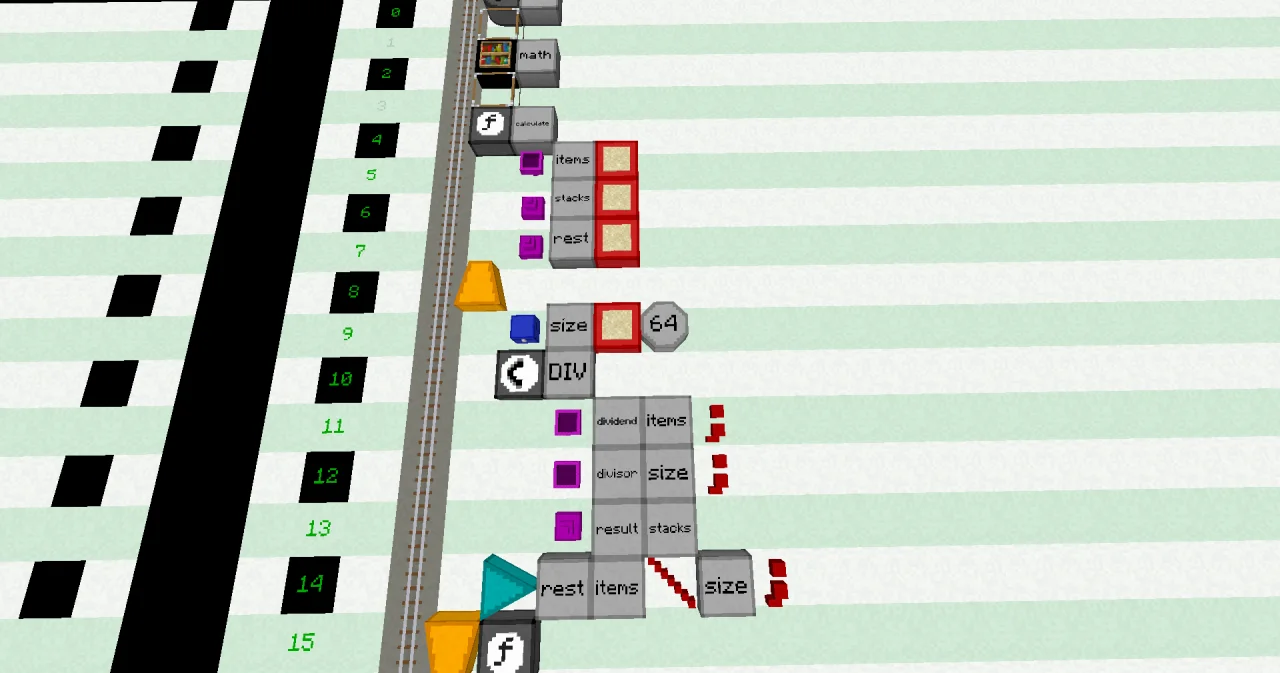
Lines 0 to 4 stay the same.
- Line 5: a PARAMETER block at x=6, a LABEL
itemsand an INTEGER type block. - Lines 6 and 7: a RESULT block at x=6, a LABEL
stacksand an INTEGER type block; then the same withrest. - Line 8: the BEGIN.
- Line 9: the VARIABLE
sizewith its start value 64. - Lines 10 to 14: the CALL of
c0de/math/DIVand the ASSIGN ofrest, as before. - Line 15: END FUNCTION.
Remove the VARIABLE lines of items, stacks and rest: they are parameters and results now. Remove the CLS and PRINT lines too. Left-click a line with the hammer to delete it.
Running it
The answer comes as items now, so this program doesn't need the display wall.
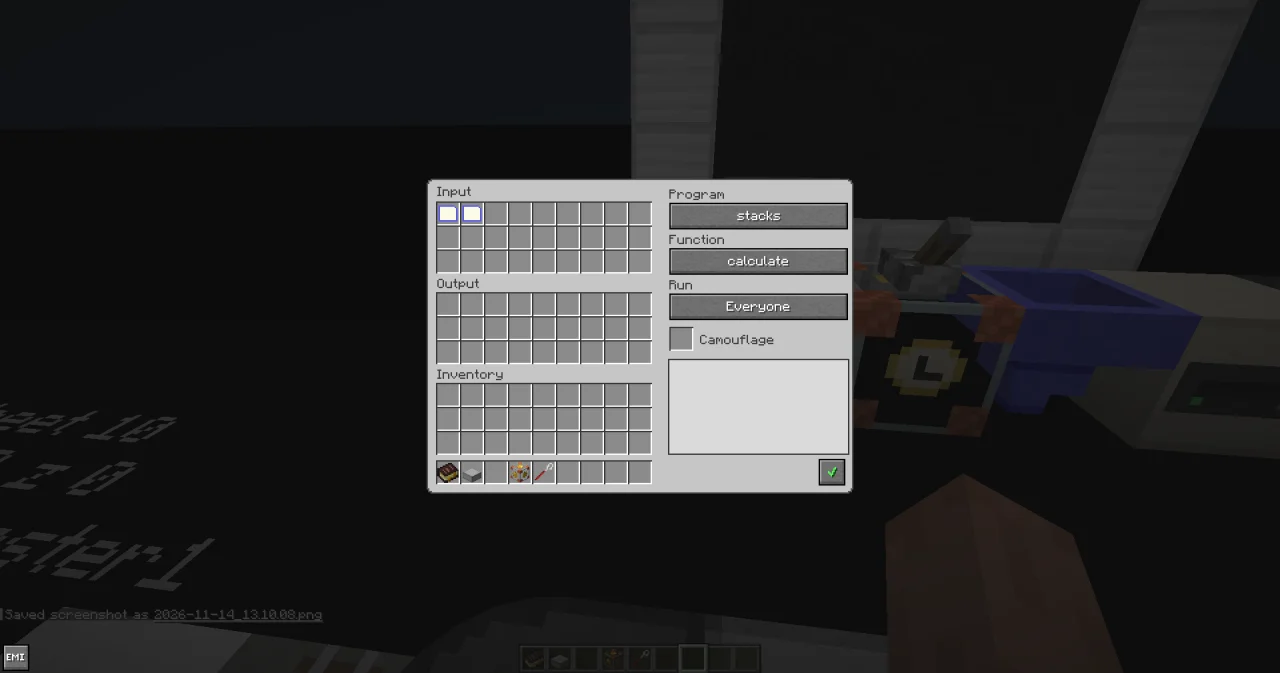
- Take a variable item from the creative inventory. Hold it in your main hand and right-click. In its dialog, enter the name
items, pick the type INTEGER and enter the value 1000. Save it with the green check mark. - Take a second variable item and leave it as it is: uninitialized, without name, type or value. The program writes a result into it.
- Right-click the trigger block of the calculator with an empty hand and put both items into its input inventory.
- Press the button.
The output inventory now holds two variable items. Take them out, hold each one and right-click: one is named stacks with the value 15, the other rest with the value 40.
Change the value of items to 500 and run it again: the answer is 7 stacks and 52 items.
How it works
PARAMETER items INTEGERsays: this function needs a whole number calleditemsto work. The parameter lines stand between FUNCTION and BEGIN, one block further east.- When the trigger block starts the function, it looks into its input inventory for a variable item with the same name,
items, and the same type. Its value goes into the parameter. Inside the function,itemsworks like a variable. RESULT stacks INTEGERandRESULT rest INTEGERare the outputs. They work like variables too, and start with 0. The CALL of DIV puts the stacks intostacks, the ASSIGN puts the remainder intorest.- When the function ends, each result goes into the output inventory as a variable item, with the name, type and value of the result.
- Why two input items for one input value? The function has two results. The item
itemstakes one of them on its way out; the uninitialized item carries the other one. A function needs one uninitialized item for every result that has no parameter item to take its place.
Try it yourself
- Give the function a second parameter
sizefor the stack size, so it can count ender pearls too (stacks of 16). Without a cardsize, it should count in stacks of 64.
Solution
A parameter can have a default value: a LITERAL after its type. If the input inventory has no item named size, the parameter gets 64. The VARIABLE line of size is no longer needed.
PROGRAM stacks
NOOP
INCLUDE c0de/math
NOOP
FUNCTION calculate
    PARAMETER items INTEGER
    PARAMETER size INTEGER 64
    RESULT stacks INTEGER
    RESULT rest INTEGER
BEGIN
    CALL c0de/math/DIV
        PARAMETER dividend items ;
        PARAMETER divisor size ;
        RESULT result stacks
    ASSIGN rest items \ size ;
END FUNCTION
With only the item items (1000), the results are 15 and 40, as before. Add an INTEGER variable item named size with the value 16, and set items to 100: the results are 6 stacks and 4 ender pearls. As there are two parameter items now for two results, you don't need an uninitialized item.
- Take the uninitialized item out of the input inventory of the first program, leave only
itemsin it, and press the button. What happens?
Solution
Nothing. The trigger block doesn't start the program, because an uninitialized item for the second result is missing. Put it back, and it works again.
Read more
- Functions in the guide: parameters, results and default values
- Variable items, Uninitialized items and Results
- When it won't start
- PARAMETER and RESULT in the handbook