Loops with a condition
How often can you fold a sheet of paper in half? You don't know before you start: you fold until it doesn't work any more. A FOR loop can't do that, because it needs to know its end before it starts. Today you meet loops that run until something happens. The laptop of Oak Hill gets a small halving machine, and it keeps asking for numbers as long as you answer "yes".
New words
- WHILE loop: a loop that runs as long as its condition is true, and checks it before every round.
- REPEAT loop: a loop that checks its condition after every round, so it always runs at least once.
- endless loop: a loop whose condition never changes, so it never ends.
- BREAK: leaves a loop at once.
What you need
- the laptop of your base, with a trigger block and a button next to it
- a new, empty sheet in the c0de dimension
- from the creative inventory: the blocks you know, the type block FLOAT, and the new WHILE and REPEAT blocks (for the exercises also a BREAK block)
The idea
Two kinds of everyday rules repeat something until a condition changes:
- "While it rains, stay inside." You look out of the window first. If the sun shines, you don't stay inside at all.
- "Taste the soup and add salt, until it tastes good." You taste first and decide afterwards. You always taste at least once.
The first rule is a WHILE loop: check, then do. The second is a REPEAT loop: do, then check. In c0de, REPEAT goes on as long as its condition is true, so "until it tastes good" becomes "repeat while it doesn't taste good yet".
Both loops need something that changes. "While it rains" ends because the weather changes. If nothing in the loop ever changes the condition, the loop runs forever: an endless loop.
The program
The program halving goes on a new sheet.
PROGRAM halving
NOOP
NOOP
FUNCTION halve
BEGIN
    VARIABLE number INTEGER
    VARIABLE half FLOAT
    VARIABLE steps INTEGER
    VARIABLE again STRING
    REPEAT
    BEGIN
        CALL PRINT
            PARAMETER value "Type a number:" ;
        CALL INPUT
            PARAMETER variable number ;
        ASSIGN half number ;
        ASSIGN steps 0 ;
        WHILE half > 1 ;
        BEGIN
            ASSIGN half half / 2 ;
            ASSIGN steps steps + 1 ;
        END WHILE
        CALL PRINT
            PARAMETER value "You can halve " ⊕ number ⊕ " " ⊕ steps ⊕ " times." ;
        CALL PRINT
            PARAMETER value "Another number? (yes/no)" ;
        CALL INPUT
            PARAMETER variable again ;
    END REPEAT again = "yes" ;
    CALL PRINT
        PARAMETER value "Bye!" ;
END FUNCTION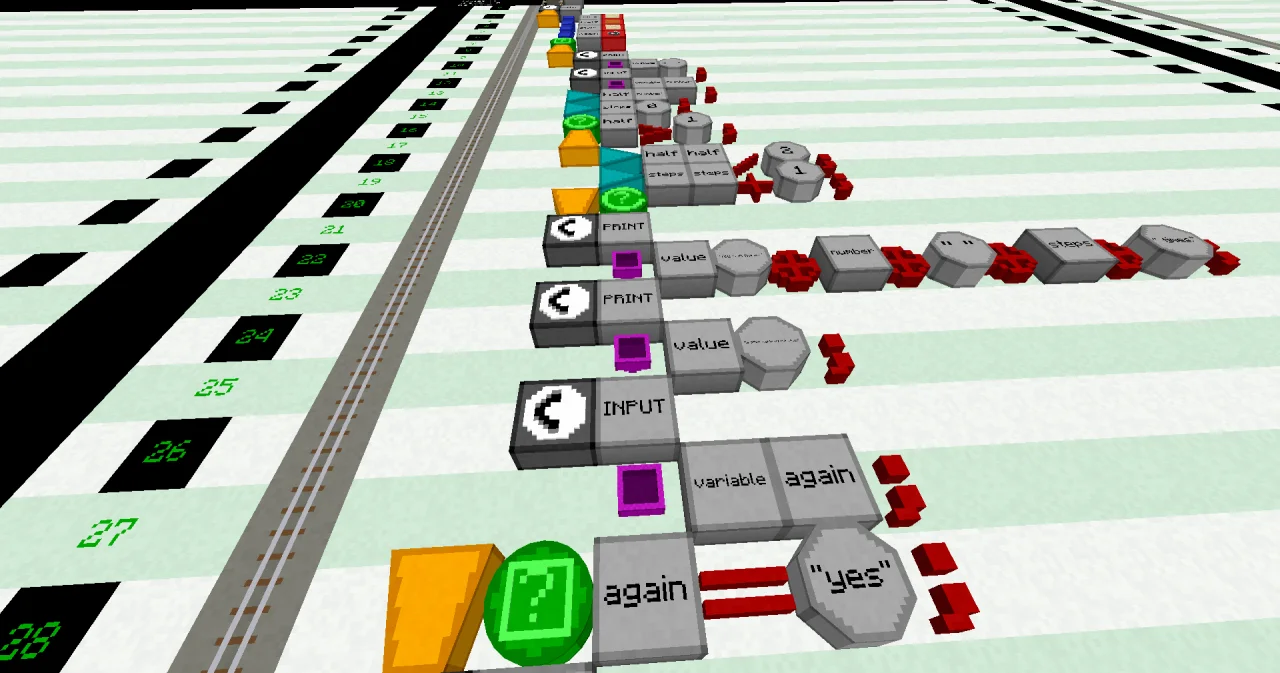
Building it
The new lines are the two loops:
- Line 6: a VARIABLE block at x=6, a LABEL
halfand a FLOAT type block. A FLOAT can hold numbers with decimals, like 62.5. - Line 9: a REPEAT block at x=6, alone in its line.
- Line 10: BEGIN at x=6. All lines of the REPEAT loop are one block further east, at x=7.
- Line 17: a WHILE block at x=7, a LABEL
half, an OPERATOR>, a LITERAL 1 and an OPERATOR;. - Line 18: BEGIN at x=7. The two ASSIGN lines of the WHILE loop are at x=8.
- Line 21: an END block at x=7, followed by a WHILE block.
- Line 28: an END block at x=6, a REPEAT block, then the condition: a LABEL
again, an OPERATOR=, a LITERAL"yes"and an OPERATOR;.
Running it
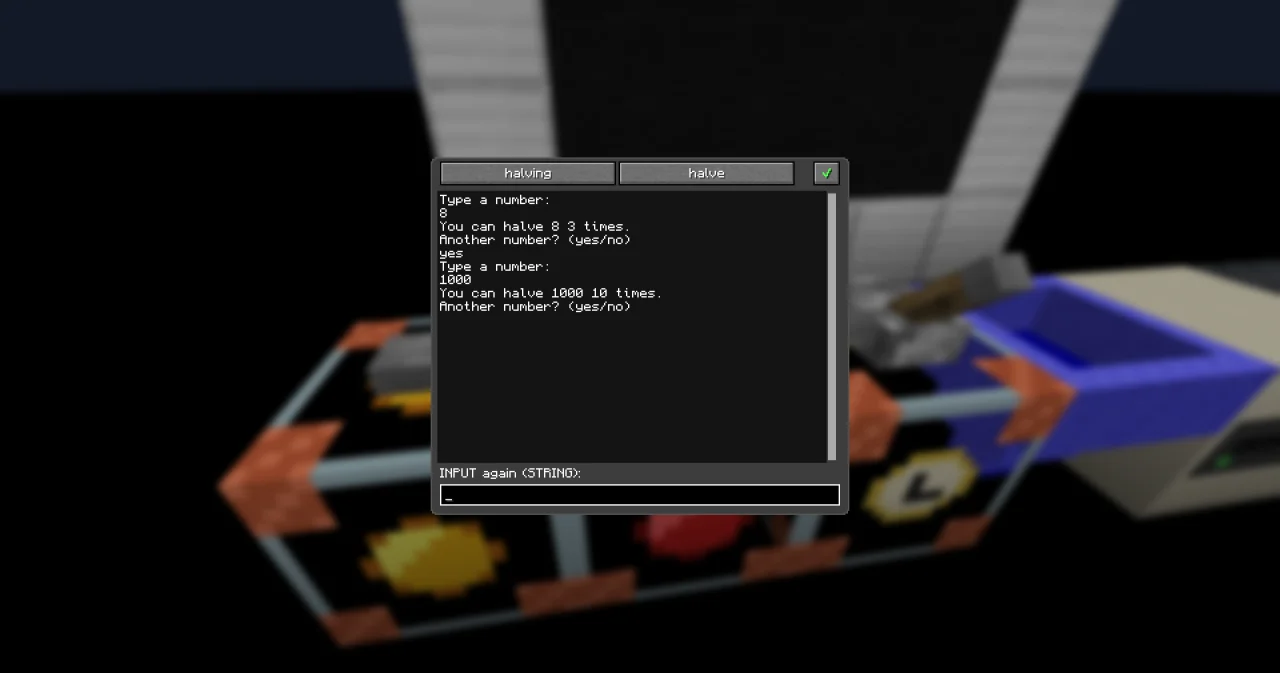
Open the laptop (right-click it), pick the program halving and the function halve with the two buttons at the top, and click ✔. Set the trigger block to the same program and function, and press the button.
Open the laptop again. It shows "Type a number:", and the input line below the screen shows INPUT number (INTEGER):. Type 8 and press Enter. The laptop answers:
You can halve 8 3 times.
Another number? (yes/no)
Type yes, then 1000: "You can halve 1000 10 times." Type no, and the laptop says "Bye!". The program has ended.
If you type something that isn't a whole number, like "ten", the laptop refuses it with a line starting with ? and waits until you type a number.
How it works
The program has two loops, one inside the other.
The inner loop does the halving:
ASSIGN half number ;copies the number into the FLOAThalf.stepsstarts at 0.WHILE half > 1 ;asks "ishalfstill bigger than 1?" before every round.- If yes, the round halves
halfand counts one step. With 8: 4, then 2, then 1. Nowhalf > 1is false, and the loop ends after 3 rounds. - With 1000, it goes 500, 250, 125, 62.5 … until 0.98, after 10 rounds. That's why
halfis a FLOAT:/always gives a number with decimals, which doesn't fit into an INTEGER. - If you type 1,
half > 1is false right away. The WHILE loop doesn't run at all, and the answer is 0 times.
The outer loop asks again:
REPEATruns its lines first: ask, halve, answer, and ask "Another number?".- Then
END REPEAT again = "yes" ;checks the answer. If it is "yes", the cursor goes back up to REPEAT, and everything starts again. - Any other answer ends the loop, and the program says "Bye!".
What if you forget the line ASSIGN half half / 2 ;? Then half never changes, half > 1 stays true, and the WHILE loop runs forever. The cursor keeps going round and round on the sheet. To stop it, shift-right-click the PID block of the process with the debugging tool. The process then crashes with PROCESS_ABORTED. So before you build a loop, ask yourself: what changes in every round, so that the loop can end?
Sometimes you want to leave a loop in the middle of a round. BREAK does that: it leaves the loop at once, and the cursor goes on after its END. With a condition, like BREAK number = 0 ;, it only leaves the loop when the condition is true. Exercise 2 uses it.
Try it yourself
- Keep asking until the player types a number from 1 to 10.
Solution
A second REPEAT loop around the question asks again as long as the number is too small OR too big.
PROGRAM halving
NOOP
NOOP
FUNCTION halve
BEGIN
    VARIABLE number INTEGER
    VARIABLE half FLOAT
    VARIABLE steps INTEGER
    VARIABLE again STRING
    REPEAT
    BEGIN
        REPEAT
        BEGIN
            CALL PRINT
                PARAMETER value "Type a number from 1 to 10:" ;
            CALL INPUT
                PARAMETER variable number ;
        END REPEAT number < 1 OR number > 10 ;
        ASSIGN half number ;
        ASSIGN steps 0 ;
        WHILE half > 1 ;
        BEGIN
            ASSIGN half half / 2 ;
            ASSIGN steps steps + 1 ;
        END WHILE
        CALL PRINT
            PARAMETER value "You can halve " ⊕ number ⊕ " " ⊕ steps ⊕ " times." ;
        CALL PRINT
            PARAMETER value "Another number? (yes/no)" ;
        CALL INPUT
            PARAMETER variable again ;
    END REPEAT again = "yes" ;
    CALL PRINT
        PARAMETER value "Bye!" ;
END FUNCTION
If you type 1000 and then 0, the laptop asks again both times. With 10, it answers "You can halve 10 4 times."
- Instead of asking "Another number?", let the player type 0 to stop.
Solution
BREAK number = 0 ; right after the INPUT leaves the REPEAT loop when the number is 0. The loop itself repeats forever (END REPEAT TRUE ;): the BREAK is its only way out.
PROGRAM halving
NOOP
NOOP
FUNCTION halve
BEGIN
    VARIABLE number INTEGER
    VARIABLE half FLOAT
    VARIABLE steps INTEGER
    REPEAT
    BEGIN
        CALL PRINT
            PARAMETER value "Type a number (0 ends):" ;
        CALL INPUT
            PARAMETER variable number ;
        BREAK number = 0 ;
        ASSIGN half number ;
        ASSIGN steps 0 ;
        WHILE half > 1 ;
        BEGIN
            ASSIGN half half / 2 ;
            ASSIGN steps steps + 1 ;
        END WHILE
        CALL PRINT
            PARAMETER value "You can halve " ⊕ number ⊕ " " ⊕ steps ⊕ " times." ;
    END REPEAT TRUE ;
    CALL PRINT
        PARAMETER value "Bye!" ;
END FUNCTION
Read more
- WHILE and REPEAT and BREAK in the guide
- WHILE, REPEAT and BREAK in the handbook Statements
- Aborting a process, for loops that don't end
- Laptop in the handbook Devices