Doing things again: counting loops
Every rocket launch starts with a countdown: 10, 9, 8 … 0, lift-off! You could write eleven PRINT lines for it. But programmers are lazy in a good way: they tell the computer to do one thing again and again, and let it count. Today the display wall of Oak Hill counts down for you.
New words
- loop: lines that the program runs again and again.
- loop variable: a variable that the loop changes on its own in every round, like a counter.
- step: how much the loop variable changes from one round to the next.
What you need
- your display wall of 2 × 1 display blocks and the trigger block with its button
- a new, empty sheet in the c0de dimension
- from the creative inventory: the blocks you know and the new FOR block
The idea
Imagine you build a staircase of ten steps. You don't think "place a block, place a block, place a block …" ten times. You think: "for every step from 1 to 10: place a block". You count while you work, and you stop when you reach 10.
That's a loop. It has a counter, the loop variable. It starts at one value, ends at another, and changes by the step in every round. A countdown counts from 10 to 0, so its step is -1: every round, the number gets one smaller.
The program
The program countdown goes on a new sheet.
PROGRAM countdown
NOOP
NOOP
FUNCTION launch
BEGIN
    VARIABLE numbers STRING
    FOR i INTEGER 10 ; 0 ; -1 ;
    BEGIN
        ASSIGN numbers numbers ⊕ i ⊕ " " ;
    END FOR
    CALL CLS
    CALL PRINT
        PARAMETER value numbers ;
    CALL PRINT
        PARAMETER value "Lift-off!" ;
END FUNCTION
Building it
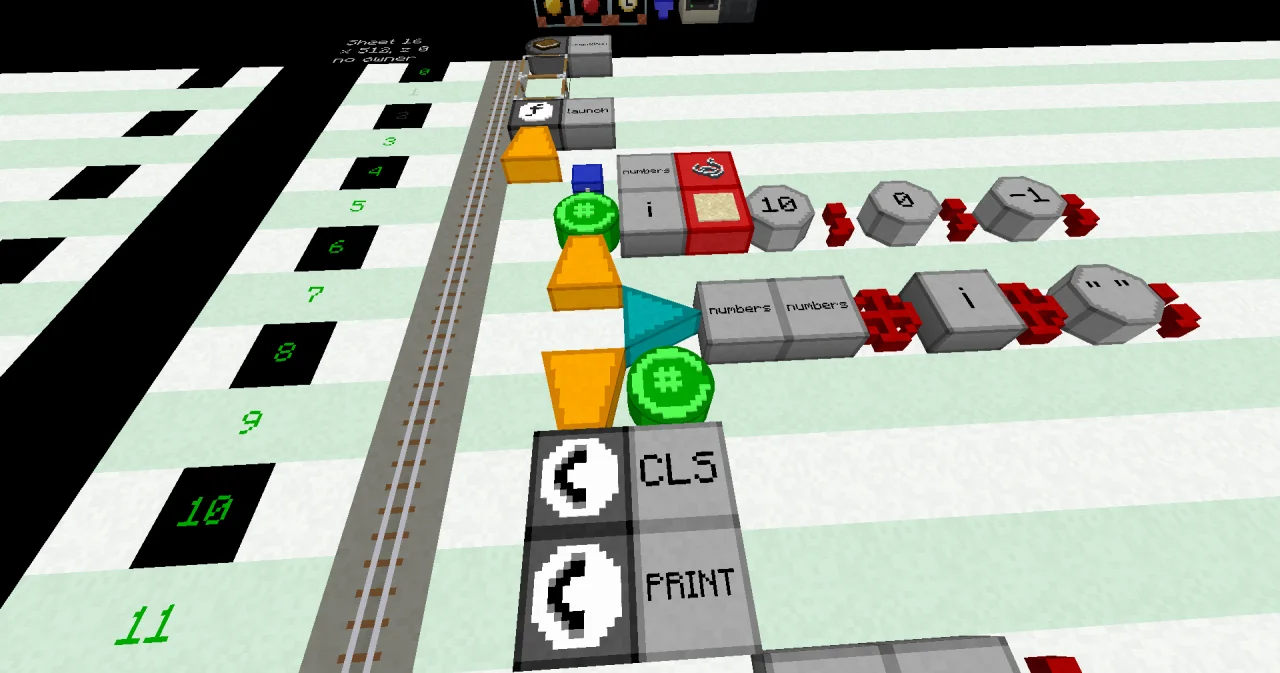
- Lines 0 to 3: PROGRAM
countdown, two NOOP lines, and FUNCTIONlaunchat x=5. - Line 4: BEGIN at x=5.
- Line 5: a VARIABLE block at x=6, a LABEL
numbersand a STRING type block. - Line 6: a FOR block at x=6, a LABEL
i, an INTEGER type block, then three values, each ending with an OPERATOR;: a LITERAL 10 and;, a LITERAL 0 and;, a LITERAL -1 and;. - Line 7: BEGIN at x=6.
- Line 8: an ASSIGN block at x=7, a LABEL
numbers, a LABELnumbers, an OPERATOR⊕, a LABELi, an OPERATOR⊕, a LITERAL" "(a text with one space) and an OPERATOR;. - Line 9: an END block at x=6, followed by a FOR block.
- Lines 10 to 14: CALL CLS, then two CALL PRINT lines with their PARAMETER lines, at x=6 and x=7.
- Line 15: END FUNCTION at x=5.
Running it
Bind the display wall to the program countdown and the function launch (click ✔ in its dialog), and set the trigger block to the same. Press the button. The wall shows:
10 9 8 7 6 5 4 3 2 1 0
Lift-off!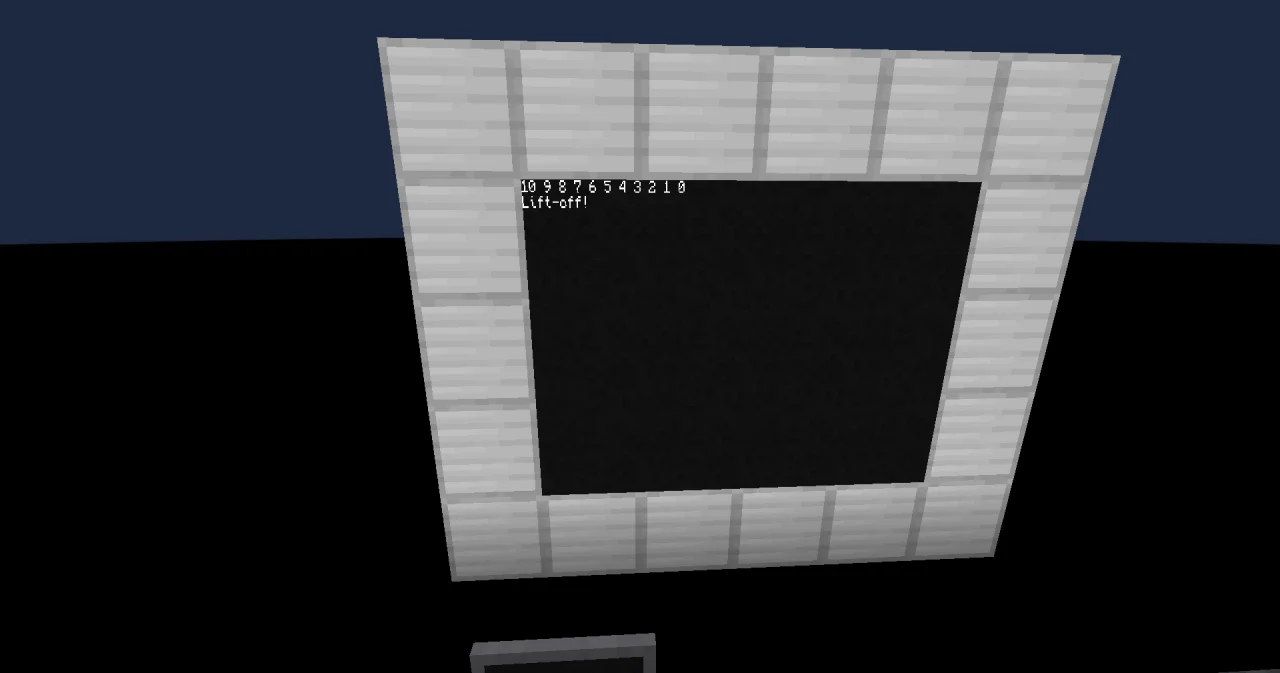
The program is done in a second or two. Watch the cursor on the sheet while it runs: it goes down to the ASSIGN line and back up to FOR, eleven times.
How it works
VARIABLE numbers STRINGstarts as an empty text. The loop collects the numbers in it.FOR i INTEGER 10 ; 0 ; -1 ;starts the loop.iis the loop variable, and its type is INTEGER. It starts at 10, ends at 0, and the step is -1.- In the first round,
iis 10. The lineASSIGN numbers numbers ⊕ i ⊕ " " ;adds "10 " to the end ofnumbers. - At
END FOR, the cursor goes back to FOR.igets one smaller, and the next round adds "9 ". - The end value is included: the last round runs with
i= 0. Then the loop is over, and the cursor goes on afterEND FOR. - Now
numbersis "10 9 8 7 6 5 4 3 2 1 0 ", and the two PRINT lines show it and "Lift-off!".
Some rules of FOR:
- Without a step, the step is 1:
FOR i INTEGER 1 ; 10 ;counts 1, 2, 3 … 10. - The step can't be 0. A negative step counts down.
- You can read
iinside the loop, but you can't change it with ASSIGN. Only the loop changes it. - If the start is already past the end, like
FOR i INTEGER 1 ; 0 ;, the loop doesn't run at all.
Why not PRINT every number on its own? The wall has 8 rows. Twelve lines don't fit, and the first ones would scroll away.
Try it yourself
- Count down from 50 to 0 in steps of 5.
Solution
Only the FOR line changes: FOR i INTEGER 50 ; 0 ; -5 ;. The wall shows "50 45 40 35 30 25 20 15 10 5 0".
PROGRAM countdown
NOOP
NOOP
FUNCTION launch
BEGIN
    VARIABLE numbers STRING
    FOR i INTEGER 50 ; 0 ; -5 ;
    BEGIN
        ASSIGN numbers numbers ⊕ i ⊕ " " ;
    END FOR
    CALL CLS
    CALL PRINT
        PARAMETER value numbers ;
    CALL PRINT
        PARAMETER value "Lift-off!" ;
END FUNCTION- Show the 7 times table: 7, 14, 21 … 70.
Solution
Count from 1 to 10 and add i * 7 instead of i. * is calculated before ⊕, so the program joins the result of the multiplication.
PROGRAM countdown
NOOP
NOOP
FUNCTION launch
BEGIN
    VARIABLE numbers STRING
    FOR i INTEGER 1 ; 10 ;
    BEGIN
        ASSIGN numbers numbers ⊕ i * 7 ⊕ " " ;
    END FOR
    CALL CLS
    CALL PRINT
        PARAMETER value "The 7 times table:" ;
    CALL PRINT
        PARAMETER value numbers ;
END FUNCTION
The wall shows "The 7 times table:" and "7 14 21 28 35 42 49 56 63 70".