Your own functions
The welcome sign of Oak Hill should look fancy: every text in a frame of stars. A frame takes several lines of code: count the letters, build a line of stars, print three rows. Writing all that three times would be long and boring, and every mistake would be there three times too. Today you write the frame once, as your own function, and use it as often as you like.
New words
- function: a named piece of a program that does one job. You have written entry functions since your first program; now you write one that another function calls.
- call: running a function from another function with CALL. When it is done, the cursor comes back to the line after the CALL.
- default value: the value a parameter gets when the caller leaves it out.
- RETURN: ends a function early.
What you need
- your display wall of 2 × 1 display blocks and the trigger block with its button
- a new, empty sheet in the c0de dimension
- from the creative inventory: the blocks you know (with PARAMETER, RESULT, IF and FOR) and the new RETURN block (for the exercises also a CHAR type block)
The idea
Think of a recipe book. The recipe for a cake says "make a dough (see page 12)". Page 12 explains the dough once, and every recipe that needs a dough points to it. If you find a better dough, you change one page, and every cake gets better.
A function is such a page. It has a name, it does one job, and other parts of the program call it when they need that job done. Like a recipe that says "dough for 2 people", a call can pass details: the parameters. And like the dough that comes back to the cake, a function can hand back results.
You know this from the outside already: CLS, PRINT and LOCATE are functions that come with c0de, and your entry functions got parameters and results from variable items. Today you write a function that your own program calls.
The program
The program frame goes on a new sheet. It has two functions: framed draws one frame, welcome uses it three times.
PROGRAM frame
NOOP
CONSTANT BASE STRING "Oak Hill"
NOOP
FUNCTION framed
    PARAMETER text STRING
    PARAMETER row INTEGER 0
    PARAMETER column INTEGER 0
    RESULT width INTEGER
BEGIN
    VARIABLE border STRING
    IF text = "" ;
    BEGIN
        RETURN
    END IF
    CALL LEN
        PARAMETER value text ;
        RESULT result width
    ASSIGN width width + 4 ;
    FOR i INTEGER 1 ; width ;
    BEGIN
        ASSIGN border border ⊕ "*" ;
    END FOR
    CALL LOCATE
        PARAMETER row row ;
        PARAMETER column column ;
    CALL PRINT
        PARAMETER value border ;
    CALL LOCATE
        PARAMETER row row + 1 ;
        PARAMETER column column ;
    CALL PRINT
        PARAMETER value "* " ⊕ text ⊕ " *" ;
    CALL LOCATE
        PARAMETER row row + 2 ;
        PARAMETER column column ;
    CALL PRINT
        PARAMETER value border ;
END FUNCTION
NOOP
FUNCTION welcome
BEGIN
    VARIABLE used INTEGER
    CALL CLS
    CALL framed
        PARAMETER text "Welcome" ;
        RESULT width used
    CALL framed
        PARAMETER text BASE ;
        PARAMETER column used + 1 ;
    CALL framed
        PARAMETER text "Mind the creepers!" ;
        PARAMETER row 4 ;
END FUNCTION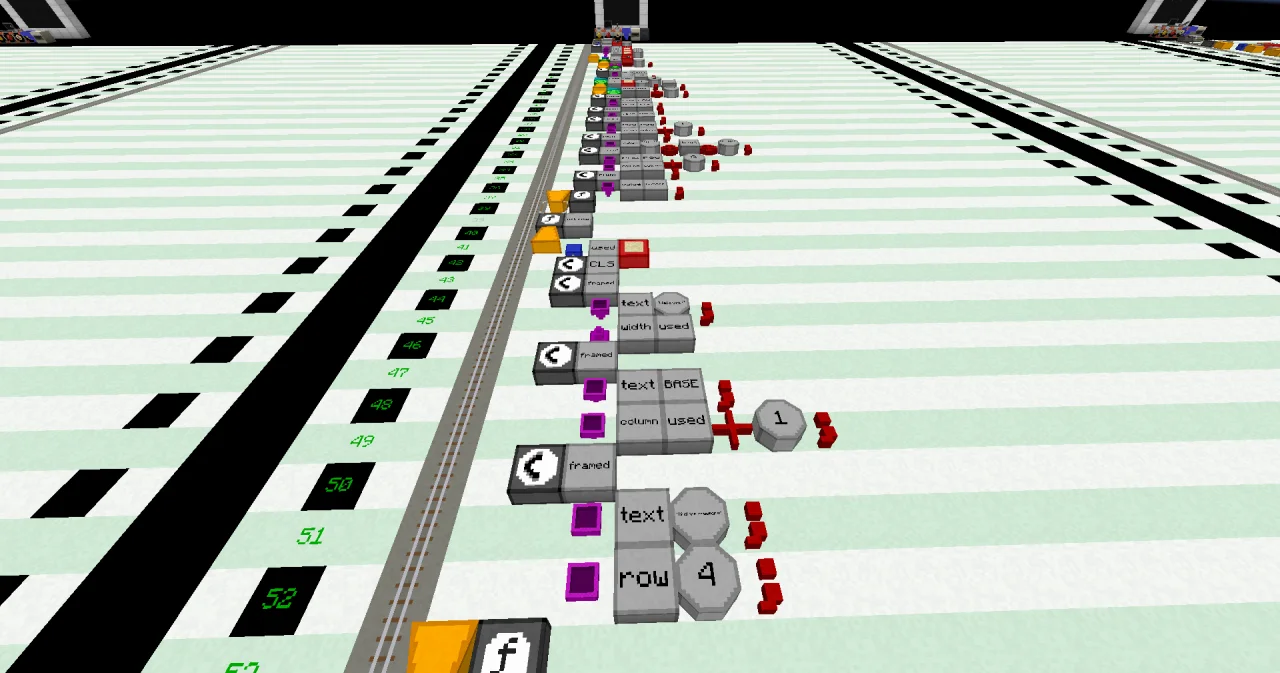
Building it
The program is long, but you know almost every line. The new parts:
- Lines 4 to 8: FUNCTION
framedat x=5, then four lines at x=6: PARAMETERtextSTRING, PARAMETERrowINTEGER with a LITERAL 0 at the end, PARAMETERcolumnINTEGER with a LITERAL 0, and RESULTwidthINTEGER. - Line 11: IF at x=6 with a LABEL
text, an OPERATOR=, a LITERAL""(an empty text) and an OPERATOR;. - Line 13: a RETURN block at x=7, alone.
- Lines 15 to 17: a CALL block at x=6 with a LABEL
LEN, then PARAMETERvaluewith LABELtextand;, and RESULT with the LABELsresultandwidth, both at x=7. - Line 39: a NOOP line. Every FUNCTION needs one right above it.
- Lines 44 to 46: a CALL block at x=6 with a LABEL
framed, then at x=7 a PARAMETER block, a LABELtext, a LITERAL"Welcome"and an OPERATOR;, and a RESULT block with the LABELswidthandused. - Line 49: a PARAMETER block at x=7, a LABEL
column, a LABELused, an OPERATOR+, a LITERAL 1 and an OPERATOR;.
Running it
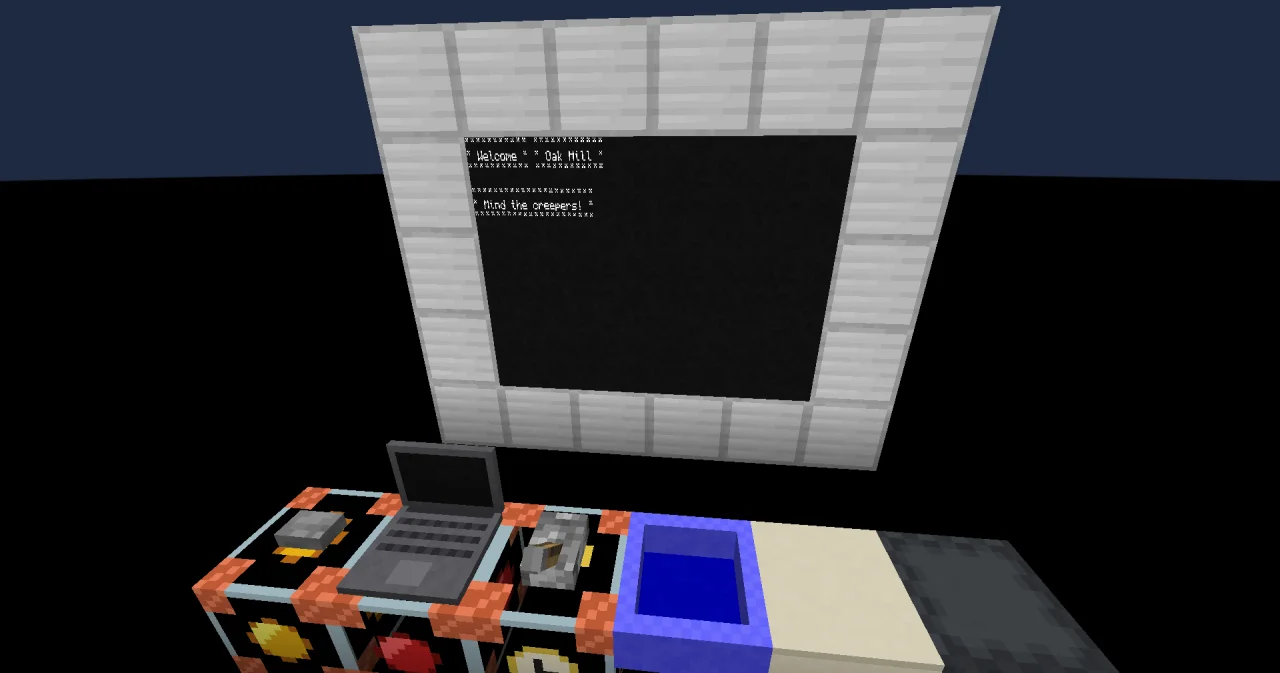
Bind the display wall to the program frame and the function welcome, and set the trigger block to the same. Press the button. The frames appear one after the other, and after a few seconds the wall shows:
*********** ************
* Welcome * * Oak Hill *
*********** ************

**********************
* Mind the creepers! *
**********************
How it works
The function framed:
- Its PARAMETER lines say what a caller can give it: a
text, and arowandcolumnwhere the frame starts.rowandcolumnhave the default value 0. A caller who leaves them out gets the top left corner. - Its RESULT line says what it gives back: the
widthof the frame. A result starts with the default value of its type, here 0. IF text = "" ;withRETURNinside: an empty text gets no frame. RETURN ends the function at once, and the cursor goes back to the caller.CALL LENcounts the letters of the text. LEN is a function that comes with c0de, and you call it like your own:PARAMETER value text ;gives it the text,RESULT result widthputs its resultresultinto your variablewidth. "Welcome" has 7 letters.- The frame is 4 wider than the text: a star and a space on each side. The FOR loop builds a line of that many stars in
border. - Three times LOCATE and PRINT: the top line, the text between
*and*, and the bottom line, each one row lower (row + 1,row + 2).
The function welcome calls it three times:
CALL framedwithPARAMETER text "Welcome" ;and nothing else:rowandcolumnare 0.RESULT width usedstores the resultwidthofframedin the variableusedofwelcome: 11.- The second call frames
BASEatcolumn used + 1, that is column 12, next to the first frame. - The third call frames "Mind the creepers!" at row 4. Its result isn't needed, so it has no RESULT line, and the result is thrown away.
Every call gets its own fresh variables: border starts empty each time. And the parameters are copies, so framed can't change the variables of welcome by accident.
A function can only call functions that are above it on the sheet. That's why framed comes first, and the trigger starts welcome.
Try it yourself
- Add a parameter
markfor the frame character, with the default value'*'. Frame "Oak Hill" with#and the creeper warning with!.
Solution
mark is a CHAR, a single character, written '*'. It replaces every "*" in framed. The first call leaves it out and gets stars.
PROGRAM frame
NOOP
CONSTANT BASE STRING "Oak Hill"
NOOP
FUNCTION framed
    PARAMETER text STRING
    PARAMETER row INTEGER 0
    PARAMETER column INTEGER 0
    PARAMETER mark CHAR '*'
    RESULT width INTEGER
BEGIN
    VARIABLE border STRING
    IF text = "" ;
    BEGIN
        RETURN
    END IF
    CALL LEN
        PARAMETER value text ;
        RESULT result width
    ASSIGN width width + 4 ;
    FOR i INTEGER 1 ; width ;
    BEGIN
        ASSIGN border border ⊕ mark ;
    END FOR
    CALL LOCATE
        PARAMETER row row ;
        PARAMETER column column ;
    CALL PRINT
        PARAMETER value border ;
    CALL LOCATE
        PARAMETER row row + 1 ;
        PARAMETER column column ;
    CALL PRINT
        PARAMETER value mark ⊕ " " ⊕ text ⊕ " " ⊕ mark ;
    CALL LOCATE
        PARAMETER row row + 2 ;
        PARAMETER column column ;
    CALL PRINT
        PARAMETER value border ;
END FUNCTION
NOOP
FUNCTION welcome
BEGIN
    VARIABLE used INTEGER
    CALL CLS
    CALL framed
        PARAMETER text "Welcome" ;
        RESULT width used
    CALL framed
        PARAMETER text BASE ;
        PARAMETER column used + 1 ;
        PARAMETER mark '#' ;
    CALL framed
        PARAMETER text "Mind the creepers!" ;
        PARAMETER row 4 ;
        PARAMETER mark '!' ;
END FUNCTION
The wall shows the "Welcome" frame in stars, the "Oak Hill" frame in # and the creeper warning in !.
- Change the first call to
PARAMETER text "" ;. What does the wall show, and why?
Solution
The first frame is gone, and the "Oak Hill" frame starts at column 1. framed returned at once, so its result width kept its start value 0, and used + 1 is 1.