Making decisions
Until now, your programs did the same thing every time. Today the welcome sign of Oak Hill gets smarter: it becomes a door guard. When you press the button at the entrance, it greets you by name. When somebody else presses it, it tells them that the base is closed.
New words
- condition: a question that the computer answers with true or false, like "is the visitor the owner?".
- BOOLEAN: the type of a value that is either true or false.
- IF and ELSE: "if the condition is true, do this; else do that".
What you need
- your display wall of 2 × 1 display blocks next to the entrance, and a trigger block with a button next to it
- a block of redstone, to start the guard without a player (also for exercise 2)
- a new, empty sheet in the c0de dimension, and the wrench
- from the creative inventory: the blocks you know (PROGRAM, NOOP, CONSTANT, FUNCTION, BEGIN, END, VARIABLE, ASSIGN, CALL, PARAMETER, LABEL, LITERAL, OPERATOR, the type block STRING) and the new ones: an IF block, an ELSE block and a BOOLEAN type block
The idea
Think of a guard at the door of a castle. Every time somebody knocks, the guard asks one question: "Is this the king?" If the answer is yes, the guard opens the door. If the answer is no, the guard says "Sorry, closed."
A program can do the same. It asks a question whose answer is true or false. That question is a condition. Depending on the answer, the program takes one of two ways. Only one of them runs, never both.
To ask questions, you compare values:
| Sign | Asks | Example | Answer |
|---|---|---|---|
= | equal? | 3 = 3 | true |
≠ | not equal? | 3 ≠ 3 | false |
< | smaller? | 2 < 5 | true |
> | bigger? | 2 > 5 | false |
≤ | smaller or equal? | 3 ≤ 3 | true |
≥ | bigger or equal? | 2 ≥ 3 | false |
The program
The guard is a new program called guard. It goes on a new sheet, so your sign stays as it is.
PROGRAM guard
NOOP
CONSTANT BASE STRING "Oak Hill"
NOOP
FUNCTION check
BEGIN
    VARIABLE visitor STRING
    VARIABLE isOwner BOOLEAN
    ASSIGN visitor PID.activator ;
    ASSIGN isOwner visitor = SHEET.owner ;
    CALL CLS
    IF isOwner ;
    BEGIN
        CALL PRINT
            PARAMETER value "Welcome home, " ⊕ visitor ⊕ "!" ;
    END
    ELSE
    BEGIN
        CALL PRINT
            PARAMETER value "Hello, " ⊕ visitor ⊕ "!" ;
        CALL PRINT
            PARAMETER value BASE ⊕ " is closed." ;
    END IF
END FUNCTION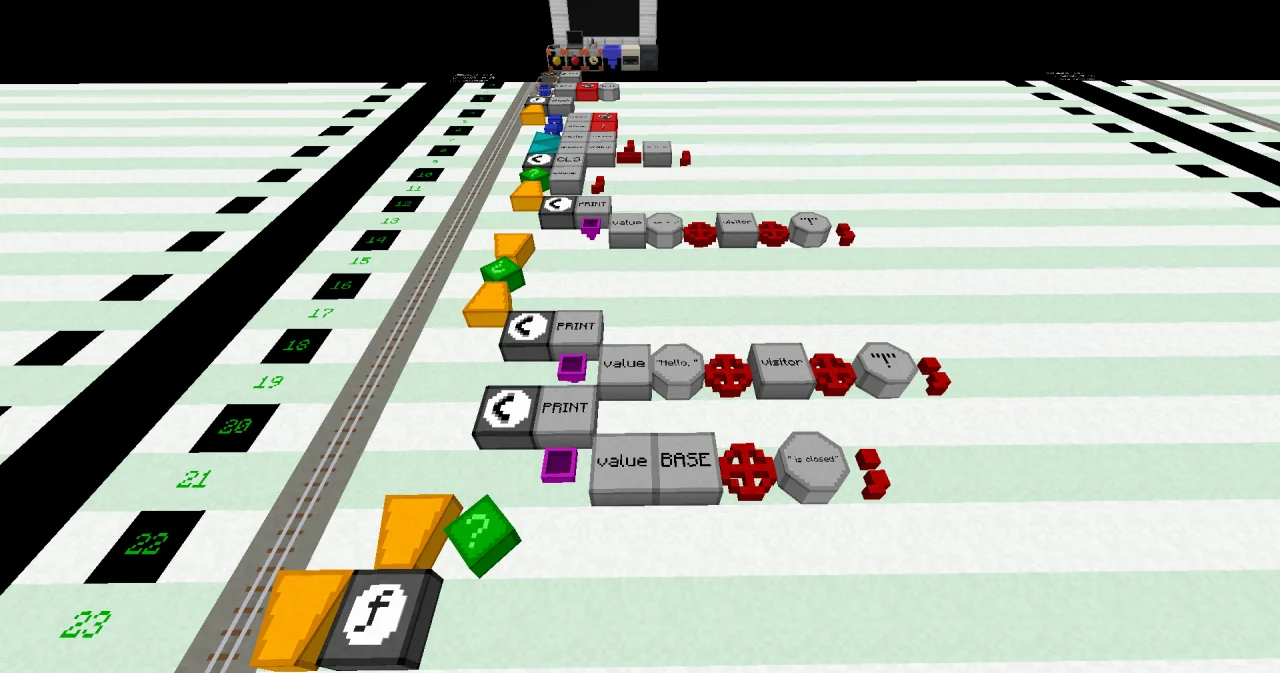
Building it
The first lines are like the ones you know. New are the BOOLEAN variable and the IF and ELSE lines:
- Line 7: a VARIABLE block at x=6, a LABEL
isOwnerand a BOOLEAN type block. A new BOOLEAN holds false. - Line 8: an ASSIGN block at x=6, a LABEL
visitor, a LABELPID.activatorand an OPERATOR;. In the LABEL dialog,PIDis the name and.activatorthe index. - Line 9: an ASSIGN block at x=6, a LABEL
isOwner, a LABELvisitor, an OPERATOR=, a LABELSHEET.ownerand an OPERATOR;. - Line 11: an IF block at x=6, a LABEL
isOwnerand an OPERATOR;. - Line 12: a BEGIN block at x=6, right below the IF.
- Lines 13 and 14: the CALL PRINT for the owner, one block further east (x=7 and x=8).
- Line 15: an END block at x=6, alone. It ends the first way.
- Line 16: an ELSE block at x=6, alone in its line.
- Line 17: a BEGIN block at x=6.
- Lines 18 to 21: the two CALL PRINT lines for everybody else, at x=7 and x=8.
- Line 22: an END block at x=6, followed by an IF block. It ends the whole decision.
- Line 23: END FUNCTION at x=5.
Line 12 shows dark yellow until you place the END in line 15: that's normal while you build.
Running it
Leave the dimension. Open the dialog of the display wall: click Program and Function until they show guard and check, then click ✔. The wall now belongs to the guard instead of the sign. Set the trigger block to the same program and function. The guard needs no variable items.
Press the button. The wall shows:
Welcome home, Steve!with your own name instead of Steve.
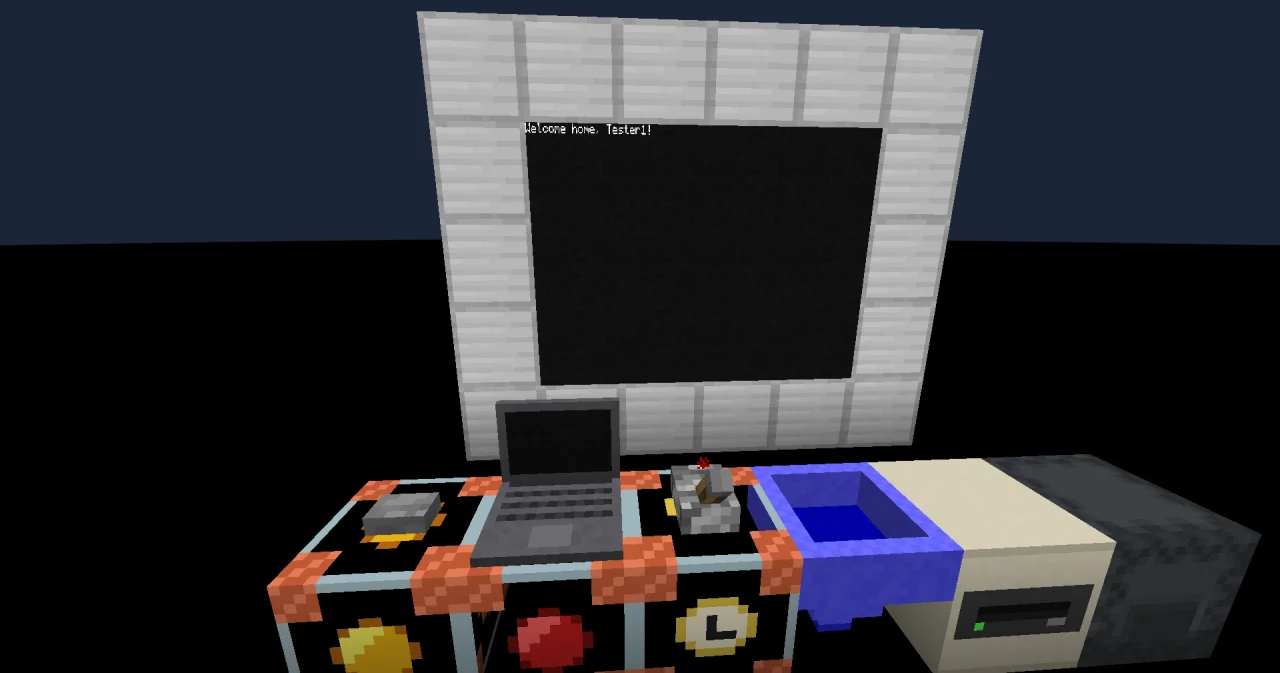
You are the only player in your world, so you always see the welcome. On a server, a friend who presses the button sees "Hello, Alex!" and "Oak Hill is closed." To see the other way alone, put a block of redstone next to the trigger block. No player started the program now, so the name is empty: the wall shows "Hello, !" and "Oak Hill is closed." Exercise 2 fixes that.
How it works
VARIABLE visitor STRINGandASSIGN visitor PID.activator ;store the name of the player who started the program.PIDis a constant that every program has. Its elementactivatoris the player who pressed the button.SHEET.owneris the name of the player who owns the sheet: you, because you built on it first.ASSIGN isOwner visitor = SHEET.owner ;asks "is the visitor the owner?" and stores the answer, true or false, in the BOOLEAN variableisOwner. Here=only compares. It never stores anything; that's the job of ASSIGN.IF isOwner ;looks at the answer. If it is true, the cursor runs the lines between BEGIN and END, and then jumps over the ELSE part.- If it is false, the cursor jumps over the first part and runs the lines between the BEGIN after ELSE and
END IF. - After
END IF, both ways meet again. Here the function ends.
You can also join questions:
- AND: both must be true.
visitor = "Alex" AND isOwneris only true if both are true. - OR: one is enough.
visitor = "Alex" OR visitor = "Kai"is true for Alex and for Kai. - NOT: turns the answer around.
NOT isOwneris true for everybody but the owner.
PRINT shows a BOOLEAN as TRUE or FALSE, like the handbook (up to c0de 0.4.0 it was true or false). For players, a text of your own usually says more: use the BOOLEAN in an IF and print what it means.
Try it yourself
- Your friends Alex and Kai may come in too. Greet them with "Come in, Alex!" instead of the closed sign.
Solution
A second BOOLEAN asks if the visitor is a friend, with OR. In the ELSE part, a second IF decides between friend and stranger. There is no "ELSE IF": you put an IF inside the ELSE.
PROGRAM guard
NOOP
CONSTANT BASE STRING "Oak Hill"
NOOP
FUNCTION check
BEGIN
    VARIABLE visitor STRING
    VARIABLE isOwner BOOLEAN
    VARIABLE isFriend BOOLEAN
    ASSIGN visitor PID.activator ;
    ASSIGN isOwner visitor = SHEET.owner ;
    ASSIGN isFriend visitor = "Alex" OR visitor = "Kai" ;
    CALL CLS
    IF isOwner ;
    BEGIN
        CALL PRINT
            PARAMETER value "Welcome home, " ⊕ visitor ⊕ "!" ;
    END
    ELSE
    BEGIN
        IF isFriend ;
        BEGIN
            CALL PRINT
                PARAMETER value "Come in, " ⊕ visitor ⊕ "!" ;
        END
        ELSE
        BEGIN
            CALL PRINT
                PARAMETER value "Hello, " ⊕ visitor ⊕ "!" ;
            CALL PRINT
                PARAMETER value BASE ⊕ " is closed." ;
        END IF
    END IF
END FUNCTION- When no player started the guard (the block of redstone), show "Nobody there." instead of "Hello, !".
Solution
First ask if the name is empty ("", a text without characters). Only if it isn't, the old decision follows, inside the ELSE.
PROGRAM guard
NOOP
CONSTANT BASE STRING "Oak Hill"
NOOP
FUNCTION check
BEGIN
    VARIABLE visitor STRING
    VARIABLE isOwner BOOLEAN
    ASSIGN visitor PID.activator ;
    ASSIGN isOwner visitor = SHEET.owner ;
    CALL CLS
    IF visitor = "" ;
    BEGIN
        CALL PRINT
            PARAMETER value "Nobody there." ;
    END
    ELSE
    BEGIN
        IF isOwner ;
        BEGIN
            CALL PRINT
                PARAMETER value "Welcome home, " ⊕ visitor ⊕ "!" ;
        END
        ELSE
        BEGIN
            CALL PRINT
                PARAMETER value "Hello, " ⊕ visitor ⊕ "!" ;
            CALL PRINT
                PARAMETER value BASE ⊕ " is closed." ;
        END IF
    END IF
END FUNCTION
Read more
- IF and ELSE and Operators in the guide
- IF and ELSE in the handbook Statements
- TYPE_BOOLEAN, and CONSTANT for everything
PIDandSHEETknow