Project: guess the number
Time for a game! The laptop of Oak Hill thinks of a secret number from 1 to 100. You guess, and it tells you "higher" or "lower" until you find it. At the end, it says how many tries you needed. This lesson has no new blocks. It is about something else: how to plan a program before you build it, and how the ideas of all the lessons fit together.
New words
- planning: writing down the steps of a program in your own words, before you build it.
- game loop: the part of a game that repeats until the game is over: ask, check, answer, and again.
What you need
- a new, empty sheet in the c0de dimension, and the wrench
- your laptop and a trigger block with a button next to it
- the blocks you know, among them INCLUDE, REPEAT and IF
The idea
Before you build a big house in Minecraft, you think about it first: where does the door go, how many floors, which blocks? A program is the same. Before you place the first block, write the steps down in plain words, like a recipe:
- Think of a secret number from 1 to 100.
- Show a hello.
- Ask the player for a guess.
- Count the try.
- If the guess is too small, say "higher". If it is too big, say "lower".
- If the guess isn't right, go back to step 3.
- Say "right" and how many tries it took.
Now go through the plan and ask for every step: which part of c0de does this?
| Step | What c0de uses | Learned in |
|---|---|---|
| 1 | a function secretNumber with RANDOM and INT | Your own functions, Using libraries |
| 2 | CLS, COLOR and PRINT | Colors and the screen |
| 3 | INPUT on the laptop | Asking the player |
| 4 | a variable tries and ASSIGN | Remembering things |
| 5 | two IFs | Making decisions |
| 6 | a REPEAT loop | Loops with a condition |
| 7 | COLOR and PRINT again | Colors and the screen |
Steps 3 to 6 are the game loop: they repeat until the guess is right. Step 3 has to happen at least once, so REPEAT fits better than WHILE: REPEAT runs its block first and checks its condition at the end.
The program
The program guess goes on a new sheet.
PROGRAM guess
NOOP
INCLUDE c0de/math
NOOP
FUNCTION secretNumber
    RESULT number INTEGER
BEGIN
    VARIABLE chance FLOAT
    CALL c0de/math/RANDOM
        RESULT result chance
    CALL c0de/math/INT
        PARAMETER value chance * 100 + 1 ;
        RESULT result number
END FUNCTION
NOOP
FUNCTION play
BEGIN
    VARIABLE secret INTEGER
    VARIABLE guess INTEGER
    VARIABLE tries INTEGER
    CALL secretNumber
        RESULT number secret
    CALL CLS
    CALL COLOR
        PARAMETER foreground COLOR_YELLOW ;
    CALL PRINT
        PARAMETER value "I am thinking of a number from 1 to 100." ;
    REPEAT
    BEGIN
        CALL INPUT
            PARAMETER variable guess ;
        ASSIGN tries tries + 1 ;
        IF guess < secret ;
        BEGIN
            CALL COLOR
                PARAMETER foreground COLOR_AQUA ;
            CALL PRINT
                PARAMETER value guess ⊕ " is too low. Go higher!" ;
        END IF
        IF guess > secret ;
        BEGIN
            CALL COLOR
                PARAMETER foreground COLOR_LIGHT_PURPLE ;
            CALL PRINT
                PARAMETER value guess ⊕ " is too high. Go lower!" ;
        END IF
    END REPEAT guess ≠ secret ;
    CALL COLOR
        PARAMETER foreground COLOR_GREEN ;
    CALL PRINT
        PARAMETER value "Right! You needed " ⊕ tries ⊕ " tries." ;
END FUNCTION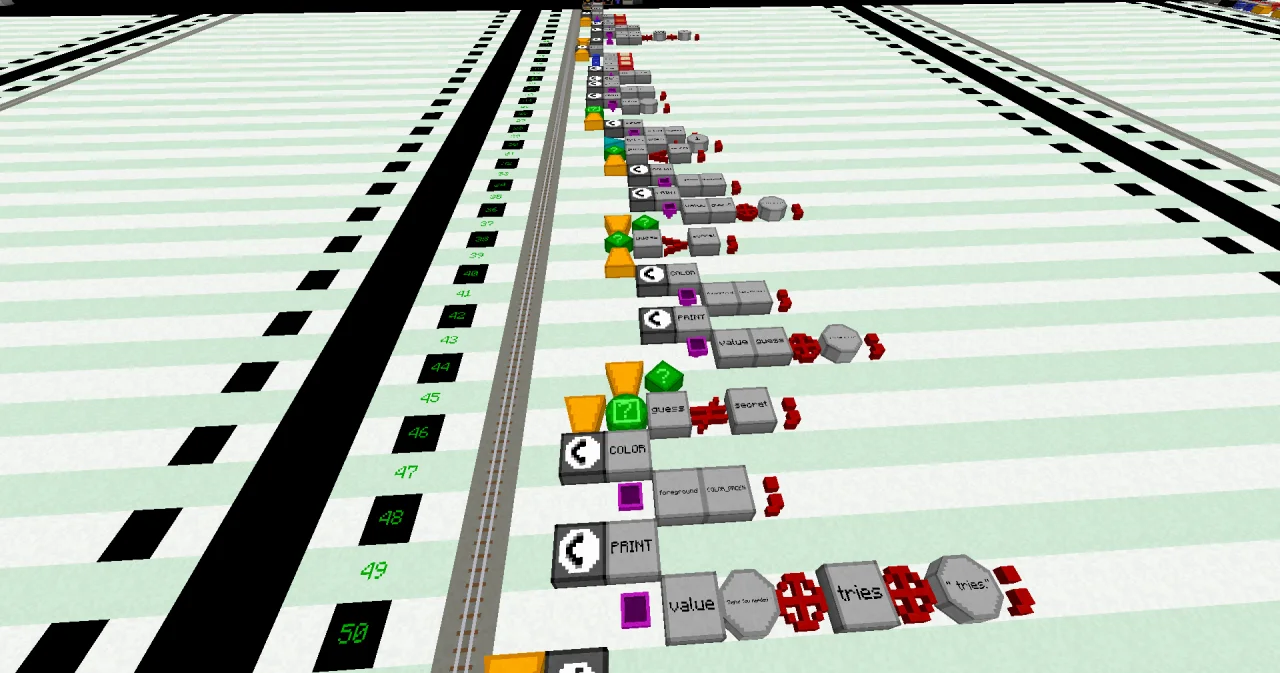
Building it
Every line uses blocks you know. Build the program part by part, along the plan:
- Lines 0 to 3: PROGRAM
guess, NOOP,INCLUDE c0de/mathand the NOOP for the first function. - Lines 4 to 13 (step 1): the function
secretNumberwith one RESULTnumber. It works like the die of the last lesson, with 100 instead of 6. - Lines 14 to 19: NOOP, FUNCTION
play, BEGIN and three INTEGER variables:secret,guessandtries. - Lines 20 and 21: CALL
secretNumber, with the RESULT linenumber secret: the resultnumbergoes into the variablesecret. - Lines 22 to 26 (step 2): clear the screen and print the hello in yellow.
- Line 27: a REPEAT block at x=6, and in line 28 its BEGIN.
- Lines 29 to 31 (steps 3 and 4): INPUT into
guess, andASSIGN tries tries + 1 ;. - Lines 32 to 45 (step 5): two IF blocks, each with its own BEGIN and END IF.
- Line 46 (step 6): END at x=6, a REPEAT block, then
guess ≠ secret ;. - Lines 47 to 50 (step 7): the green message.
- Line 51: END FUNCTION.
Take your time with the indentation: the lines inside the REPEAT are one block further east than the REPEAT, and the lines inside each IF one more. The line numbers tell you if something is wrong.
Running it
Open the laptop and click Program and Function until they show guess and play, then ✔. Set the trigger block to the same program and function, and press the button.
The laptop shows the hello, and the input line below the screen asks INPUT guess (INTEGER):. Type a number and press Enter. A game can look like this:
I am thinking of a number from 1 to 100.
50
50 is too low. Go higher!
75
75 is too low. Go higher!
90
90 is too high. Go lower!
85
85 is too low. Go higher!
89
Right! You needed 5 tries.
The lines you type appear on the screen too. "Too low" is aqua, "too high" is light purple, and the last line is green.
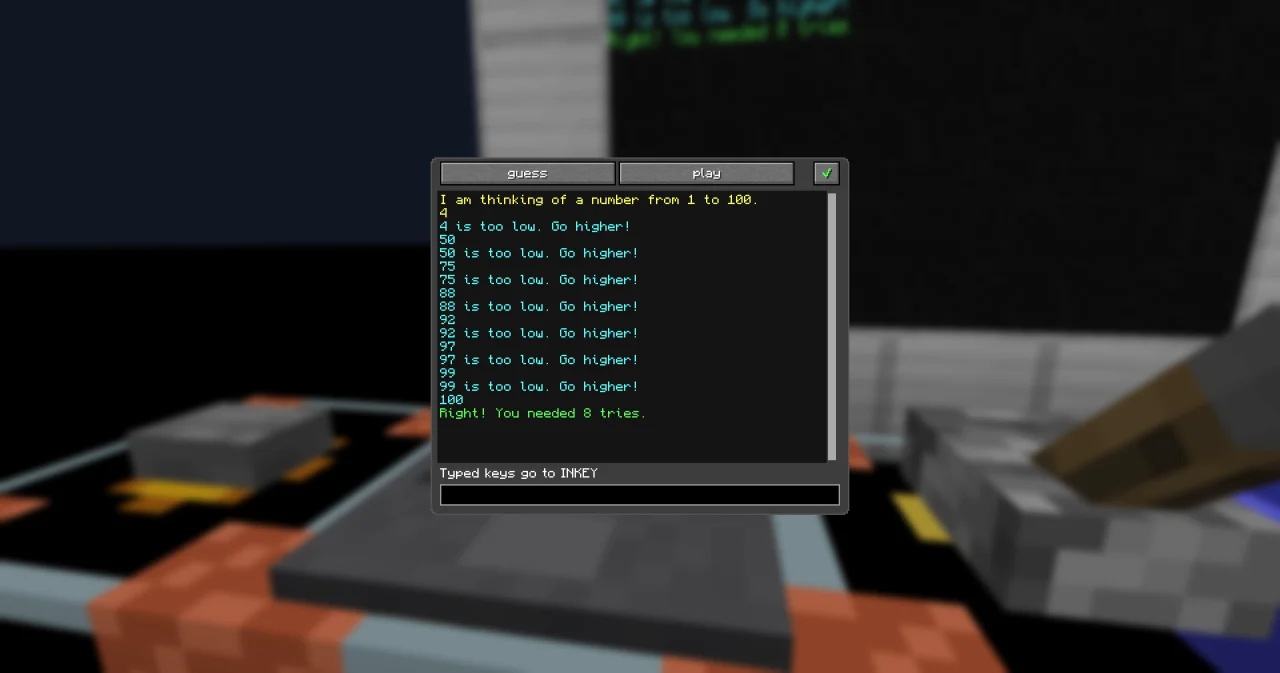
If you type something that isn't a whole number, like abc or 4.5, the laptop answers with a line starting with ? and waits for a new try. INPUT only takes values that fit the type of the variable.
How it works
- The secret number. RANDOM gives a number from 0 up to below 1. Times 100 plus 1 makes it a number from 1 up to below 101. INT rounds it down, so
numberis a whole number from 1 to 100. Because this is a function of its own,playonly needs one CALL line for it – and the plan's step 1 is one clear piece of the program. - The game loop. REPEAT runs its block, then checks
guess ≠ secret ;after END REPEAT. As long as that is true – the guess is wrong – it runs the block again. When you find the number, the condition is false, and the cursor goes on below the loop. - Counting.
triesstarts at 0. Each run of the loop adds 1, so after the loop it holds the number of guesses. - Two IFs. A guess is either too small, too big or right. The first IF handles "too small", the second "too big". If the guess is right, neither runs, and the loop ends.
- Colors. Each message gets its color right before it is printed, so the player sees at a glance what happened.
The plan was worth it: every step became a few lines, and when something goes wrong, you know which part to look at.
Try it yourself
- Play several games in a row, and keep a high score: the fewest tries of all games since you pressed the button. After each game, ask "Play again?" and start a new game if the player types
yes.
Solution
The game becomes a function round, which returns the number of tries. play calls it in a second REPEAT loop around it, keeps the best result in best, and asks with an INPUT into a STRING variable whether to play again. best starts at 0, which means "no game yet".
PROGRAM guess
NOOP
INCLUDE c0de/math
NOOP
FUNCTION secretNumber
    RESULT number INTEGER
BEGIN
    VARIABLE chance FLOAT
    CALL c0de/math/RANDOM
        RESULT result chance
    CALL c0de/math/INT
        PARAMETER value chance * 100 + 1 ;
        RESULT result number
END FUNCTION
NOOP
FUNCTION round
    RESULT tries INTEGER
BEGIN
    VARIABLE secret INTEGER
    VARIABLE guess INTEGER
    CALL secretNumber
        RESULT number secret
    CALL COLOR
        PARAMETER foreground COLOR_YELLOW ;
    CALL PRINT
        PARAMETER value "I am thinking of a number from 1 to 100." ;
    REPEAT
    BEGIN
        CALL INPUT
            PARAMETER variable guess ;
        ASSIGN tries tries + 1 ;
        IF guess < secret ;
        BEGIN
            CALL COLOR
                PARAMETER foreground COLOR_AQUA ;
            CALL PRINT
                PARAMETER value guess ⊕ " is too low. Go higher!" ;
        END IF
        IF guess > secret ;
        BEGIN
            CALL COLOR
                PARAMETER foreground COLOR_LIGHT_PURPLE ;
            CALL PRINT
                PARAMETER value guess ⊕ " is too high. Go lower!" ;
        END IF
    END REPEAT guess ≠ secret ;
    CALL COLOR
        PARAMETER foreground COLOR_GREEN ;
    CALL PRINT
        PARAMETER value "Right! You needed " ⊕ tries ⊕ " tries." ;
END FUNCTION
NOOP
FUNCTION play
BEGIN
    VARIABLE tries INTEGER
    VARIABLE best INTEGER
    VARIABLE again STRING
    CALL CLS
    REPEAT
    BEGIN
        CALL round
            RESULT tries tries
        IF best = 0 OR tries < best ;
        BEGIN
            ASSIGN best tries ;
        END IF
        CALL COLOR
            PARAMETER foreground COLOR_WHITE ;
        CALL PRINT
            PARAMETER value "High score: " ⊕ best ⊕ " tries" ;
        CALL PRINT
            PARAMETER value "Play again? Type yes or no." ;
        CALL INPUT
            PARAMETER variable again ;
    END REPEAT again = "yes" ;
END FUNCTION
After a first game with 5 tries and a second with 4, the laptop shows "High score: 4 tries". When you type no, the program ends. The high score only lives as long as the program runs: the next button press starts with a new one.
- Make the game harder: the player has only 7 tries. After the seventh wrong guess, the laptop says "No tries left." and tells the secret number.
Solution
The loop goes on only while the guess is wrong and fewer than 7 tries were used. After the loop, an IF decides whether the player won or ran out of tries.
PROGRAM guess
NOOP
INCLUDE c0de/math
NOOP
FUNCTION secretNumber
    RESULT number INTEGER
BEGIN
    VARIABLE chance FLOAT
    CALL c0de/math/RANDOM
        RESULT result chance
    CALL c0de/math/INT
        PARAMETER value chance * 100 + 1 ;
        RESULT result number
END FUNCTION
NOOP
FUNCTION play
BEGIN
    VARIABLE secret INTEGER
    VARIABLE guess INTEGER
    VARIABLE tries INTEGER
    CALL secretNumber
        RESULT number secret
    CALL CLS
    CALL COLOR
        PARAMETER foreground COLOR_YELLOW ;
    CALL PRINT
        PARAMETER value "I am thinking of a number from 1 to 100." ;
    REPEAT
    BEGIN
        CALL INPUT
            PARAMETER variable guess ;
        ASSIGN tries tries + 1 ;
        IF guess < secret ;
        BEGIN
            CALL COLOR
                PARAMETER foreground COLOR_AQUA ;
            CALL PRINT
                PARAMETER value guess ⊕ " is too low. Go higher!" ;
        END IF
        IF guess > secret ;
        BEGIN
            CALL COLOR
                PARAMETER foreground COLOR_LIGHT_PURPLE ;
            CALL PRINT
                PARAMETER value guess ⊕ " is too high. Go lower!" ;
        END IF
    END REPEAT guess ≠ secret AND tries < 7 ;
    IF guess = secret ;
    BEGIN
        CALL COLOR
            PARAMETER foreground COLOR_GREEN ;
        CALL PRINT
            PARAMETER value "Right! You needed " ⊕ tries ⊕ " tries." ;
    END
    ELSE
    BEGIN
        CALL COLOR
            PARAMETER foreground COLOR_RED ;
        CALL PRINT
            PARAMETER value "No tries left. It was " ⊕ secret ⊕ "." ;
    END IF
END FUNCTION
With a clever plan, 7 tries are always enough: guess the middle (50), then the middle of the half that is left (25 or 75), and so on. Each guess halves the numbers that are left – just like in the lesson about halving.
Read more
- WHILE and REPEAT and IF and ELSE in the guide
- Talking to players in the guide
- INPUT, PRINT and COLOR in the handbook Functions, and the Laptop in the handbook Devices
- RANDOM and INT