Project: the guarded door
In the lesson Making decisions, your door guard could only greet people. Now it gets real power: it opens the door. The entrance of Oak Hill gets an iron door that nobody can open by hand. In front of it lies a pressure plate. When you or one of your friends steps on it, the door opens. Strangers stay outside. And the welcome sign shows how many visitors are standing at the door.
New words
- timer: something that starts a program again and again, at a fixed interval – here every second.
- world: everything around the program in Minecraft: blocks, doors, players. This program reads the world and changes it.
What you need
- a new, empty sheet in the c0de dimension, and the wrench
- an iron door in the wall of your base, a pressure plate, a button and a lever
- a timer block
- your display wall at the entrance (the welcome sign)
- the blocks you know, among them INCLUDE, EACH, IF, RETURN and the type blocks ARRAY, STRUCT and BOOLEAN
Needs an operator
Iron doors can't be opened by hand, so a program may only open them if the owner of the timer block is an operator. In the world of the tutorials, you are an operator, so it works. On a server, the administrator can allow it for everybody with allowBlockChanges=true in config/c0de.properties. Without that right, the program crashes with PERMISSION_DENIED. A wooden door works for everybody – but then anybody can open it by hand, and the guard can only greet.
The idea
Think of a guard at the gate of a castle. Every few moments, he looks around: Who is standing on the doormat? Is it the lord of the castle or one of his friends? Then he opens the gate. Is it a stranger? Then the gate stays shut. Then he waits a moment and looks again.
The guard doesn't decide once; he checks again and again. That's what a timer does: a timer block starts your program every second. Each run looks at the world, decides and acts – and is over after a moment. One second later, the next run starts.
Each run starts fresh. Like a guard who forgets everything at the end of his round, a run doesn't know what the run before it saw. That's why the sign shows who is at the door right now: the program counts the players near the door in every run.
The program
The program door goes on a new sheet.
PROGRAM door
NOOP
INCLUDE c0de/minecraft
CONSTANT BASE STRING "Oak Hill"
VARIABLE friends ARRAY STRING
BEGIN
    "Alex" "Kai"
END VARIABLE
VARIABLE plate STRUCT c0de/minecraft/POSITION
BEGIN
    x 100
    y 64
    z 198
END VARIABLE
VARIABLE door STRUCT c0de/minecraft/POSITION
BEGIN
    x 100
    y 64
    z 200
END VARIABLE
NOOP
FUNCTION isFriend
    PARAMETER name STRING
    RESULT friend BOOLEAN
BEGIN
    IF name = SHEET.owner ;
    BEGIN
        ASSIGN friend TRUE ;
    END IF
    EACH someone friends
    BEGIN
        IF someone = name ;
        BEGIN
            ASSIGN friend TRUE ;
        END IF
    END EACH
END FUNCTION
NOOP
FUNCTION watch
BEGIN
    VARIABLE visitors ARRAY STRUCT c0de/minecraft/ENTITY
    VARIABLE count INTEGER
    VARIABLE strength INTEGER
    VARIABLE known BOOLEAN
    VARIABLE letIn BOOLEAN
    CALL c0de/minecraft/FIND_ENTITIES
        PARAMETER position door ;
        PARAMETER radius 5 ;
        PARAMETER type "minecraft:player" ;
        RESULT result visitors
    CALL LEN
        PARAMETER value visitors ;
        RESULT result count
    CALL CLS
    CALL COLOR
        PARAMETER foreground COLOR_YELLOW ;
    CALL PRINT
        PARAMETER value "Welcome to " ⊕ BASE ⊕ "!" ;
    CALL COLOR
        PARAMETER foreground COLOR_WHITE ;
    CALL PRINT
        PARAMETER value "Visitors at the door: " ⊕ count ;
    CALL c0de/minecraft/GET_PRESSURE_PLATE
        PARAMETER position plate ;
        RESULT result strength
    IF strength = 0 ;
    BEGIN
        RETURN
    END IF
    EACH visitor visitors
    BEGIN
        IF visitor.position.x = plate.x AND visitor.position.y = plate.y AND visitor.position.z = plate.z ;
        BEGIN
            CALL isFriend
                PARAMETER name visitor.name ;
                RESULT friend known
            IF known ;
            BEGIN
                ASSIGN letIn TRUE ;
            END IF
        END IF
    END EACH
    CALL c0de/minecraft/SET_OPEN
        PARAMETER position door ;
        PARAMETER open letIn ;
END FUNCTION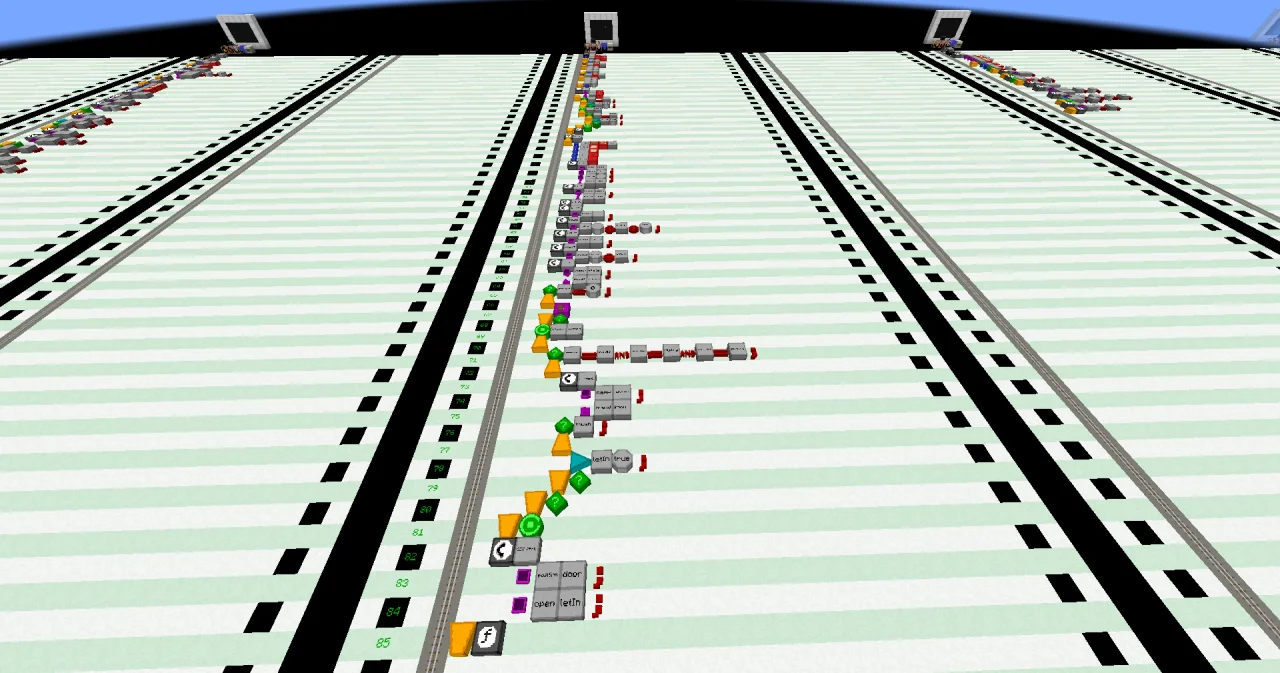
Building it
First, build the door, so you can read its position:
- Put an iron door into the entrance of your base.
- Outside, leave one block free in front of the door, and put the pressure plate on the next block. The plate must not touch the door: a pressure plate right in front of an iron door opens it by redstone – for everybody.
- Inside, put a button on the wall next to the door. It opens the door by redstone, so you can go out.
- Press F3 and look at the pressure plate. The debug screen shows its position under "Targeted Block", three numbers x, y and z. Write them down. Do the same for the lower half of the door.
Now build the program. Lines 0 to 3 and the NOOP lines are like before. New are:
- Lines 4 to 7: the list
friends, like the notes of the lesson Lists: VARIABLEfriends, the type blocks ARRAY and STRING, and between BEGIN and END VARIABLE one line with two LITERAL blocks,"Alex"and"Kai". Put in the names of your friends. - Lines 8 to 13: the position of the pressure plate. VARIABLE
plate, a STRUCT type block and a LABELc0de/minecraft/POSITION: that's a struct type of the library c0de/minecraft, with the elements x, y and z. Between BEGIN and END VARIABLE, one line per element, like the offer of the lesson Tables and your own types: a LABELxand a LITERAL with your number, thenyandz. Use your numbers, not the ones in the example. - Lines 14 to 19: the same for
door, with the position of the lower half of the door. - Lines 21 to 36: the function
isFriend. It answers true for the owner of the sheet and for every name infriends. - Lines 38 to 85: the function
watch, which does the work in every run. The new functions of c0de/minecraft are explained below.
Running it
- Place the timer block somewhere near the entrance, where neither the pressure plate nor the button touches it – a redstone signal pauses a timer block. Put the lever right next to it, switched off.
- Open the dialog of the timer block. Set it to the program
doorand the functionwatch, and the interval to 20 ticks: one second. - Open the dialog of your display wall, and bind it to
doorandwatch. The wall now belongs to the door instead of the sign.
Within a second, the sign shows:
Welcome to Oak Hill!
Visitors at the door: 1
If you stand near the door, the one visitor is you. Step on the pressure plate: the door opens. Walk in. Inside, press the button to go out again.
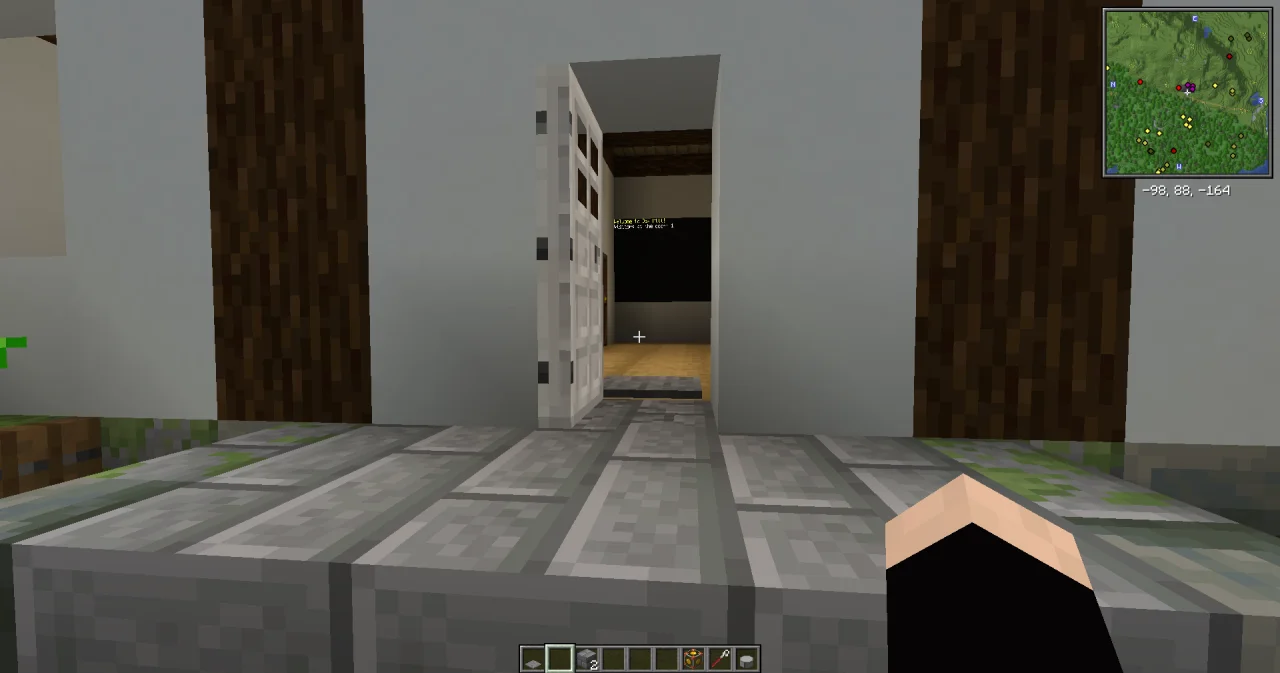
When anybody else steps on the plate – on a server, a player who isn't on your list, or simply a pig – the door closes: there is no friend on the plate.
To change the program, switch the lever on first. It pauses the timer block, and when the last run is over, you can change the sheet. While a process runs, its sheet is locked – and with a timer every second, that's almost always.
How it works
- The timer block starts
watchevery 20 ticks. A new run only starts when the last one has ended. - Positions. The functions of c0de/minecraft need to know where something is. A
c0de/minecraft/POSITIONis a struct with x, y and z.plateanddoorhold the positions you read with F3. - Who is there? FIND_ENTITIES (lines 45 to 49) looks for everything within
radiusblocks around a position. Withtype "minecraft:player", it only finds players. Its result is a list of ENTITY structs. Each has aname, atypeand aposition, which is a POSITION itself. - Counting. LEN (lines 50 to 52) gives the number of elements of the list: the players within 5 blocks of the door. The sign shows it in lines 53 to 61.
- The pressure plate. GET_PRESSURE_PLATE (lines 62 to 64) gives the signal strength of the plate: 0 if nobody stands on it. Then there is nothing to do, and RETURN ends the run in line 67. The door stays as it is.
- Who is on the plate? The EACH loop goes through all players near the door. A player stands on the plate if their position is the position of the plate: x, y and z must all be equal.
visitor.position.xreads the elementxof the elementpositionofvisitor. - Friend or stranger? For each player on the plate,
isFriendchecks the name. If one of them is a friend,letInbecomes true. - The door. SET_OPEN (lines 82 to 84) opens the door if
letInis true and closes it if it is false. So a friend opens it, and a stranger on the plate closes it again.
The program acts on behalf of the owner of the timer block – you. That's why it may open an iron door, see the box at the top.
Try it yourself
- The door stays open after a friend has gone in, until a stranger steps on the plate. Close it again after five seconds.
Solution
After the door has opened, the program waits 100 ticks – five seconds – with SLEEP from the library c0de/time, and then closes the door. The program needs a third INCLUDE line for it.
PROGRAM door
NOOP
INCLUDE c0de/minecraft
INCLUDE c0de/time
CONSTANT BASE STRING "Oak Hill"
VARIABLE friends ARRAY STRING
BEGIN
    "Alex" "Kai"
END VARIABLE
VARIABLE plate STRUCT c0de/minecraft/POSITION
BEGIN
    x 100
    y 64
    z 198
END VARIABLE
VARIABLE door STRUCT c0de/minecraft/POSITION
BEGIN
    x 100
    y 64
    z 200
END VARIABLE
NOOP
FUNCTION isFriend
    PARAMETER name STRING
    RESULT friend BOOLEAN
BEGIN
    IF name = SHEET.owner ;
    BEGIN
        ASSIGN friend TRUE ;
    END IF
    EACH someone friends
    BEGIN
        IF someone = name ;
        BEGIN
            ASSIGN friend TRUE ;
        END IF
    END EACH
END FUNCTION
NOOP
FUNCTION watch
BEGIN
    VARIABLE visitors ARRAY STRUCT c0de/minecraft/ENTITY
    VARIABLE count INTEGER
    VARIABLE strength INTEGER
    VARIABLE known BOOLEAN
    VARIABLE letIn BOOLEAN
    CALL c0de/minecraft/FIND_ENTITIES
        PARAMETER position door ;
        PARAMETER radius 5 ;
        PARAMETER type "minecraft:player" ;
        RESULT result visitors
    CALL LEN
        PARAMETER value visitors ;
        RESULT result count
    CALL CLS
    CALL COLOR
        PARAMETER foreground COLOR_YELLOW ;
    CALL PRINT
        PARAMETER value "Welcome to " ⊕ BASE ⊕ "!" ;
    CALL COLOR
        PARAMETER foreground COLOR_WHITE ;
    CALL PRINT
        PARAMETER value "Visitors at the door: " ⊕ count ;
    CALL c0de/minecraft/GET_PRESSURE_PLATE
        PARAMETER position plate ;
        RESULT result strength
    IF strength = 0 ;
    BEGIN
        RETURN
    END IF
    EACH visitor visitors
    BEGIN
        IF visitor.position.x = plate.x AND visitor.position.y = plate.y AND visitor.position.z = plate.z ;
        BEGIN
            CALL isFriend
                PARAMETER name visitor.name ;
                RESULT friend known
            IF known ;
            BEGIN
                ASSIGN letIn TRUE ;
            END IF
        END IF
    END EACH
    CALL c0de/minecraft/SET_OPEN
        PARAMETER position door ;
        PARAMETER open letIn ;
    IF letIn ;
    BEGIN
        CALL c0de/time/SLEEP
            PARAMETER ticks 100 ;
        CALL c0de/minecraft/SET_OPEN
            PARAMETER position door ;
            PARAMETER open FALSE ;
    END IF
END FUNCTION
While the program sleeps, the run isn't over, so the timer block starts no new run, and the sign isn't updated. After the five seconds, everything goes on as before.
Read more
- Three trigger blocks in the guide, and the Timer block in the handbook Triggers
- c0de/minecraft, Changing the world and Owner and permissions in the guide
- The functions of this lesson: FIND_ENTITIES, GET_PRESSURE_PLATE, SET_OPEN, LEN and SLEEP
- Protected programs in the guide: why the sheet is locked while the program runs