Where to go next
You made it! When you started, a program was a mystery. Now the computer of Oak Hill greets visitors, calculates stacks, keeps notes, runs a shop, plays a guessing game and guards the door. You built all of it yourself, block by block. This last lesson looks back at what you have learned, shows you how to find answers on your own, and where to go from here.
New words
- handbook: the reference of c0de, with one entry for every block, item and function. You don't read it from start to end; you look things up in it.
What you need
Nothing new. For the second exercise: a new, empty sheet, a trigger block with a button and an uninitialized variable item.
What you have learned
Every lesson added one idea. Together, they are the ideas that every programming language is built on – not only c0de.
| Idea | What it means | Lesson |
|---|---|---|
| program | a list of instructions, carried out one after the other | Your first program |
| parameters | the details of an instruction, like the color of a text | Colors and the screen |
| variable | a named box for a value | Remembering things |
| expression | a calculation, with operators and brackets | Calculating |
| input and output | values that go into a program and results that come out | Giving and getting values, Asking the player |
| condition | a question with the answer true or false, and IF and ELSE | Making decisions |
| loop | doing something again, counting or until something happens | Doing things again, Loops with a condition |
| function | a part of a program with a name, which you can use again | Your own functions |
| list, table and struct | many values under one name | Lists, Tables and your own types |
| debugging | finding bugs, and catching errors | When things go wrong |
| library | ready-made functions | Using libraries |
| planning | the steps in plain words first, then the program | Guess the number |
| the world | programs that read and change Minecraft, started by a timer | The guarded door |
If you learn another language one day – Python, JavaScript, Java – you will meet all of them again. Only the words and the look are different.
How to read the handbooks
The tutorials only showed a part of c0de. Everything else is in the handbooks, and you can read them now. They are on this site under c0de, and with the mod Patchouli they are red books in the game too.
There are handbooks for data, statements, tools, triggers, devices and functions. Each entry has the same parts:
- a short description: what the block or function does, in one or two sentences,
- the recipe: how to craft the block or item,
- an example: a few lines in the text notation you know.
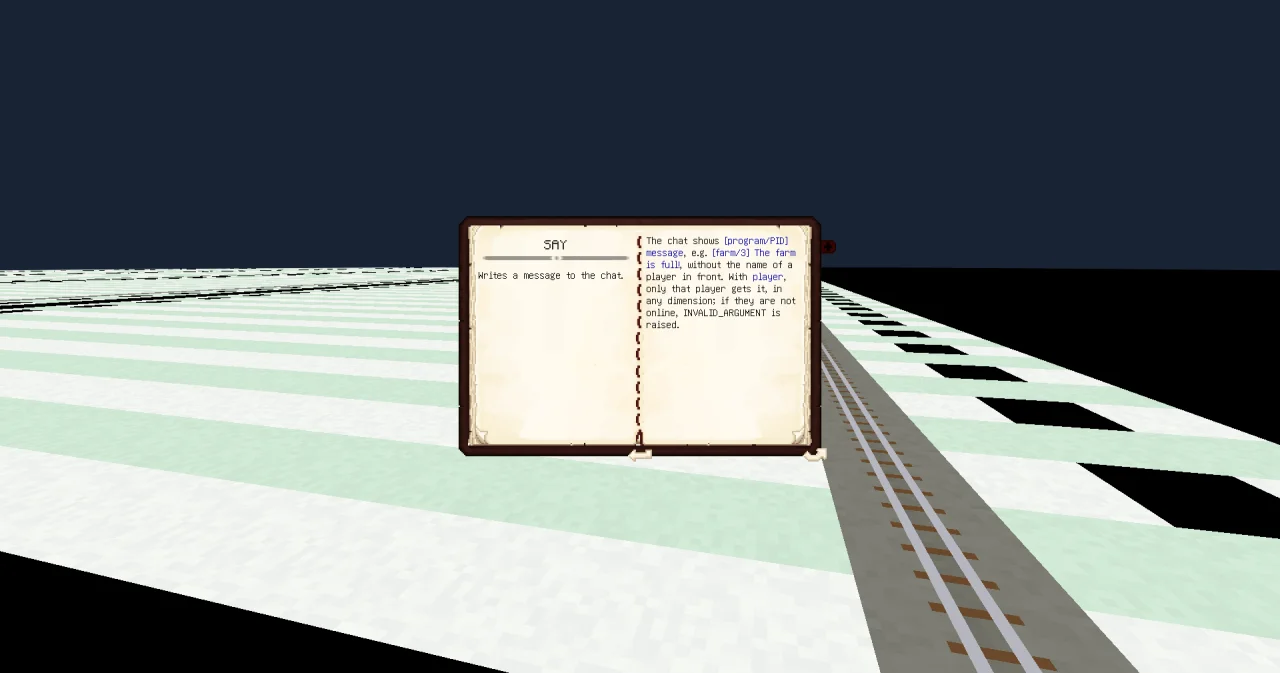
The entries of functions have one more part, Parameters and results. Take SAY, which you used for the dice:
messageSTRING: the messageplayerSTRING: the name of one player (optional, default empty for all players nearby)
Every line is one PARAMETER line of your CALL: the name to put after PARAMETER, the type of the value, and what it means. "Optional" means that you can leave the line out; then the function uses the default value. A line that starts with "result" is a RESULT line: most functions call their only result result, so you write RESULT result and the name of your variable.
When you look for a function and don't know its name, start with the list of a library, like c0de/strings: it names every function with one sentence about what it does.
Where to go next
- Libraries in practice is the next path for you. Every recipe builds something useful – a clock on the wall, a combination lock, a farm monitor, a tunnel digger – and shows the functions of one library at work.
- The examples of the guide are complete programs to build and try, like the prime numbers.
- The guide explains the whole language in short chapters. Read it once from start to end: much of it is familiar now, and the rest fills the gaps.
And most of all: build your own ideas. A quiz for your friends, a sign that shows the time, a shop that counts its sales. When you get stuck, look it up, try a small program, read the error message – exactly as you learned.
Try it yourself
- Look up the function UCASE of c0de/strings in the handbook. What does it need, and what does it give back?
Solution
UCASE has one parameter, text of the type STRING, and one result, result of the type STRING: the text in capital letters. You need INCLUDE c0de/strings, and you call it like this: CALL c0de/strings/UCASE with the lines PARAMETER text name ; and RESULT result shout, if your variables are called name and shout.
- Build the example "Prime numbers" from the guide on a new sheet and run it. What is its result?
Solution
The function main has one result and no parameters, so the trigger block needs one uninitialized variable item. The output gets the item primes with the text "2 3 5 7 11 13 17 19 ": the prime numbers up to 20. Change the 20 in the first FOR line to find more of them.
Read more
- c0de: the overview of the guide and all handbooks
- Examples in the guide
- Handbooks in the guide: how to craft the red books in the game
- Libraries in practice: the recipes for every library